You have a list of 600 people, a sequence of three steps, and one mailbox with a daily limit of 30. Do the sum and the campaign takes two months at best. The obvious move is to raise the limit. The right move is to add mailboxes and let the campaign rotate across them.
Mailbox rotation is a simple idea with a few details that matter more than they look. A campaign has several mailboxes attached. Each new prospect is handed to the next mailbox in the order you set. Each mailbox sends only up to its own daily limit. And once a prospect has been assigned to a mailbox, they stay with it, so that every follow-up comes from the same person in the same thread.
This article walks through how rotation works in practice, why the “stay with one mailbox” rule is not negotiable, how to size the number of mailboxes, and what rotation does not do.
What rotation is
Picture three mailboxes attached to a campaign: Anna, Bartek and Celina, in that order. The campaign starts sending. Prospect one goes to Anna, prospect two to Bartek, prospect three to Celina, prospect four back to Anna, and so on down the list. Each mailbox receives roughly a third of the new prospects.
Each mailbox also has its own daily limit, set on the mailbox rather than on the campaign. When Anna reaches her limit for the day, the campaign does not push her further; it continues with Bartek and Celina until they too reach theirs, and then waits for tomorrow’s sending window. If Anna’s limit is 30 and the other two are at 20 each, the campaign can send at most 70 messages a day, and no arrangement of prospects changes that.
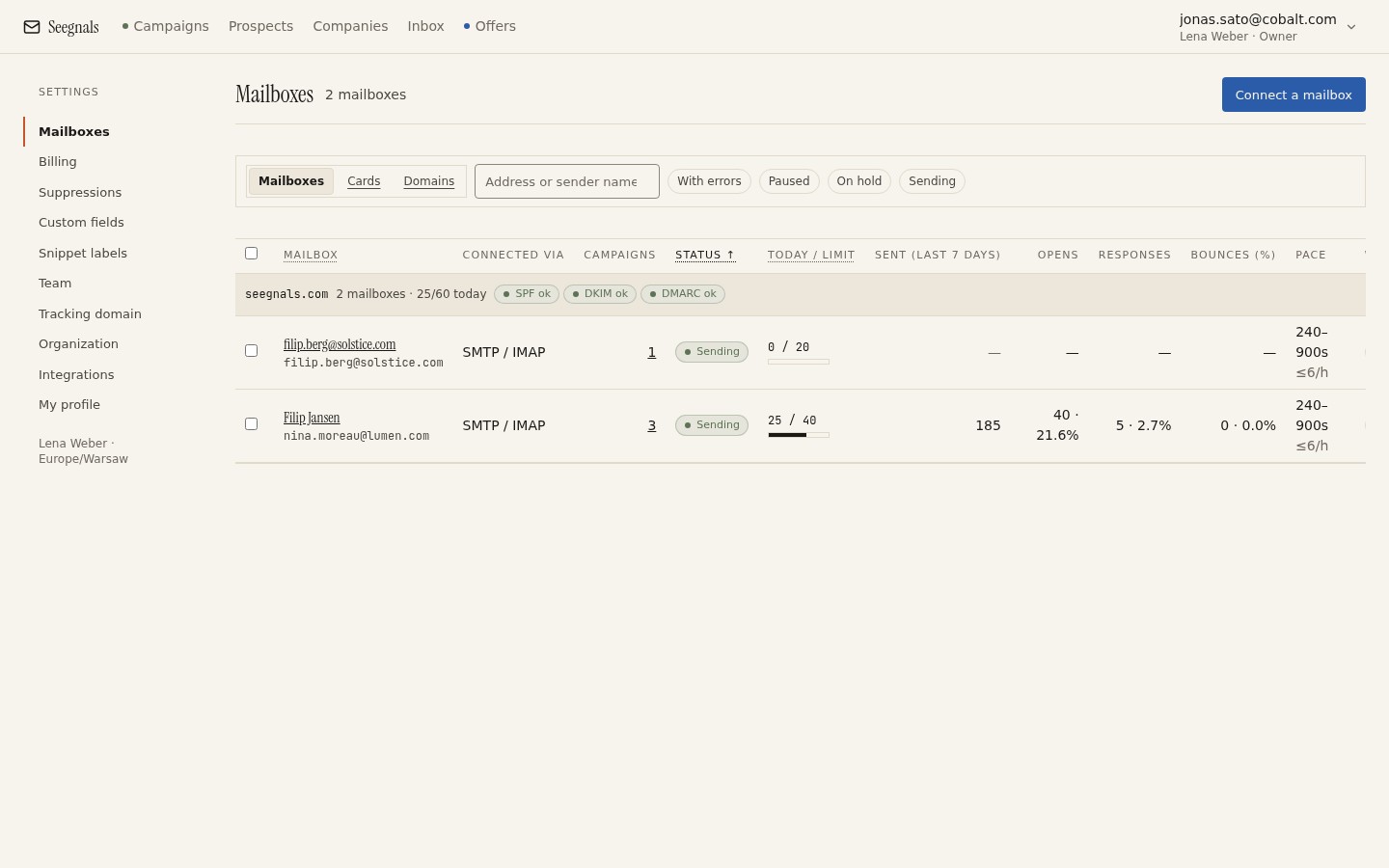 Each mailbox carries its own limit and shows its current pace; add the limits up and you have the campaign’s daily capacity, because the campaign fills each one to its limit and never past it.
The order you pick matters at the margins. The first mailbox in the list takes the first prospect of the day and, when limits differ, tends to be the busiest. If one mailbox is newer or more precious than the others, put it last so it takes what is left rather than leading.
Why a prospect stays with one mailbox
Rotation as described so far would still work if step two came from a different mailbox than step one. It would also be a mistake, for three reasons.
The first is the thread. A follow-up that arrives as a reply to your own earlier message sits in the same conversation in the prospect’s mail client, under the same subject, with the earlier text quoted below. It reads as a person following up. A follow-up from a different address with the same subject line is a new conversation from a stranger, and it looks like what it is: an automated sequence.
The second is trust signals at the receiving end. Mail clients and servers track which senders a recipient has seen before. Anna’s second message to a prospect who has already received one from Anna is a known sender. Bartek’s first message to the same prospect is not, even though the prospect is mid-sequence.
The third is the reply. When the prospect answers, the answer goes to whoever wrote. If steps came from different mailboxes, replies would land in different inboxes and the conversation would be split across people. Seegnals shows all mailboxes in one inbox, so this is less painful than it might be, but the prospect still sees two names on what was meant to be one conversation.
So the rule is fixed: the mailbox assigned at the first send owns the prospect for the rest of the sequence. The Prospects tab of a campaign shows which mailbox each person was assigned to.
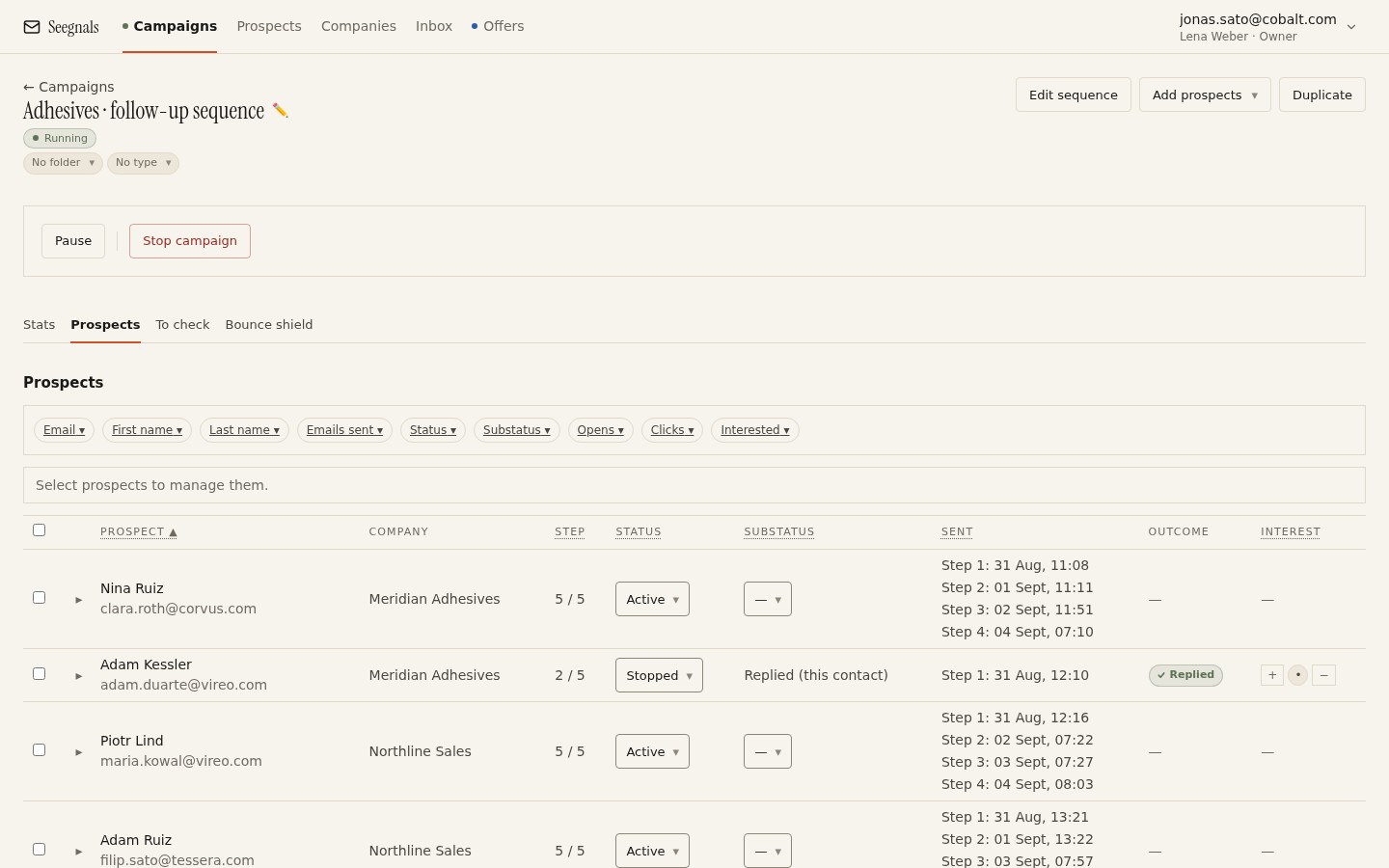 Each row shows where a prospect is in the sequence; the mailbox that wrote step one is the one that will write step three.
Sizing the rotation
The arithmetic runs in either direction. If you know how many messages you need to send per day and the limit you are comfortable with per mailbox, divide one by the other. Needing 120 a day at 30 per mailbox means four mailboxes. Needing 120 at 20 per mailbox means six.
Running it the other way is more useful in practice. Take the mailboxes you have, add up their limits, and that is the campaign’s capacity. Then work out how long the list will take: prospects, multiplied by the number of steps a non-replying prospect receives, divided by daily capacity. That is the number of sending days at minimum. Replies shorten it, because a reply stops the remaining steps for that person, as explained in daily sending limits per mailbox.
If the number of days is too long, the answer is more mailboxes. The limit is what keeps each address looking like a person. The mailbox count is what gives you throughput.
Within one domain, across domains
All three of Anna, Bartek and Celina might be on yourcompany.com. That spreads per-address volume, and per-address signals do count, but the domain is still a single reputation. If the campaign goes badly, the whole domain feels it.
Rotating across mailboxes on different domains adds a second layer. Two mailboxes on your main domain and two on a dedicated outbound domain means a problem on one domain does not touch the other. Whether that is worth the setup, and how to do it well, is the subject of should you send cold email from your main domain. The short version: rotation across domains is the stronger protection, and it comes with the cost of maintaining authentication and reputation for each domain separately.
Whichever you choose, one thing does not change. Each domain needs its own SPF, DKIM and DMARC, and a broken record on one domain affects every mailbox on that domain regardless of rotation. The Deliverability tab shows the three checks per domain for exactly this reason.
Rotation and the sending window
Rotation interacts with two other settings. The campaign’s schedule sets which weekdays and hours are allowed, applied in each prospect’s timezone where known. Within those hours, gaps between messages are randomised rather than fixed, so a mailbox at 30 a day does not fire every sixteen minutes on the dot. The reasoning is covered in why randomised sending intervals matter.
Put together, a campaign with three mailboxes, an eight-hour window and modest limits produces a pattern that looks like three people sending a handful of messages each through the working day. That is the pattern receiving servers see from ordinary businesses, and it is the pattern you want to match.
What rotation does not do
Rotation spreads volume. It does not create reputation, and it does not repair a bad list.
A brand-new mailbox rotated into a campaign is still a brand-new mailbox. It has no sending history, and its first messages are judged on the domain alone. The practice of building that history gradually, sending small numbers of messages that get replies before the mailbox carries real campaigns, is called warm-up. Seegnals does not do warm-up yet; it is planned through a partner and shown as coming soon. Until then, give a new mailbox a lower limit than its neighbours and raise it slowly, or warm it by hand with genuine correspondence for a few weeks first.
Rotation also does nothing about a list that bounces. If the addresses are bad, spreading them across four mailboxes produces four mailboxes with bounces instead of one. Verification on import and the To check queue come first; rotation comes after.
And rotation does not change what the message says. A sequence that gets no replies from one mailbox will get no replies from three. The product overview covers the parts of the workflow that are about the message rather than the plumbing.
What to do this week
- List the mailboxes attached to each running campaign and their daily limits. Add them up; that is the campaign’s real daily capacity.
- For each campaign, divide prospects times steps by that capacity. If the result is longer than the campaign should run, connect another mailbox rather than raising a limit.
- Reorder the mailboxes in each campaign so that the newest or most valuable one is last in the rotation.
- Confirm that any mailbox younger than two months has a lower limit than the rest, and put a date in the calendar to review it.
- Check the Deliverability tab for every domain in the rotation. One failing record on one domain is a problem for every mailbox on it.