Your first campaign went out, replies were fine for a week, and then nothing. You check the sending logs and everything says delivered. Somewhere between your mailbox and the prospect’s inbox the message was accepted and then filed where nobody reads it.
Very often the cause is authentication. SPF, DKIM and DMARC are three DNS records that tell receiving servers whether a message claiming to come from your domain really does. They are not optional extras for cold email. Major mailbox providers treat unauthenticated mail as suspect by default, and a cold email has no history with the recipient to argue otherwise.
The good news is that all three are set once, on the domain, and then protect every mailbox that sends from it. The bad news is the same sentence read the other way: a mistake in one record affects every mailbox at once. This article explains what each record does, why cold email setups break them more often than ordinary business mail, and how to check yours.
What each record actually does
Think of a message arriving at a receiving server. The server wants to know three things: whether the server that handed over the message is allowed to send for that domain, whether the message has been altered since it left, and, if either check fails, what the domain owner wants done about it.
SPF answers: who may send
An SPF record is a line of text in your domain’s DNS that lists the servers permitted to send mail on the domain’s behalf. When your message arrives, the receiving server looks at the IP address that delivered it, fetches your SPF record, and checks whether that address is on the list. The specification is RFC 7208.
For a domain on Google Workspace, the record includes Google’s servers. If you also send invoices from an accounting tool and newsletters from a marketing tool, each of those adds an include entry. That is where problems start, and we come back to it below.
DKIM answers: was it altered
DKIM adds a cryptographic signature to the headers of each outgoing message. The signature is computed from the message content and a private key that only your sending server holds. The matching public key is published in your DNS. The receiving server fetches the public key, recomputes the signature, and checks that it matches. If anyone changed the message on the way, or if it was not signed by your key at all, the check fails.
DKIM has one property SPF lacks: it survives forwarding. When a message is forwarded, the server that finally delivers it is not yours, so SPF fails. The DKIM signature travels inside the message and still verifies.
DMARC answers: what to do about failures, and tell me
DMARC is the policy layer on top. It is a DNS record that says two things. First, what a receiving server should do with a message that fails both SPF and DKIM: nothing (p=none), treat as suspicious (p=quarantine), or refuse it (p=reject). Second, where to send aggregate reports about mail claiming to come from your domain. The specification is RFC 7489.
The reporting part is underrated. It is the only way to see who else is sending mail as your domain, legitimately or not, and whether your own tools pass.
Alignment: the part most guides skip
Passing SPF or DKIM is not enough for DMARC. DMARC also requires alignment: the domain in the visible From address, the one your prospect sees, must match the domain that SPF or DKIM actually authenticated.
Here is why that matters for cold email. Some sending tools deliver through their own servers and sign with their own domain. The message passes SPF and DKIM for the tool’s domain, but your From address says yourcompany.com. DMARC looks at that mismatch and treats the message as failing, whatever the individual checks said.
The fix is to make sure your sending tool either sends through your own mailbox provider (so SPF aligns) or signs with a DKIM key published under your domain (so DKIM aligns). Seegnals sends through the mailbox you connect, whether that is Google Workspace, Microsoft 365 or an SMTP account, so the message leaves from your provider’s servers with your provider’s DKIM signature. There is no intermediary domain to misalign.
Why cold email setups break these records more often
Ordinary business mail usually has one sender: the mailbox provider. Cold email operations accumulate tools. A CRM that sends from your domain, a proposal tool, a sequencing tool, a transactional service for the product, a newsletter platform. Each one asks you to add an include to SPF.
SPF has a hard limit on how many DNS lookups a single check may trigger: ten, set in RFC 7208. Every include costs at least one lookup, and many includes contain further includes. Cross the limit and the check returns a permanent error, which most receivers treat as a fail. Nothing in your DNS panel warns you. The record looks fine; it simply stops working.
The second common break is a second SPF record. Someone adds a new tool, creates a new TXT record starting with v=spf1 instead of editing the existing one, and now the domain has two. The specification says a domain with multiple SPF records fails. Again, nothing warns you.
The third is DKIM keys that were never published. A provider generates the key, shows you a DNS record to add, and the person setting up the mailbox closes the tab. Mail still sends. It is simply unsigned.
Check before the first send, and keep checking
Because all of this lives in DNS, it can change without anyone in sales knowing. An IT colleague tidies up records, a domain moves registrar, a marketing tool is added. The campaign that ran fine in June fails in July.
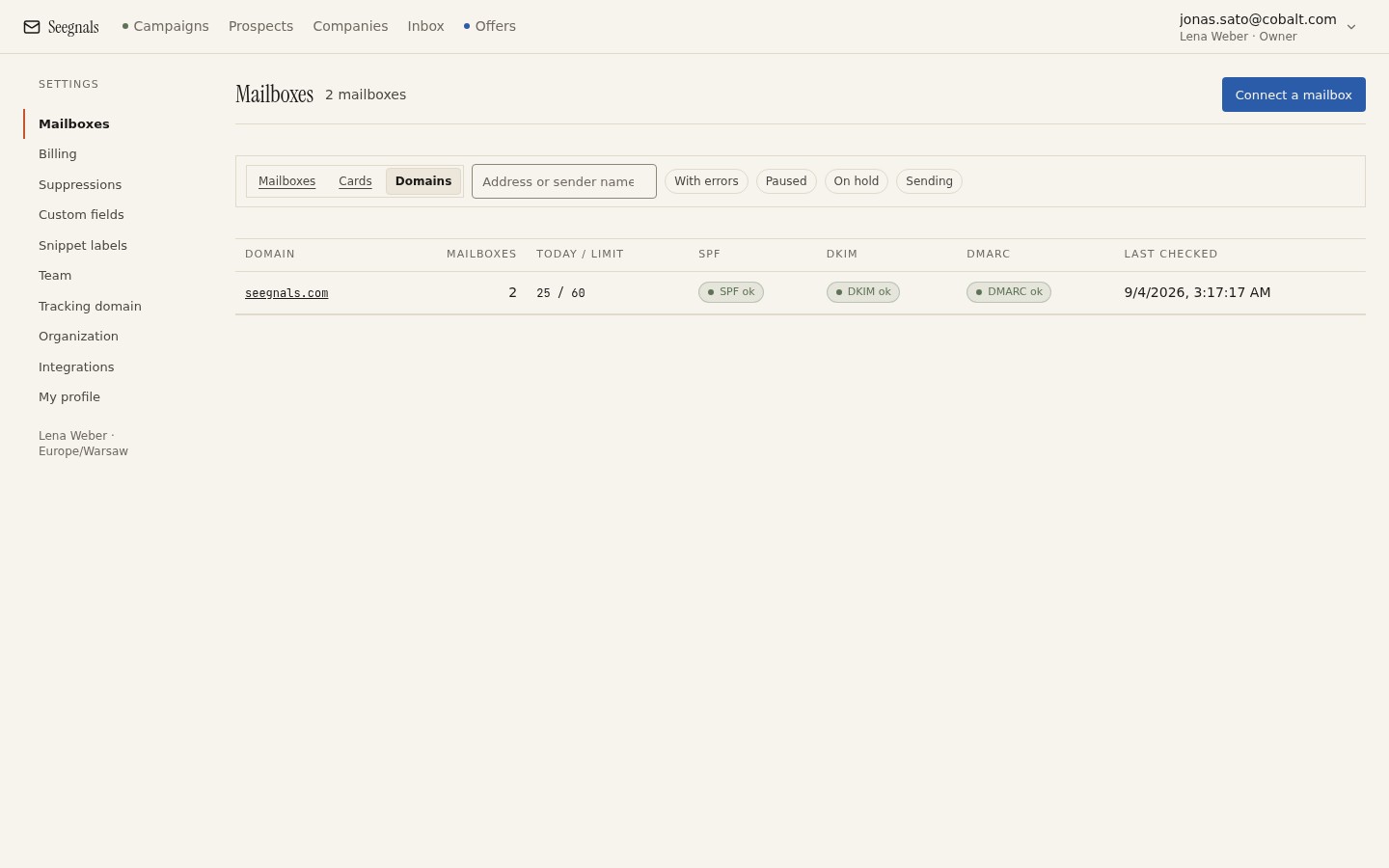 Three checks per domain, refreshed hourly, so a record that breaks on Tuesday is visible on Tuesday rather than after a campaign has gone quiet.
Seegnals checks SPF, DKIM and DMARC for every sending domain once an hour and shows the result in the Deliverability tab of your mailboxes. The check is per domain rather than per mailbox, because that is how the records work: two mailboxes on the same domain share the same three records and cannot differ.
One detail worth knowing. When a lookup fails to complete, the status shows “unknown” rather than “missing”. A DNS resolver can time out or return an error for reasons that have nothing to do with your record. Showing “missing” in that case would send you off to fix something that is not broken. Unknown means: we could not tell this time, wait for the next check or look it up yourself.
Choosing a DMARC policy for a cold email domain
People often go straight to p=reject because it sounds safest. It is safest against impersonation. It is also the fastest way to make your own mail disappear if any legitimate tool fails alignment.
The sensible order is the one the DMARC specification itself suggests. Publish p=none with a reporting address and let reports accumulate for a few weeks. Read them: they list every source sending as your domain and whether each one passed. Fix the sources you recognise and fail. Once everything you use passes, move to p=quarantine, wait again, then to p=reject.
If you send cold email from a separate domain, as discussed in should you send cold email from your main domain, each domain needs its own three records and its own DMARC journey. A reject policy on your main domain does nothing for a sending domain that has no policy at all.
Pair authentication with disciplined sending
Passing all three checks means receiving servers believe the message is genuinely from you. It does not mean they think the message is welcome. Volume, bounces, complaints and engagement still decide where it lands.
That is why authentication sits alongside the practices covered in daily sending limits per mailbox and what bounce rate is safe. A fully authenticated domain that sends too much to a bad list still ends up in spam. But an unauthenticated domain ends up there faster and has no way back, because the receiver cannot even be sure who to blame.
The deliverability page collects the whole set of practices in one place.
What to do this week
- Look up the SPF record for every domain you send cold email from. Confirm there is exactly one, and count the includes. If you cannot explain what each include is for, find out or remove it.
- Send a test message from each mailbox to an address you control on a different provider and read the headers. Confirm DKIM shows pass and the signing domain matches your From domain.
- If you have no DMARC record, publish
p=nonewith a reporting address today. If you already have one, check that reports are arriving somewhere someone reads. - Open the Deliverability tab and confirm all three checks pass for each domain. Put a note in the team’s weekly rhythm to glance at it before campaigns start on Monday.
- Write down which tools send mail as your domain and who owns the DNS. The next break will come from a change nobody told sales about, and the list shortens the search.