There is no correct word count for a cold email, and any number you have seen quoted for one was invented by whoever wrote it down. The constraint that actually matters is one you can check yourself: open your own sent folder on your phone, the way most of your list will read you, and see how much of the message shows before it needs a scroll. That is the length. The unit is a screen: whatever a normal phone screen holds before the reader has to act just to keep reading.
This matters because the question a cold email has to answer is not “will they read the whole thing” but “will they read the ask”. A message that runs past the first screen is a bet that the reader scrolls before deciding whether you are worth their attention, and most of a cold list will not take that bet on your behalf. Getting length right is mostly about protecting the one sentence the email exists to deliver.
What follows is not a target word count, because a target number would be exactly the kind of invented rule this article is arguing against. It is how to think about length as a screen rather than a count, why length should fall out of how many ideas the email carries, why a first email and its follow-ups should not be written to the same length, what to cut when a draft runs long, and how to test length on your own list instead of trusting someone else’s rule of thumb.
Let the phone screen set your limit
Word counts travel badly between devices. A sentence that sits comfortably on a laptop screen wraps twice on a phone in a larger system font, and most of a B2B list reads mail on a phone between meetings. So a number like “seventy-five words” is not really a length rule; it is a guess about someone else’s screen, typeface and eyesight, none of which you control.
What you do control is the shape of the message: how many separate ideas it carries, and where the ask sits relative to them. The practical test is to open the draft on your own phone, in the mail client your prospects are likely to use, and check one thing: does the question at the end appear without the reader touching the screen. If yes, the length is right, whatever the word count turns out to be. If no, something in the message is doing work the reader did not ask for, and that is what to remove.
This is also why the ask has to be the last sentence and nothing else. As the piece on one ask covers, the question that closes the email is the one thing you are actually measuring the message by. If it falls off the bottom of the first screen, you have written a longer email than the one you intended to send.
Let the ideas decide the length
The useful way to think about length is to count ideas. A first cold email to a stranger needs to do three things: name something specific about their situation, say in one sentence what you do about it, and ask one closed question. Three moves. Each one is a sentence or two. Add them up and the email is short, because there was nothing else it needed to say.
Emails get long when a fourth or fifth idea creeps in: a paragraph of company background, a list of features, a case for why now, a second ask offered as a fallback in case the first one lands wrong. None of these were asked for. The reader did not request your company’s history before deciding whether your first line described their problem, and adding it does not make the case stronger; it moves the ask further down the screen and gives the reader more places to stop reading before they get there.
So the honest length question is not “how many words is too many” but “how many ideas does this specific reader, at this specific stage, actually need before they can answer one question”. For a cold stranger, the answer is usually three. For a warmer list, or a message that references something the company has itself published, it might stretch to four. It rarely needs five.
Write every follow-up shorter than the last
A common mistake is writing every step in a sequence to roughly the same length as the opener, as though each one were a fresh chance to make the full case. It is not. By the second message the reader has, at minimum, seen your name and subject line once already; by the third, there is a thread with your first email sitting above it, which they can scroll to if they want the full context.
That changes what a follow-up needs to carry. It does not need to reintroduce you, restate the problem in full, or repeat the pitch. It needs one new thing, a fact, an angle, or a narrower version of the ask, and the same closing question as before, in two or three sentences. How many follow-ups belong in a sequence covers how many of these steps to run and how to space them; the length point sits underneath that: each step should be shorter than the one before it, because each one is asking less of a reader who already has more context.
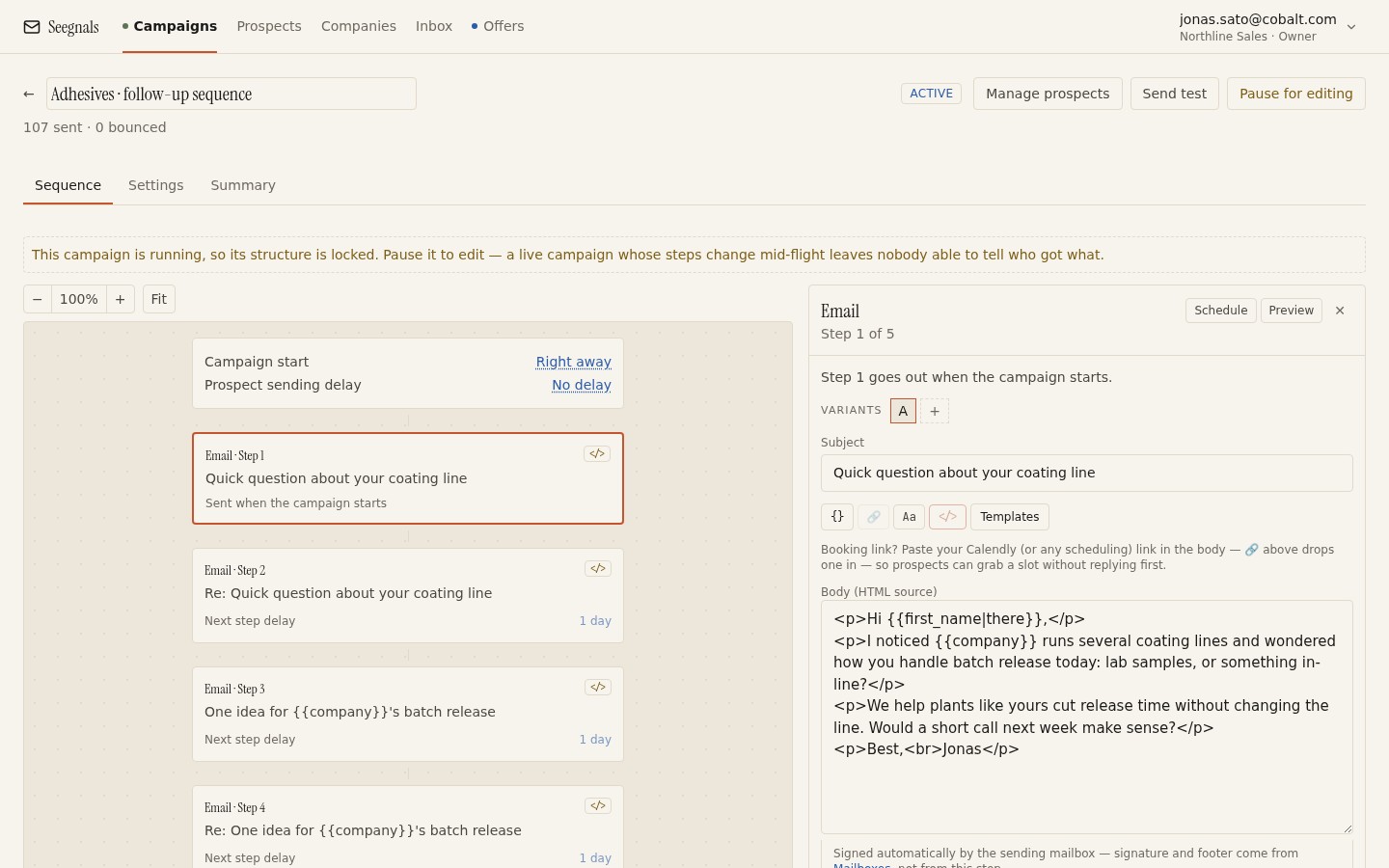 Each step in a sequence carries less new information than the last; the editor is a good place to check that step three is not just step one with different words.
A sequence where every step is the same length usually means every step is doing the same job, which is the job step one already did. If you cannot say what a follow-up adds that the previous step did not, it is not ready to send, whatever its word count is.
What to cut when a draft runs long
When a draft does not fit on one screen, the fix is rarely to shorten every sentence a little. That produces a denser paragraph that says the same amount in a smaller, harder-to-scan space, which is worse. The fix is to remove whole ideas, in a fairly predictable order.
The company background goes first. A stranger deciding whether to keep reading does not need your founding story before the first line has told them you understand their situation.
The feature list goes next. A cold email is not a specification sheet; naming five things your product does answers a question (“what does it do”) the reader has not asked yet, ahead of the one they might ask if the first line lands (“is this relevant to me”).
The second ask, offered as a softer fallback, goes after that. It reads as generous but does the opposite of what you want: it gives the reader an easy way to reply without answering the real question, and it adds a sentence purely to manage the risk that the first ask fails. One ask, kept, does more.
Hedging language is the last thing to cut, and it is worth doing even when the email already fits on one screen: “I know this might not be a priority” and “just wanted to check” add nothing a busy reader needs and quietly signal that you expect a no. Removing them shortens the message and strengthens it in the same stroke.
What should not be cut is the specific observation in the first line. That sentence is doing the hardest work in the email, and it is often the thing an over-eager edit removes to save two lines. Openers that are not embarrassing is about protecting exactly that sentence while everything around it gets shorter.
Test length like you would test anything else
Once you have a short version and a longer one, do not guess which is right. Run them as A/B variants of the same step, to the same list, with nothing else different: same subject, same ask, same send window. The method is the same one used for testing subject lines and variants; length is just another variable in the same test.
Compare Interested and Maybe later, because a shorter email can produce more total replies while producing fewer useful ones if it strips out the context a reader needed to say yes. The Stats tab breaks a campaign down into Responded and Interested as separate tiles, alongside the full outcome mix, so the comparison is visible per variant rather than blended into one number.
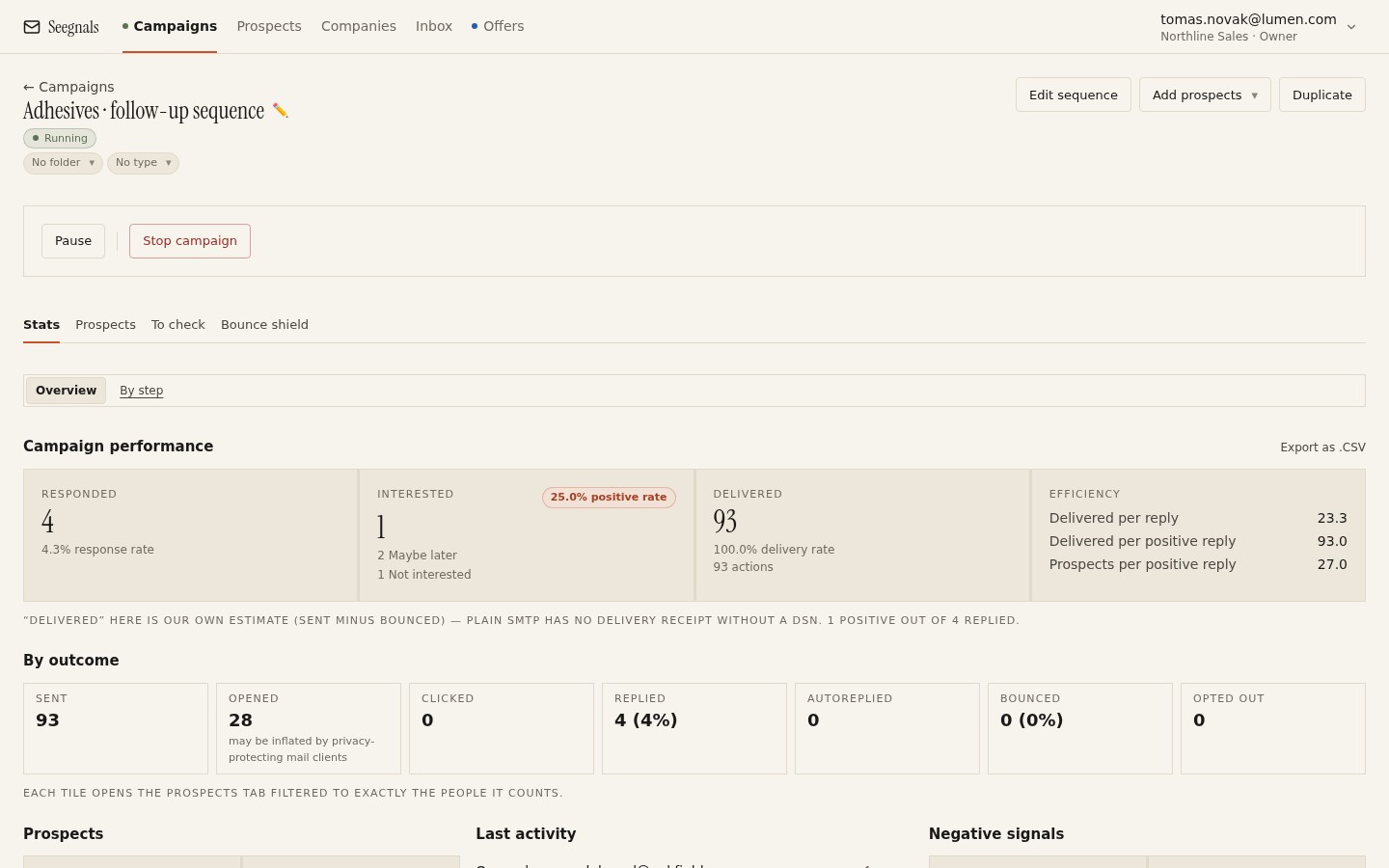 Compare the shorter and longer variant on Interested. A shorter email that only trims the useful sentence will show up here as more replies and fewer of them worth having.
Run this once per segment. A list of specialists who already know the category may read a slightly longer message in full; a cold list in an unfamiliar industry punishes anything past one screen more consistently. Seegnals lets a campaign’s steps carry A/B variants of subject and body, so the comparison sits inside the same campaign rather than across two separate sends that are hard to compare fairly.
What to do this week
- Open your current opener on your own phone and check whether the closing question is visible without scrolling. If it is not, that is the length problem, regardless of the word count.
- List the ideas the email carries. If there are more than three (an observation, what you do, one ask), name which ones the reader did not ask for and cut those first.
- Compare the length of your follow-up steps to your opener. Shorten any step that is the same length as step one; it is probably doing step one’s job again.
- Write a shorter variant of your opener that removes one whole idea rather than trimming every sentence, and run it as an A/B variant against the current version.
- After the batch runs, compare Interested and Maybe later between the two lengths before you decide which one wins.