The reply says: “Thanks, this is interesting, not the right moment though. Feel free to check in later.” Is that a lead? A polite no? Something to put in the calendar? If two people on your team would answer differently, your pipeline is being sorted by mood.
Sorting replies is a small discipline with a large effect. A reply that is classified correctly gets the right next action: a meeting proposal, a calendar entry, a suppression, a note in the CRM. A reply that sits in the inbox as “read” gets nothing, and warm interest cools within a week.
This article sets out a fixed set of classes, the decision rule for each, and the next action that goes with it. It also covers what to do when the automatic classifier disagrees with you, and why the class of one reply is a fact about a person alone.
A fixed set of classes
Free-text labels multiply until nobody knows what they mean. The classes below are enough for cold outbound and map directly onto what a sequence tool needs to know.
- Interested. A next step was proposed or accepted.
- Maybe later. Interest is stated but deferred, ideally with a time.
- Not interested. A no, polite or otherwise.
- Autoreply / Out of office. A machine answered.
- Bounce. Delivery failed.
- Unsubscribe request. They asked to be removed.
- Other. A question, a forward, a wrong-person note, anything that needs a human read.
Seegnals classifies incoming replies into exactly these classes automatically, shows them in one inbox across all connected mailboxes, and stops the sequence for that person the moment a class is assigned. You can change a class with one click. The rest of this article is about deciding which class is right.
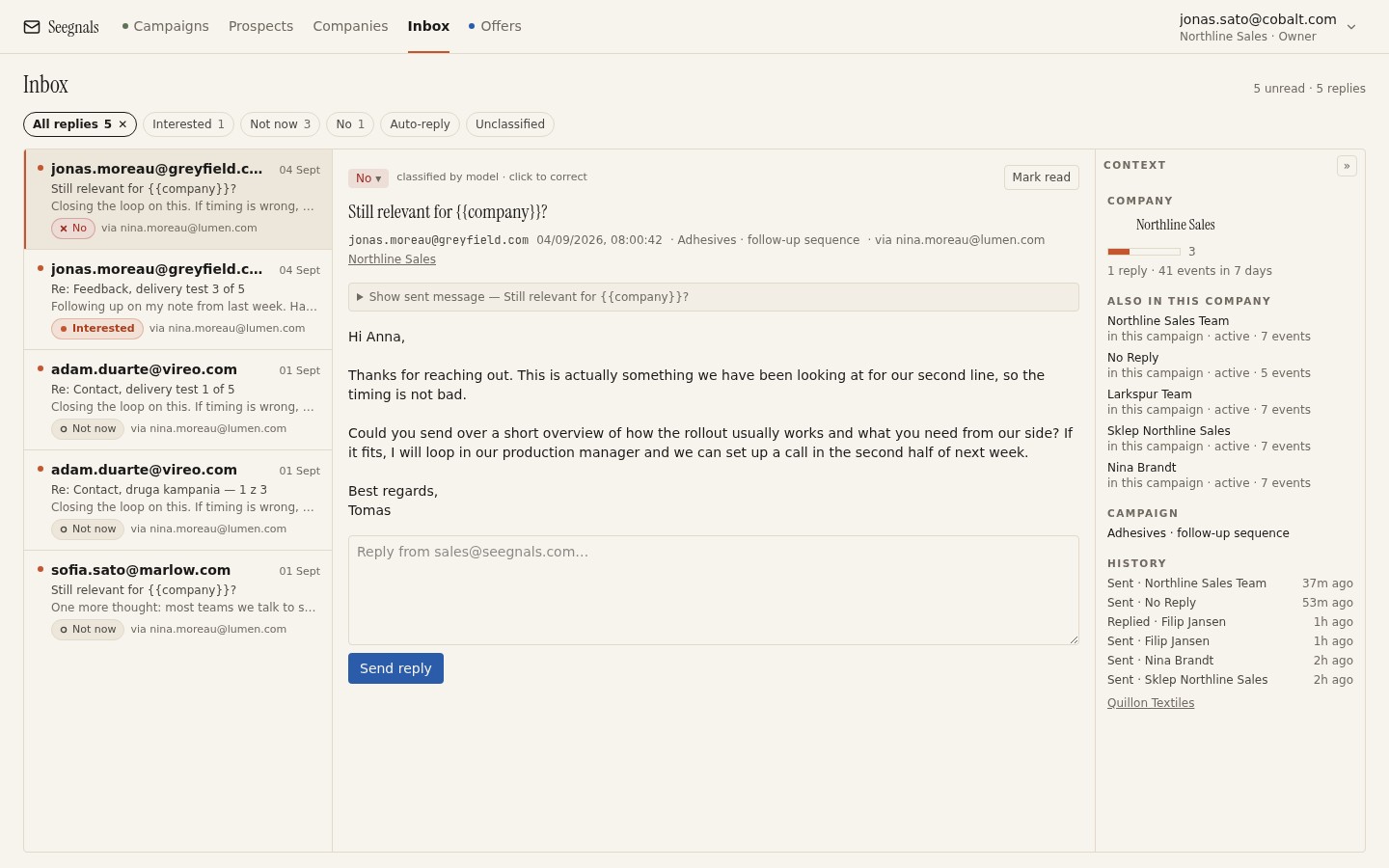 Each reply carries a class. The panel beside the thread shows the company and who else there is in a campaign, which you need before you decide what the class means for the account.
Turn an Interested reply into a next step
The test for Interested is mechanical: did the prospect propose, accept or ask for a concrete next step? Examples that pass:
- “Can you do Thursday afternoon?”
- “Send me the document and I will look.”
- “Who would be the right person on your side to talk to about pricing?”
- “How does this work with our existing system?” (a question whose answer moves the conversation)
- “I have copied in our head of operations, please take it from here.”
Examples that do not pass, however warm they read:
- “Interesting, thanks for reaching out.”
- “Looks good, we might need something like this at some point.”
- “I will keep it in mind.”
Those are Maybe later at best. Treating them as Interested inflates your pipeline with conversations that are not happening and hides the ones that are. The reasons this matters for your numbers are in reply rate is the wrong north star.
Next action for Interested: reply within the working day, propose two specific times or send the thing they asked for, and create the deal or activity in your CRM. If you use the Seegnals CRM sync, the reply and its class are pushed into Pipedrive, HubSpot or another connected CRM as a note or activity on the matching person and organisation; the setup is described in push replies into your CRM.
Maybe later: only real with a date
“Not now” is the most common reply in B2B outbound and the most badly handled. The distinction that matters is whether there is a time attached.
With a time. “We are re-tendering in Q1.” “Come back after the summer.” “Budget resets in April.” This is a real Maybe later. The next action is to confirm the time in your reply (“I will write again in early April”), put it in the calendar, and stop. When the date comes, restart with a short fresh opener that refers to their own words. Do not resume the old sequence at step three.
Without a time. “Not right now, maybe later.” Ask once for a time: “Is there a point in the year when this comes up?” If they answer with a date, it becomes the first case. If they do not answer, reclassify as Not interested. A Maybe later without a date is a polite no, and keeping it in the pipeline is self-deception.
The autoreply variant. An out-of-office with a return date is not Maybe later; it is Autoreply / Out of office. The person has not expressed anything. The handling is different and is covered in what to do with autoreplies.
Next action for Maybe later: confirm or ask for the date, calendar it, and note it in the company timeline so a colleague does not restart the sequence early.
Not interested: a fact about a person
A no is a no. Reply briefly if a reply is warranted (a one-line thanks costs nothing and leaves the door open), and stop contacting that person. Whether you also add them to the suppression list depends on your rules; a firm “please do not contact me again” is an unsubscribe request in all but name and should be suppressed. A “not relevant for us” from someone whose role fits is a person who might be worth writing to in a year, and suppression would prevent that.
What a Not interested does not do is close the company. The head of engineering saying no does not mean the head of operations would. It also does not mean the company is a bad fit; it means one person, on one day, with one email, did not see a reason to talk.
Read the reason before you decide the account’s fate. “We already use a competitor” is information about the company. “I am not the right person” is a redirect. “Not a priority this year” is a Maybe later in disguise. Only “we do not need this and never will” is a fact about the company, and even that has a shelf life.
Next action for Not interested: stop the sequence (automatic if the class is set), decide on suppression for the person, and check the company view before deciding anything about colleagues.
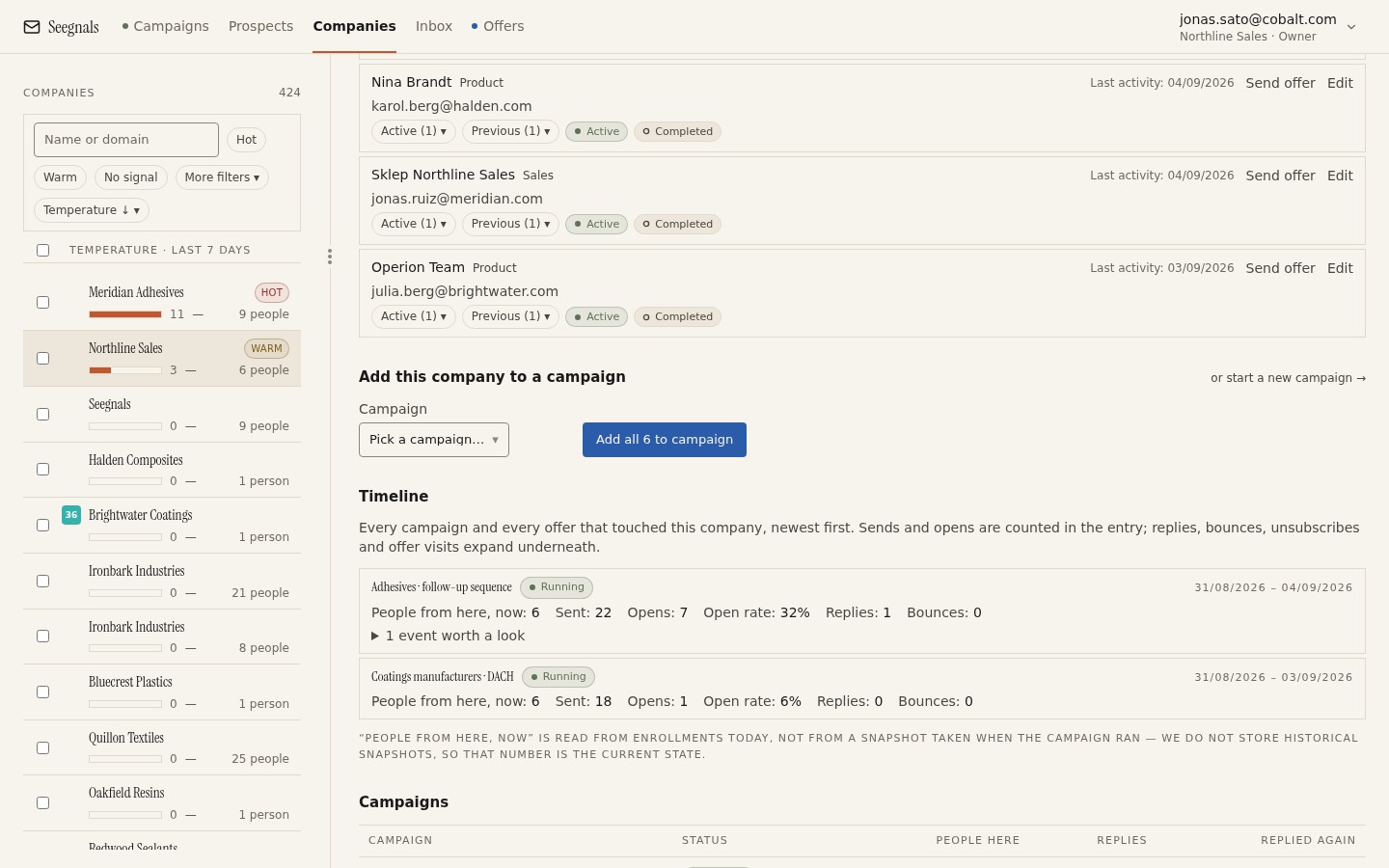 A Not interested from one person appears in the company timeline alongside what everyone else at the firm did. The account decision is made here.
Unsubscribe request: honour it today
Anyone who asks to be removed, in any words, must be removed from all sequences and added to the suppression list the same day. This is a legal obligation as much as a courtesy. Seegnals includes a one-click unsubscribe header and an unsubscribe link in every message, and a click or a reply classified as Unsubscribe request stops the sequence and suppresses the address. If a person writes “unsubscribe” in a reply that the classifier put elsewhere, reclassify it; the class drives the suppression.
Do not reply to an unsubscribe request with anything more than a confirmation, and do not treat it as an opportunity to ask why.
Other: read it, then reclassify
The Other class is a holding pen for replies that need a human. Common cases:
- A redirect. “Speak to my colleague Piotr.” The person is out; Piotr is a new prospect at the same company. Add Piotr, write a fresh opener that mentions the referral, and mark the original as Not interested with a note.
- A question that is really an objection. “How is this different from what we already have?” Answer it properly; this is usually a live conversation and should be reclassified as Interested once a step is agreed.
- A forward you were copied on. Someone sent your email to a colleague and you can see it. Wait for the colleague; do not write to both.
- Spam complaints or legal notices. Rare, and they need a considered reply.
The rule for Other is that it does not stay Other. Every reply in the class should be reclassified within the day once read.
Correcting the classifier
Automatic classification is fast and mostly right, and when it is wrong the consequences are real: an Interested reply mislabelled as Other gets no urgent reply; a Not interested mislabelled as Maybe later stays in the pipeline. Two habits keep this in check.
First, read every reply, including the ones the classifier did not mark Interested. The ones the classifier got wrong are, by definition, not where you expect them.
Second, correct the class on the spot with a single click rather than mentally noting it. The class is what the sequence engine and the CRM sync act on. A correction that lives only in your head does not stop a sequence.
Sorting is a company decision in the end
Every rule above is about one person’s reply. The decision that matters to your pipeline is about the company: is this account in conversation, warming, or closed for now? That decision needs all the replies from everyone at the domain, in one place, with the timeline of what was sent and opened.
This is the reason Seegnals aggregates by company and why the inbox shows the company beside the thread. A single reply is a data point; the account is the thing you are selling to. The company temperature view takes all the events across people and gives you one reading, so that a Maybe later from one contact and an opened offer by another add up to something you can act on.
What to do this week
- Write the seven classes and their next actions on one page and share it with everyone who touches the inbox. Agree the test for Interested: a concrete next step, nothing less.
- Go through the last month’s replies classified as Interested and demote any that have no step attached to Maybe later or Not interested.
- For every Maybe later, check there is a date. Ask for one where it is missing; reclassify as Not interested if none comes within a week.
- Confirm every unsubscribe request from the last quarter is on the suppression list.
- Before closing any account after a Not interested, open the company view and check whether someone else at that firm is already in conversation.