A single open tells you almost nothing. Mail clients prefetch images, security gateways follow links, and one person may glance at a subject line on a phone and never come back. Yet most outreach tools present engagement as exactly that: per person, per event, as a flag on a row.
Company temperature is a different way of reading the same events. Instead of asking “did this person engage”, it asks “how much is happening at this company right now”, across everyone you have written to there and across every campaign and proposal. It is a summary number, and like any summary it hides detail. Used well, it tells you where to look first each morning. Used badly, it becomes a vanity metric that rewards accounts full of people who open and never answer.
This article explains what feeds the temperature, which patterns across people are worth acting on, when to distrust the number, and how to build a rough version in a spreadsheet if your tool has no company view.
What a temperature is, and what it is not
In Seegnals every prospect belongs to a company by email domain, and every company has a card with a timeline of events: sent, opened, clicked, replied, offer viewed, offer returned. The temperature is a value that rises as those events accumulate. The dashboard ranks companies by it, so the hottest accounts sit at the top of your day.
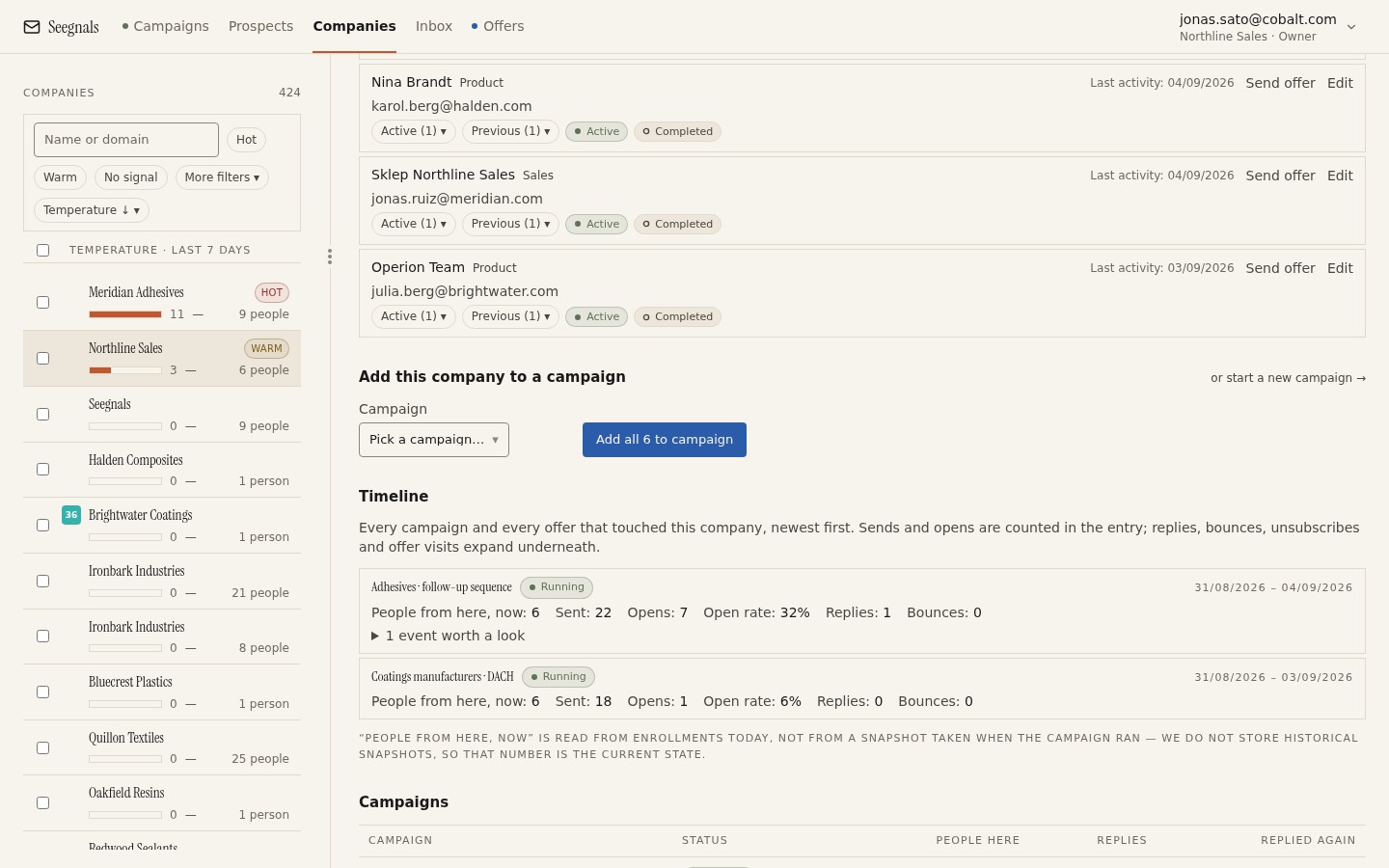 The temperature sits beside the timeline that produced it, so you can always check the number against the events before you act on it.
Three things a temperature is not.
It is not a lead score in the marketing sense. Lead scores usually mix fit (industry, size, title) with behaviour. A temperature is behaviour only. Fit is your job at import time; see the list quality checklist.
It is not a prediction. It does not say the account will buy. It says the account is paying attention, which is necessary but not sufficient.
It is not a replacement for reading the timeline. The number gets you to the right card. The card tells you what to do. We covered why the card is organised around the company rather than the person in why the company is the unit.
Which events count, and why they are not equal
Every engagement event is evidence, but of different strength.
An open is the weakest. Since Apple Mail Privacy Protection began preloading images, an open can be generated by the mail app on the recipient’s behalf whether or not a human looked. Seegnals shows open rates with a note about exactly this, and we go into detail in open rates after Apple Mail Privacy Protection. Opens are also only tracked at all when you have a verified custom tracking domain; without one the interface says opens are not tracked rather than showing you zeros.
A click is stronger. Somebody chose a link. Security scanners do sometimes follow links, so one click from one person is still not proof, but a click on a specific link (pricing, a case page, a calendar) is a real signal.
A reply is strongest, in either direction. Even “not interested” is a human at the account engaging with you. The classifier sorts replies into Interested, Maybe later, Not interested, Autoreply, Bounce, Unsubscribe request and Other, and each of those means something different for the account. An autoreply should not warm a company; an interested reply should.
Offer events sit at the top. Someone viewing a proposal you sent, and especially someone returning to it, is the clearest sign of evaluation short of a signed order. These events appear on the same timeline as email events, which is the whole point: the account’s story is in one place.
Reading across people: the patterns that matter
The value of a company-level number is that it captures patterns no single contact row can show. Here are the ones worth learning to recognise.
Several people, one short window. Three opens from three colleagues within an hour or two almost always means an internal forward. One person read your email and passed it on. The account is discussing you. This is the pattern most worth acting on and the one contact-level tools hide completely.
One person, repeated returns. A single prospect who opens the same email on three different days is re-reading it. They may be waiting for a moment, a budget cycle or a colleague. A gentle, specific follow-up fits here better than step four of a generic sequence.
Engagement moving up the hierarchy. You wrote to a manager; a director at the same domain opens or replies. You did not send to the director, so somebody inside forwarded it upwards. Treat this as a new conversation with a new person, and read what to do when a colleague replies.
Heat without replies. An account whose temperature is high on opens and clicks alone, with no reply after several steps, is either a group that reads everything and answers nothing, or a technical artefact. Look at the timeline: if the opens all land within seconds of sending, a gateway is probably scanning your mail. That is not a hot account.
Heat that stops. A company that was warm two weeks ago and has gone quiet is more interesting than one that was never warm. Something changed. A short note asking whether the timing is wrong often gets a straight answer.
When to distrust the number
Temperature is honest about what it measures, but you should know its blind spots.
Volume bias. An account where you contacted six people will accumulate more events than one where you contacted two, simply because there are more people to generate them. Always read the temperature next to the number of people on the card. The trade-offs of how many people to include are in how many people to contact in one company.
Tracking gaps. If you send from a domain with no verified tracking domain, opens and clicks are not recorded, and the temperature for those accounts will depend on replies and offer events alone. That is not a fault; it is a reason to read the card rather than the rank.
Machine engagement. Autoreplies, bounce notifications and gateway link checks are all events, but not human ones. A good classifier keeps autoreplies and bounces from counting as interest. Clicks from scanners are harder to filter; the tell is timing (seconds after send) and completeness (every link clicked).
Recency. A temperature that never cools would rank the accounts you contacted first above the ones moving now. That is why recent events should matter more than old ones. If you build your own version, build in decay.
Building a rough version in a spreadsheet
If your tool has no company view, you can get most of the way with a sheet and an export of events.
Export your events with columns for email, event type and timestamp. Add a column that extracts the domain from the address. Give each event type a weight you can defend: say 1 for an open, 3 for a click, 8 for a human reply, 10 for an offer view. Add a recency factor: events from the last seven days count in full, the previous three weeks at half, anything older not at all. Sum per domain.
Those weights are yours to choose, and the exact values matter less than the ordering. What you are after is a list of domains sorted by recent engagement from several real people. Check the top five by reading the raw events for each. If the ranking matches your instinct, keep it. If it keeps surfacing accounts full of gateway clicks, raise the reply weight and lower the click weight.
What the spreadsheet cannot do is act on the data: pause a sequence for an account that just replied, or show you the proposal view next to the email click. That is where a product with the grouping built in earns its place, and the company view page shows what that looks like.
What to do this week
- Open your five hottest companies (or your five top domains from the spreadsheet) and read each timeline from the bottom up. Write one sentence per account describing what is going on.
- For each of those five, decide one action: a specific follow-up, a pause, or nothing. Do not send a generic sequence step to a hot account.
- Find one account with high heat and no replies. Check the timestamps. If everything happened within seconds of sending, mark it as gateway noise and move on.
- Check whether your sending domains have a verified tracking domain. If not, decide whether you want opens and clicks at all before you trust any temperature built on them.
- Pick one account that was warm a month ago and has cooled, and send a short note asking whether the timing was wrong. Note what comes back.