Most cold email tools are built around a list of people. You import a CSV, each row becomes a prospect, and everything the tool knows (sent, opened, replied) hangs off that row. That model is simple, and it is wrong for B2B. Nobody at a 200-person manufacturer buys alone. The person who opens your email is rarely the person who signs, and the person who replies is often a third one you never wrote to.
Account-based cold email means treating the company as the unit you plan, send and measure against. People are still the ones who receive messages. But the question you ask each morning changes from “who opened” to “which companies are moving”. The rest of this article explains why that matters, how the grouping is done mechanically, and what changes in your day once outreach is organised this way.
The short answer: group by email domain, decide roles per account before you import, and read engagement across people rather than per person. A tool with a company view, like the one described on the company view page, does the grouping for you. You can also approximate it with a spreadsheet, and we will show how.
What “the unit” means in practice
A unit is the thing you count, plan against and report on. In contact-based outreach the unit is a row: 500 rows imported, 480 delivered, 40 replies. In account-based outreach the unit is a company: 120 companies targeted, 3 people each, 31 companies with at least one reply.
Three things follow from choosing the company as the unit.
First, planning is per account. You do not ask “how many emails can I send” but “how many companies can I work properly this month”. A tool priced per person contacted, as described on the pricing page, makes the arithmetic simple: 120 companies x 3 people = 360 people.
Second, sequencing is per account. If one person at a company replies, the others at that company should not keep receiving step three of a sequence written for strangers. The account has changed state, so the outreach to that account should change too.
Third, measurement is per account. Reply rate per contact tells you about copy. Companies engaged per hundred targeted tells you about targeting, which is usually the bigger lever. We wrote about this in why reply rate is the wrong north star.
Where contact-level tools break
The failures are not dramatic. They are small and daily, and each one costs you a little credibility.
You send a friendly opener to a head of operations on Tuesday. On Wednesday their colleague, the plant manager, gets step one of the same sequence. On Thursday the plant manager replies, interested, and asks for a call. On Friday the head of operations receives your follow-up: “Just checking you saw my last email.” The plant manager forwarded your Thursday thread to the head of operations that morning. You now look like two people who do not talk to each other, and the prospect is right.
Or the reverse. Three people at one company open your email within an hour of each other. In a contact table that is three rows with an “opened” flag, buried among two hundred others. Nothing tells you that three opens from one domain in one hour is a very different event from three opens spread across three companies. Somebody forwarded your email internally. That account is warm, and you cannot see it.
Or the quiet one. A prospect bounces. You mark them as bad and move on. The company still exists, still fits your profile, still has four other people who would be perfectly reachable. But because the unit was the row, the company disappears when the row does.
How grouping by domain works
The mechanism is mundane, which is the point. Every business email address has a domain after the @. Prospects sharing a domain almost always work for the same organisation. So a company view is, at its core, a group-by on the domain part of the address.
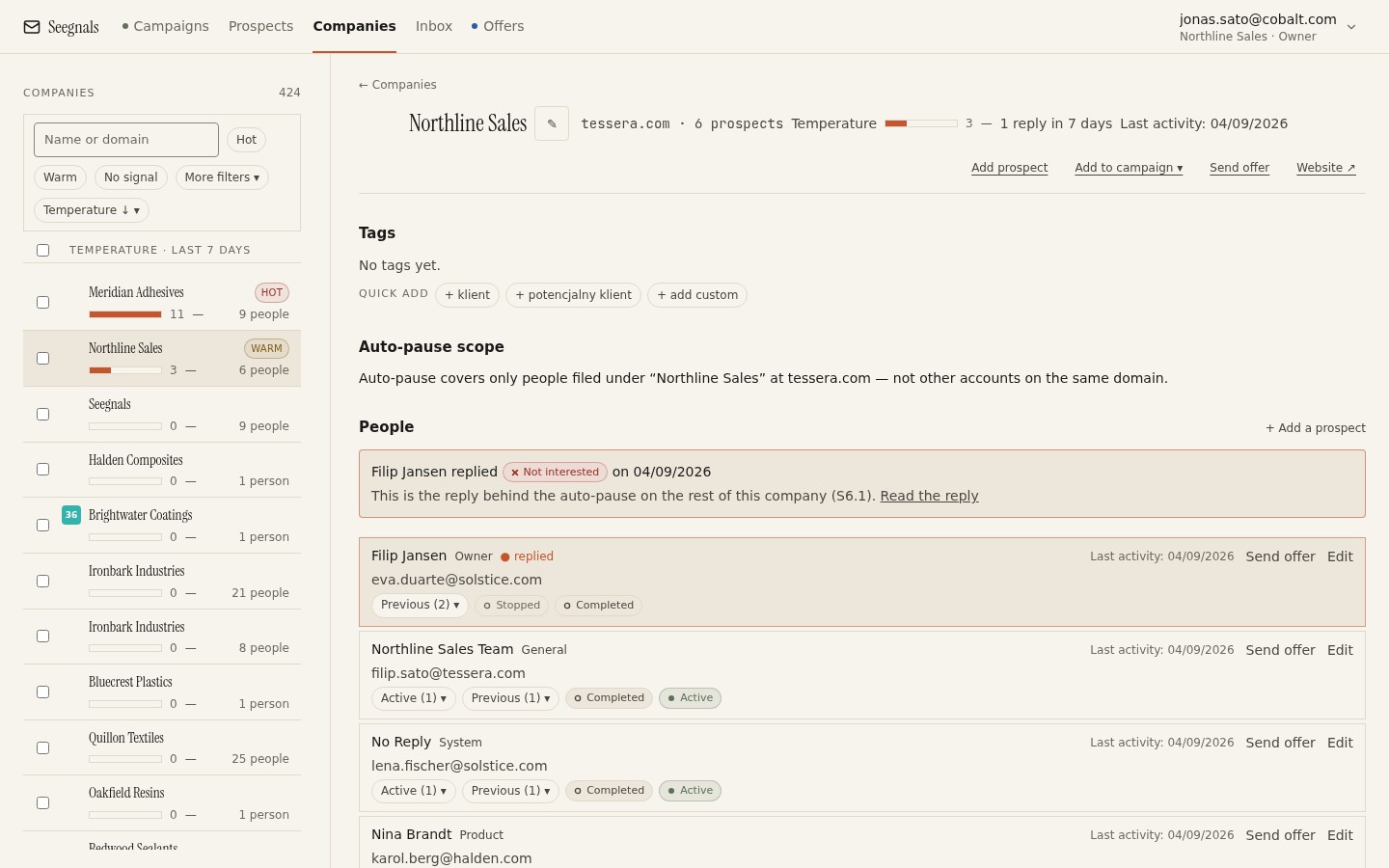 Every prospect you import lands in a company automatically, grouped by the domain of their email address; the list on the left is a list of accounts.
The edge cases are what a tool has to handle and what a spreadsheet will not.
Free mail domains. A prospect at gmail.com is not a colleague of every other gmail.com prospect. These need to be treated as single-person companies or excluded.
Group domains. Some organisations use several domains (a holding, a brand, a country subsidiary). A good company view lets you treat them as one account; a spreadsheet needs a manual mapping table.
Subdomains. sales.example.com and example.com are the same company in most cases. Normalising to the registered domain handles this.
If you want to do this without a tool, add a column with a formula that extracts the domain, then build a pivot table on it. You will have an account list within ten minutes. What you will not have is the timeline, the pause-on-reply behaviour or the temperature, because those need the sending system to know about the grouping too.
What you see once outreach is grouped
The company card is where the account view pays off. In Seegnals every company has one: the people you have at that domain, a single timeline of every event across every campaign (sent, opened, clicked, replied, offer viewed, offer returned), and a temperature that rises with engagement.
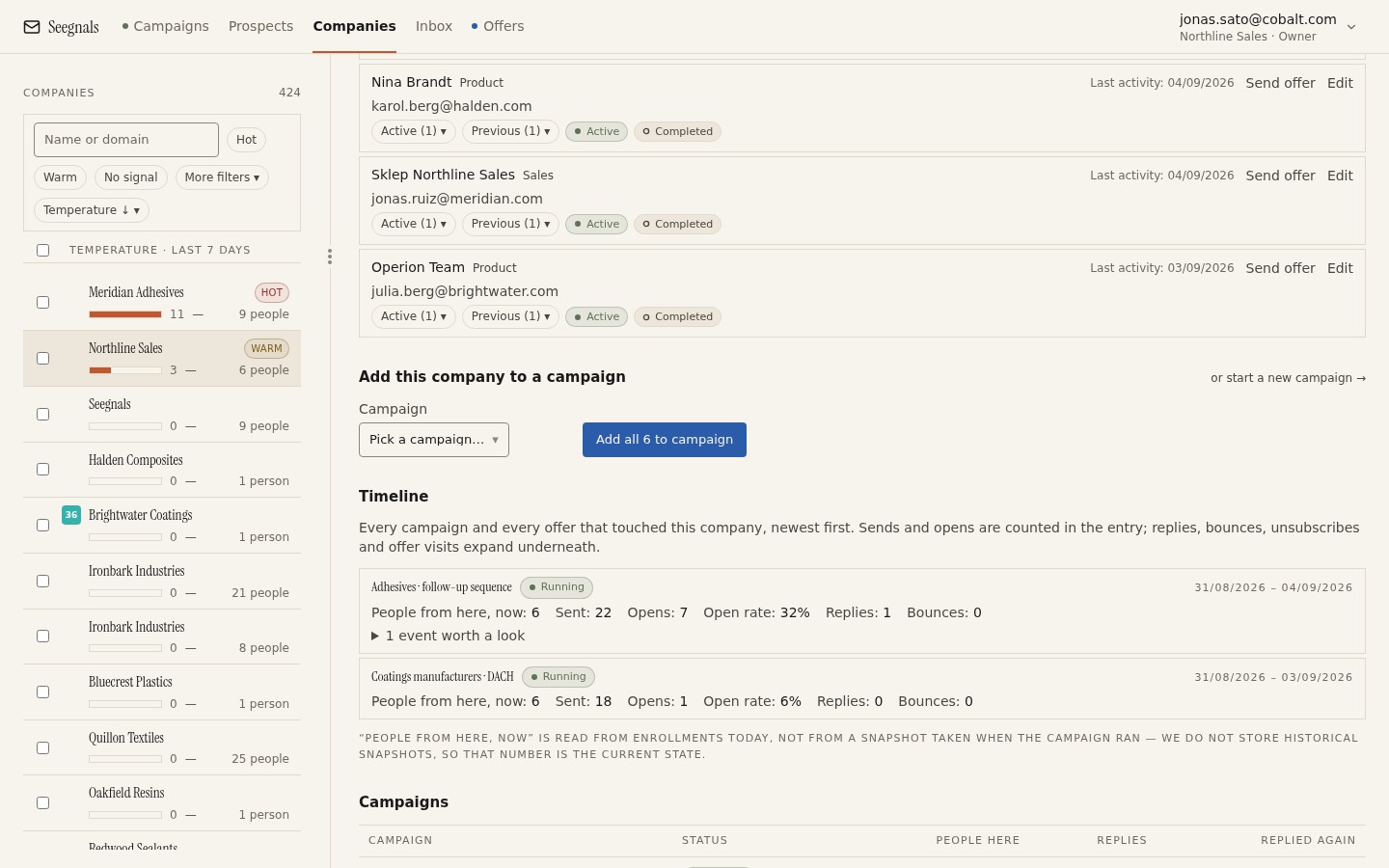 One account, one timeline: three people, two campaigns and a proposal view, in the order they happened, so you can read the story instead of reconstructing it.
Read that timeline once and the value is obvious. You see that the CFO opened twice but never clicked, that the operations lead clicked the pricing link, and that someone viewed the proposal you sent to the operations lead from a device you have not seen before. That is an account in evaluation. Three separate contact rows would never have told you that.
The temperature is the same information compressed into one number so that a dashboard can rank accounts. We cover how to read it in company temperature: reading engagement across people.
Rules that follow from the account view
Once the company is the unit, a few operating rules become natural.
Decide roles before you import. For each account, which two to four roles do you want to reach, and in what order? Doing this up front means the company card has something to compare against. Our guide to how many people to contact in one company goes through the trade-offs.
When someone replies, stop the whole account. In Seegnals a classified reply stops the sequence for that person automatically. For the rest of the account you decide: pause them, or switch them to a shorter sequence that references the conversation. Either is better than pretending nothing happened. The specific case of a colleague answering is covered in when a colleague replies instead of your prospect.
Report per account. Your weekly number is companies engaged, companies in conversation and companies closed. Emails sent is a cost you pay to get there.
Keep a person’s mailbox stable. Follow-ups should arrive in the same thread from the same sender. If your tool rotates mailboxes, it should rotate per prospect rather than per message. This is a deliverability point as much as a courtesy, and mailbox rotation explained has the detail.
Who this is for and who it is not
Account-based outreach is worth the small extra effort whenever more than one person influences the purchase. That covers most B2B sales to companies with more than a handful of employees.
It is less useful when you sell to sole traders, freelancers or very small shops where one person is the whole company. There, the contact and the account are the same thing, and a company view simply shows you one person per card. It does no harm, but it adds nothing.
It is also not a replacement for a CRM. A CRM organisation record is where the relationship lives across years. The company view in an outreach tool is where the outreach lives across weeks. The two should talk to each other, which is what a CRM sync is for, but they answer different questions.
What to do this week
- Export your current prospect list, add a domain column and pivot on it. Count how many companies you are actually working. The number is usually smaller than you think.
- Pick three accounts where more than one person has engaged and read their events in order. Write down what you would have done differently had you seen it at the time.
- Write your role plan: for your typical target company, which roles do you contact, in what order, and what happens to the others when one replies.
- Change one report. Replace “emails sent” or “reply rate” with “companies with at least one engaged person” for one week and see whether it changes a decision.
- If your tool has no company grouping, try one that does on a small campaign and compare what you can see. The product overview shows what the grouped view looks like end to end.