The dashboard shows a company you wrote to on Monday climbing to the top of the hottest list on Wednesday. Three people have opened. One has clicked the link to your pricing page. Nobody has replied. What you do in the next few hours matters more than the whole sequence you wrote for that account.
The short version: read the timeline before you touch anything, choose one person and one specific message, pause the automation that no longer fits, and write down what you learned. Heat is attention. Converting it into intent takes a human message sent at the right moment to the right person.
This article gives you a routine for that moment. It assumes you already group outreach by company; if not, start with why the company is the unit.
What “hot” actually means
In Seegnals every company has a temperature that rises with engagement across everyone you have contacted there: opens, clicks, replies, proposal views and returns, across every campaign. The dashboard lists the companies with the highest temperature so you see them without searching.
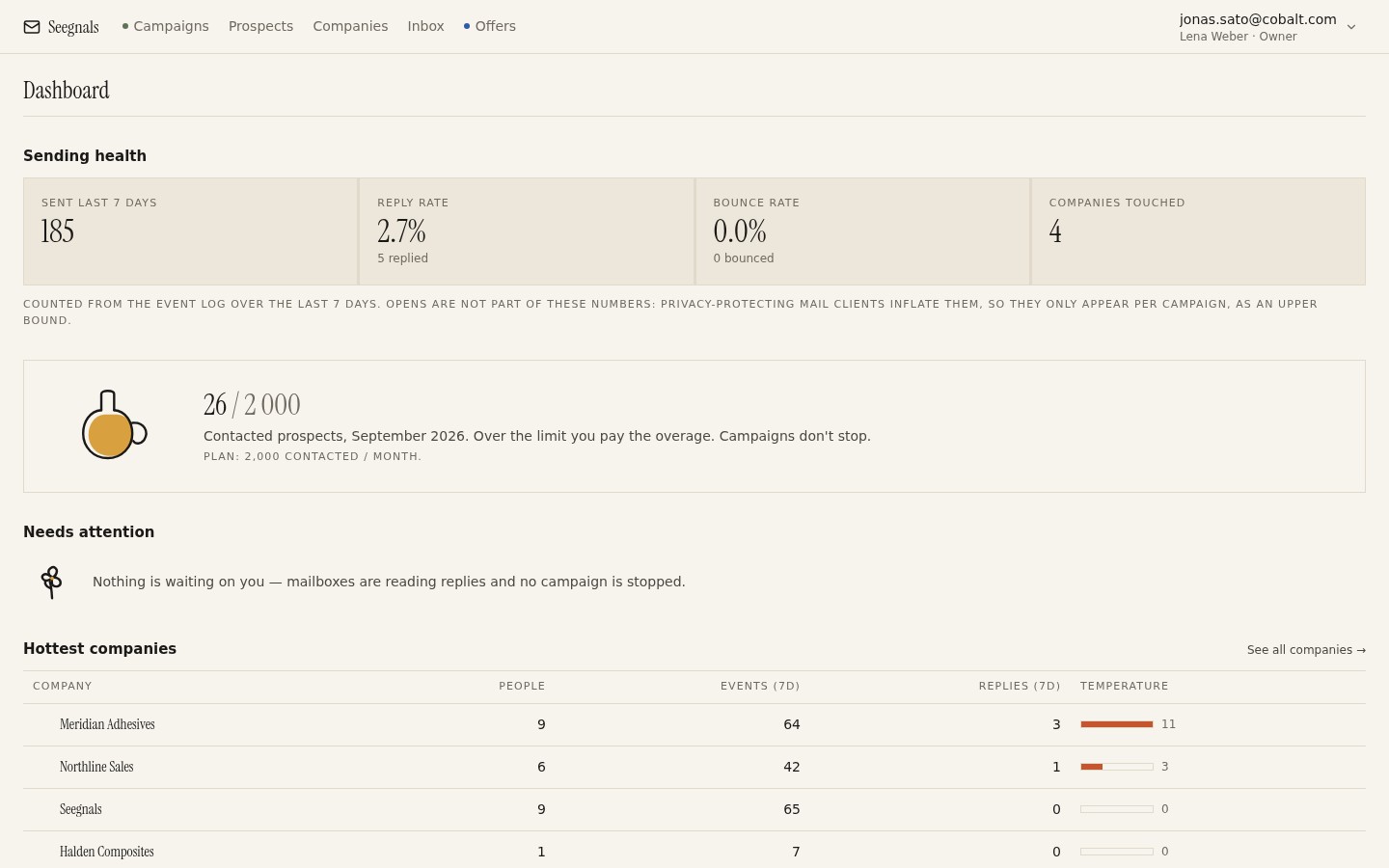 The hottest companies panel is a reading list for the morning: these accounts moved recently, and each name is a card with the events behind the rank.
What the rank tells you is that something happened recently, involving people at this domain, that looks like attention. What it does not tell you is why. The reasons range from “the whole buying committee is discussing you” to “a security appliance clicked every link”. Reading the card is how you tell them apart, and company temperature explained goes into the patterns in depth.
First, read the timeline
Open the company card. Ignore the number and read the events from the bottom up, as a story.
Start with who engaged. If the opens and clicks come from the person you wrote to, that is one kind of heat: a single interested reader. If they come from two or three colleagues, someone forwarded your message. If one of them is a title you never contacted, you have reached a new person through the account’s own channels.
Then the timing. Events spread over a day or two, at working hours in their timezone, are human. Events clustered within seconds of your send time are machines. If you use a scheduling window in the prospect’s timezone, as described in sending in the prospect’s timezone, the human pattern is easier to spot because you know when your mail landed.
Then what they touched. A click on a pricing link, a case page or a calendar link says something about their question. An open with no click says less. A proposal view says the most, and a return to the proposal says more still.
Write a one-sentence summary. “Operations manager opened twice, forwarded to the plant director who clicked pricing on Wednesday morning.” That sentence is your brief for the next step.
Pick the person and the message
You now choose one person to write to and one thing to say. Exactly one of each.
If the original recipient did the engaging, reply in the same thread with something specific to what they touched. They clicked pricing: offer to walk through the pricing for a company their size, and name the size. They opened three times without clicking: ask directly whether the topic is relevant, and offer to stop if not. Specificity is what separates this message from step three of your sequence.
If a colleague engaged, the decision is whether to write to them directly or to go back through the person who forwarded. As a rule, write to the original recipient and mention that you noticed interest from their side, without naming the colleague’s actions. “I noticed the topic seems to be doing the rounds on your side” is fine. “I saw that your director clicked our pricing page” is surveillance. The colleague gets a message only if they reply or if the original recipient goes quiet for a week.
If an unknown person viewed a proposal, the same rule applies. Go back to the person you sent it to. Who else opened your proposal covers this case in detail.
Send the message from the same mailbox the account has been hearing from. Consistency of sender is part of what makes the account trust that a person is on the other end.
Stop the automation that no longer fits
A hot account is no longer a cold one. Sequences written for strangers stop being appropriate the moment strangers start paying attention.
Pause the sequence for everyone at the account who is still in it. Not because automation is bad, but because a follow-up that says “I know inboxes are busy” landing while the plant director is reading your pricing page makes you look like you cannot see what they see.
If your tool supports conditional steps, the fork idea, you can pre-build this: a path for “someone at this company engaged” that switches to a shorter, more direct message. If not, a manual pause takes ten seconds. In Seegnals a classified reply stops the sequence for that person automatically; for the colleagues you decide.
Check any scheduled sends for the domain too. The worst version of this mistake is a cold opener going to a fourth person at the company the morning after their director clicked your pricing.
When heat is not intent
Some hot accounts are not hot. Learn the false positives and you will waste less time.
Gateway scanning. Every link clicked, all within a few seconds of delivery, often for every recipient at the domain. This is a security product. Do not follow up on it. If it happens for every recipient at a domain, note the domain so you stop reacting.
Image preloading. Opens that arrive for every message you send, regardless of subject or day, can be a mail client fetching images on the reader’s behalf. Apple Mail Privacy Protection does this, which is why open rates carry a note in the product and why we wrote about open rates after Apple Mail Privacy Protection. Opens alone should not move you to act.
Curiosity without a problem. Some people read everything. Three opens and a click from one person, then silence after a direct question, usually means interest in the topic rather than in a purchase. One specific follow-up is right. A fourth and fifth are not.
Out-of-office replies. An autoreply is an event, and the classifier sorts it as Autoreply so it does not read as interest. If an account looks warm but the only reply is an out-of-office, the heat is coming from the opens, and you should weigh it accordingly. What to do with autoreplies has the handling.
Turning the routine into a habit
The routine is short enough to do daily.
Morning: open the dashboard, read the hottest companies panel, pick the three that are new since yesterday. For each, read the card, write the one-sentence summary, decide on one action. Send the messages. Pause what needs pausing.
Afternoon: check the inbox. Replies that came from hot accounts get answered first, and the company context beside each thread shows whether anyone else at the account has moved since the morning.
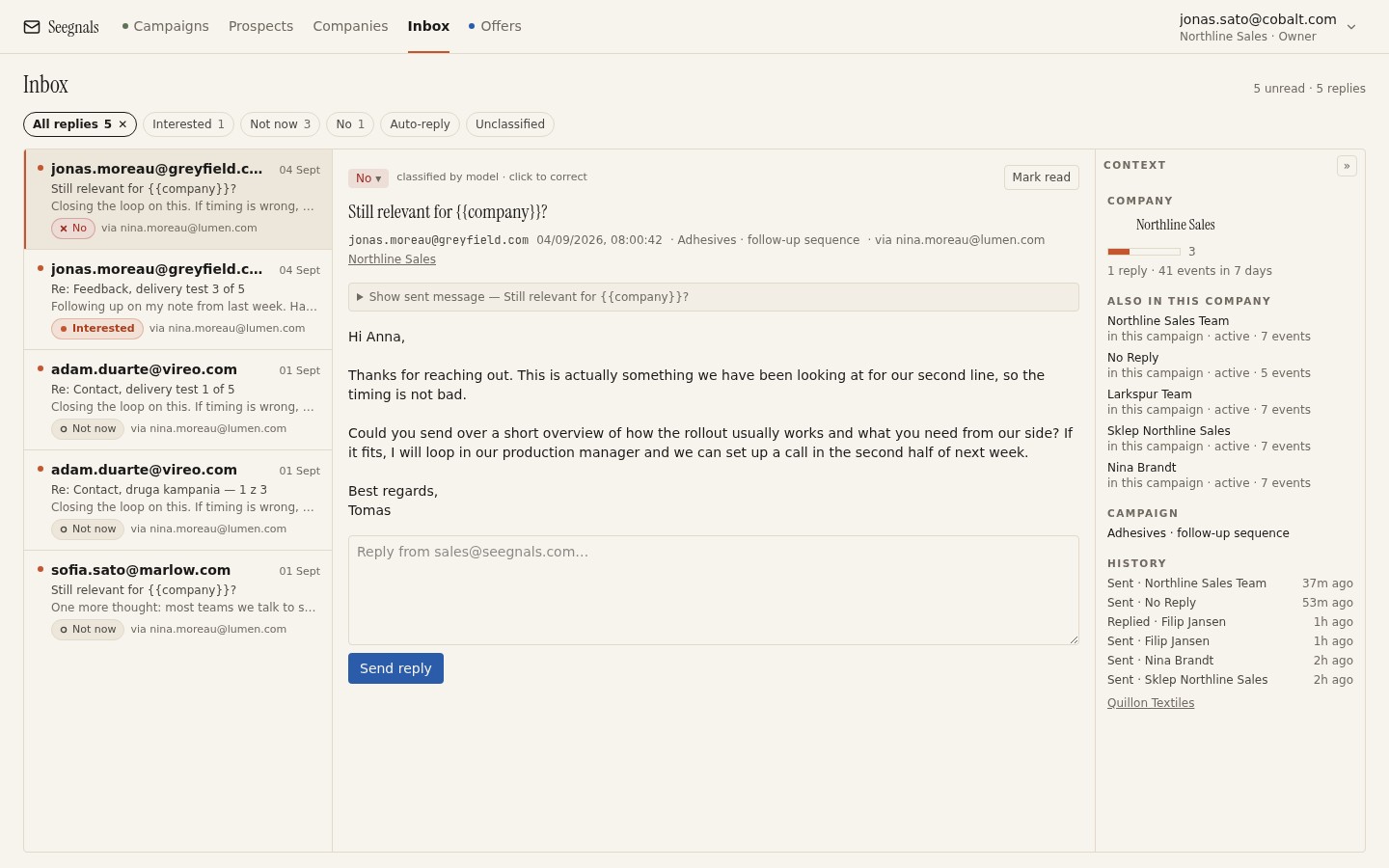 Every reply arrives with the account beside it, so the question of who else at this company is in play is answered before you start typing.
Weekly: look at the accounts that were hot a week ago. Which converted to conversations, which cooled. Adjust what you send on the first hot day based on what worked. If pricing clicks converted and opens did not, stop acting on opens.
Two people can run this for a few hundred accounts in a modest slice of the day. The rhythm is described in a weekly rhythm for a two-person outbound team.
What to do this week
- Tomorrow morning, before opening your inbox, open the hottest companies list and read three cards from the bottom up. Write one sentence per account.
- For each, send one specific message to one person, from the mailbox the account already knows.
- Pause every remaining sequence step for those three accounts. Note the time it took. It will be seconds.
- Find one account that looks hot but has clicks within seconds of sending. Mark it as gateway noise so you stop reacting to it.
- At the end of the week, list the hot accounts from Monday and what happened to each. Keep the note; next week’s version will be shorter.