You wrote to the head of production. The reply comes from someone in purchasing whom you have never heard of: “Piotr forwarded your email to me, can you send more details on pricing.” It is good news, and it is also the moment most sequences break. Piotr is still scheduled to receive step three on Thursday. The person from purchasing is not in your system at all. And the thread now has two people in it who expect you to know who they are.
This article is about handling that moment cleanly: classifying the reply for the account rather than just the sender, stopping or rerouting the original sequence, adding the new person properly, replying in a way that respects both of them, and handling the case where the colleague’s answer is no.
The underlying idea, that the company is the unit and the people are members of it, is set out in why the company is the unit. Here we assume it.
Why this happens more than you expect
Cold email reaches the person whose address you found, who is often not the person who owns the decision. Even with good role selection (see how many people to contact in one company), a fair share of first replies come from someone else: an assistant, a deputy, the person the recipient thinks actually handles this, or the boss the recipient forwarded it to for cover.
Internally, forwarding is the lowest-effort action available. It takes two seconds and moves the decision to someone else. So a message that lands on a busy person who finds it relevant but not theirs will very often be forwarded, and the forwardee, who now has a small task assigned to them by a colleague, replies.
That is why a colleague’s reply is a strong signal. Two people at the account have now spent attention on you, one of them voluntarily. It is worth more than a reply from the original recipient alone, and it deserves a more careful response than “thanks for reaching out”.
Classify the reply at account level first
The reply arrives in your inbox from an address you did not send to. The first thing to establish is which company it belongs to. In Seegnals that is automatic: the domain matches, so the purchasing reply lands on the same company card as Piotr’s sends and opens, and the inbox shows the company context beside the thread.
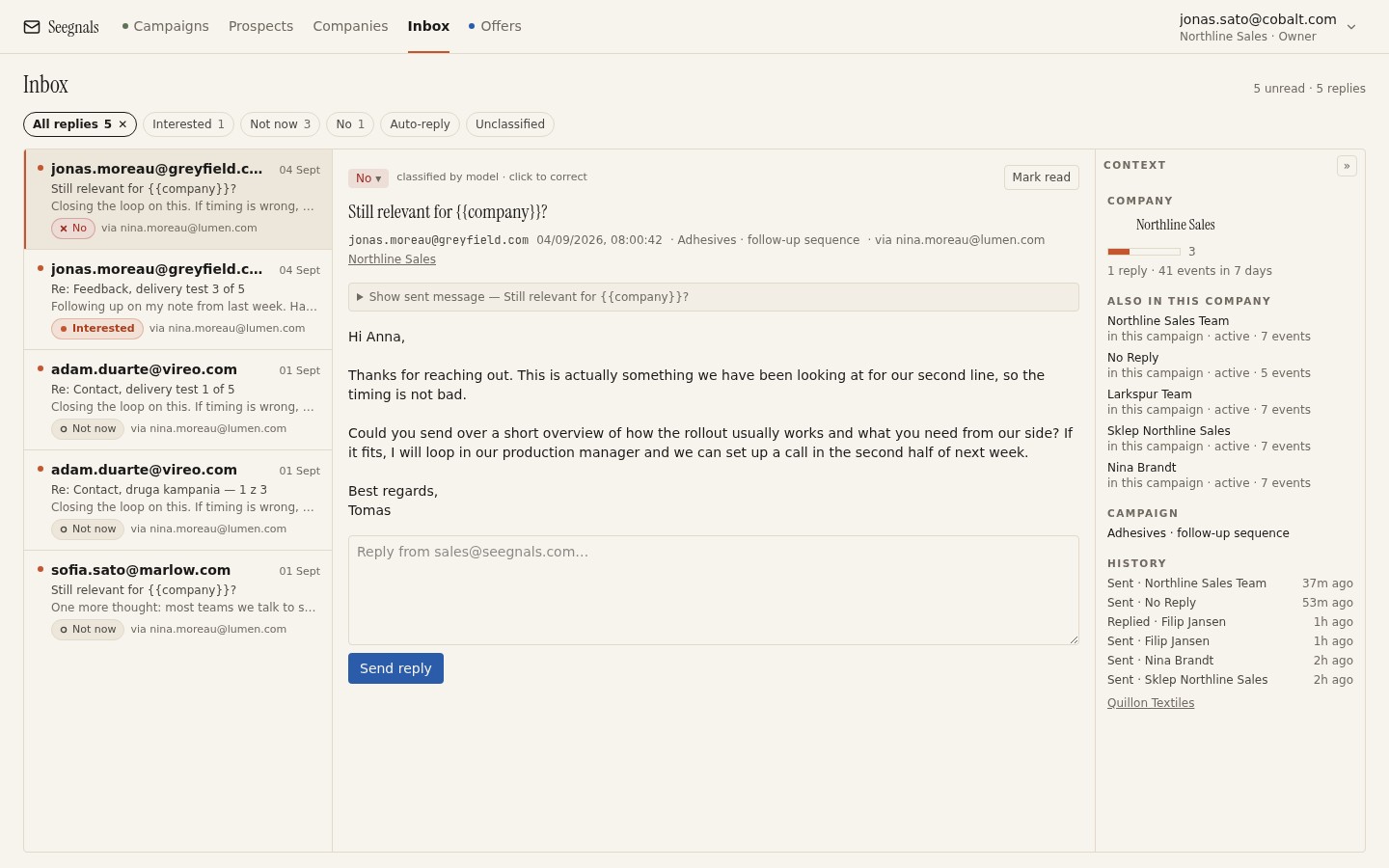 The reply is from a new address, but the company panel shows the person you originally wrote to, their opens, and the fact that this thread belongs to the same account.
Now classify. The reply classifier will have made a first pass: Interested, Maybe later, Not interested, Autoreply, Bounce, Unsubscribe request, Other. A colleague asking for pricing is Interested. Check the label and reclassify with one click if it is wrong. The categories and what each means for follow-up are covered in sorting replies: interested, maybe later, not now.
Then ask the account-level question: what does this reply mean for everyone else at the company? An interested reply from purchasing means the account is in evaluation, regardless of what Piotr does next. A not-interested reply from a colleague who was clearly asked to decline on Piotr’s behalf means the account has said no, even though the original recipient never wrote a word.
Stop or reroute the original sequence
A classified reply stops the sequence for the person who replied. The colleague was never in the sequence, so there is nothing to stop for them. Piotr is still in it, and this is where you must act by hand or by rule.
If the colleague is interested, pause Piotr. He forwarded your email; the conversation is now with purchasing, and a follow-up to Piotr asking whether he saw your message would tell him you cannot see that he did more than see it. If you want him kept informed, copy him on your reply, once, and let the colleague decide who else belongs in the thread.
If the colleague says not now, pause Piotr as well, and put a reminder on the account rather than the person. When you come back in three months, you will write to whoever is right then, and it may be neither of them.
If the colleague says no on the company’s behalf, stop the account. Mark the remaining people as not to be contacted in this campaign. Continuing to Piotr after his colleague declined is how you end up on a suppression list, theirs or your own.
If your tool supports conditional steps, you can pre-build a fork: when anyone at the company replies, the rest of the account switches to a short hold or a single acknowledgement. Without it, a manual pause takes seconds and is worth doing the moment you read the reply, before you write your answer.
Add the new person properly
The colleague needs to exist in your system, and not as a note in a thread.
Create them as a prospect at the company. In an account-based tool they join the company card automatically by domain, and from then on their opens, clicks and offer views appear on the same timeline as Piotr’s.
Record how they arrived. A custom field or a tag saying “came via forward from Piotr” is the kind of detail you will want in three months when someone asks how this deal started. It also stops you adding them to a cold campaign by mistake later; they have never been cold.
Do not put them in a sequence. They replied to you. They get human messages from now on, in the thread they started. The one exception is a deliberately built warm follow-up sequence with one or two steps written for people who have already spoken to you, and even then, only after the live conversation has gone quiet.
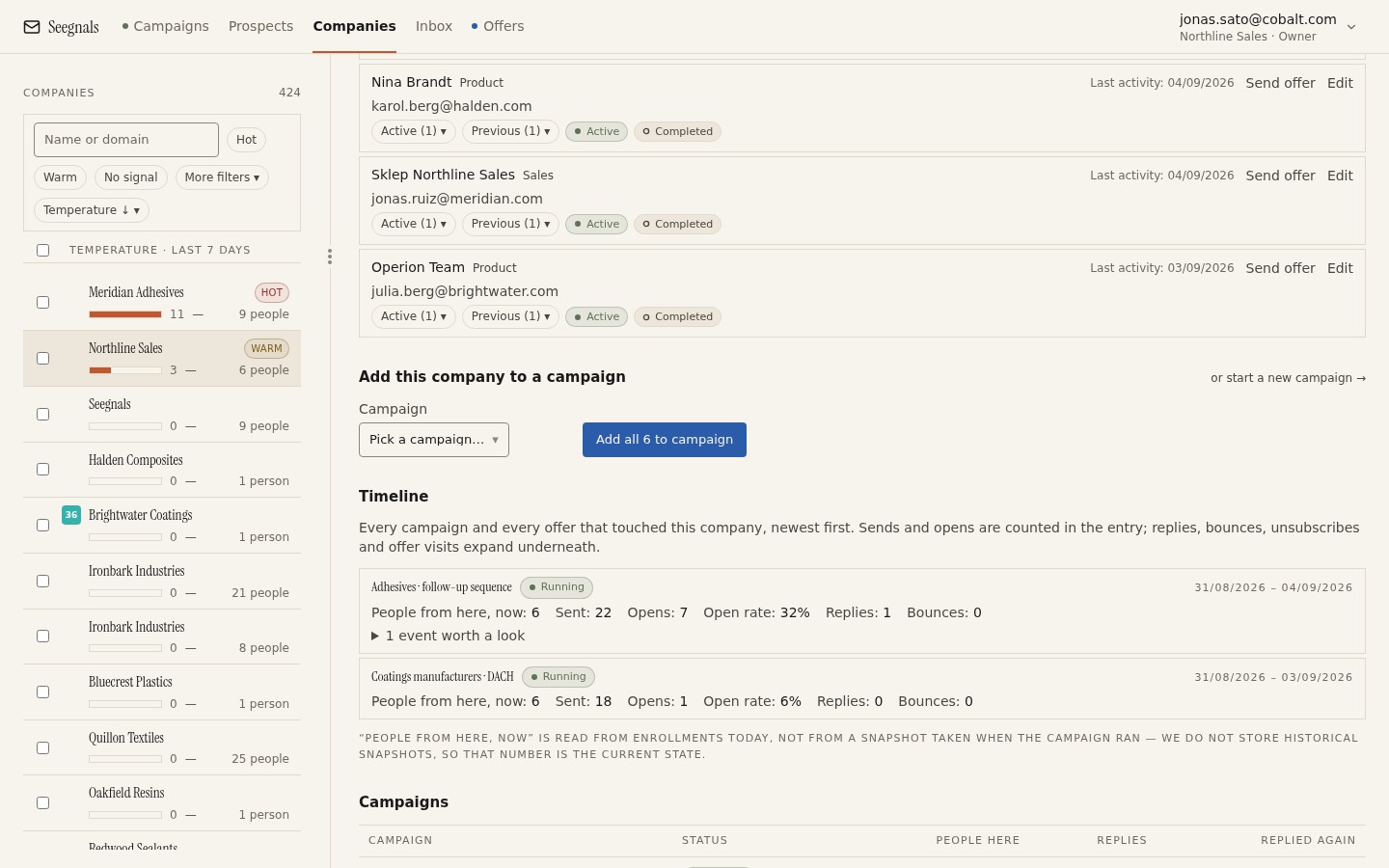 Once the colleague is a person on the card, the account has a complete story: who was written to, who forwarded, who answered and what each of them has seen since.
If your CRM is connected, the reply and its classification go across as a note or activity on the matching person and organisation, so the sales side sees the new contact without anyone retyping it. The setup is in push replies into your CRM.
Replying well
The reply itself has three jobs: acknowledge the handover, answer the question, and make the next step easy for the new person.
Acknowledge briefly. “Thanks, and thanks to Piotr for passing this on.” One sentence. It shows you understand what happened without making a performance of it.
Answer what was asked, in the shape it was asked. If they asked for pricing, give pricing or the path to it. Do not redirect to a discovery call as a condition of answering; they have a task from a colleague, and helping them finish it is how you become useful.
Match the level. Purchasing asks about terms and process; a director asks about outcomes; an operator asks about how it works. The forwarder’s role and the forwardee’s role are usually different, so the message that worked on Piotr is the wrong message for his colleague.
Keep the thread. Reply in the thread they started, from the same mailbox that wrote to Piotr. Do not start a fresh email with a new subject; the forward chain is the account’s own record of how you got there, and breaking it makes you harder to find later.
If a proposal is the natural next step, send it as a tracked link rather than an attachment. You will then see whether the colleague reads it, whether it goes back to Piotr, and whether a fourth person appears. What happens after you send the PDF explains what you can and cannot see.
When the colleague says no
Sometimes the forward is a polite way of saying no. “Piotr asked me to let you know we are not looking at this currently.” Treat it as the account’s answer.
Reply once, briefly, without a counter-offer. Thank them, ask whether it would be useful to check back at a specific point (a quarter, a project date they mentioned), and stop. Reclassify as Not interested or Maybe later depending on what they said.
Pause everyone at the account. If the answer was a firm no, add the domain to your suppression list so nobody reimports it by accident. Suppression lists by address and by domain explains the difference and when to use each.
Record who said no and in what role. A no from purchasing at the request of production is not the same as a no from the director of production. The first may be worth revisiting with a different entry point in six months; the second is not.
What to do this week
- Search your inbox for replies from addresses you never sent to. For each, check whether the original recipient is still in a running sequence. Pause any that are.
- Add each of those colleagues as a prospect at their company, with a field noting who forwarded to them.
- Write two reply templates you can adapt by hand: one for a colleague who asks for details, one for a colleague who declines on someone’s behalf. Keep each under a hundred words.
- If your tool supports conditional steps, build a fork that holds the rest of the account when anyone at the company replies. If not, add “pause the account” to your reply checklist.
- Look at three accounts where a colleague replied in the past. Note which role forwarded to which role. That pattern tells you who to write to first next time.