You spend two days on a proposal, export it to PDF, attach it to an email and press send. Then nothing. For a week you do not know whether it was opened, skimmed, printed, forwarded to a competitor or filtered into a folder called “later”. The follow-up you send on day five is written blind, and it sounds like it.
Proposal tracking replaces the attachment with a personal link. The document opens in a browser, page by page, and the link records what happens: each visit, how long it lasted, which pages held attention, whether the reader came back, and on which device. You still send a PDF. You just stop sending it into the dark.
This article explains how tracked links work mechanically, what gets recorded event by event, what tracking cannot tell you, and how to use what you learn without making your prospect feel watched.
The gap between sent and answered
Sales conversations have a rhythm: a call, a proposal, a decision. The proposal step is the one where you lose visibility entirely. Before it, you were on a call and could read the room. After it, you wait.
That gap is where deals stall, and it is where most follow-ups go wrong. A follow-up written without information has to be generic: “Did you have a chance to look at the proposal?” It asks the prospect to do your reporting for you. A follow-up written with information can be specific: “I saw the implementation section is getting attention; happy to walk through the timeline.” One of these gets a reply.
Tracking is worth having for exactly the length of that gap. Once the prospect replies, you are back in conversation and the data matters less.
How a tracked proposal link works
The mechanism is simple enough to explain in a paragraph.
You upload the PDF to a service. It generates a link that is unique to one recipient. When that link is opened, the service renders the document in the browser, page by page, and records events as the reader moves through it. The reader can zoom, fit to width, use the keyboard, print and download. The experience is a document.
Because the link is personal, an open of that link is an open by that recipient or by someone they passed it to. Because the pages are rendered one at a time, the service can tell which page is on screen and for how long. Because each visit is a new browser session, returns are countable.
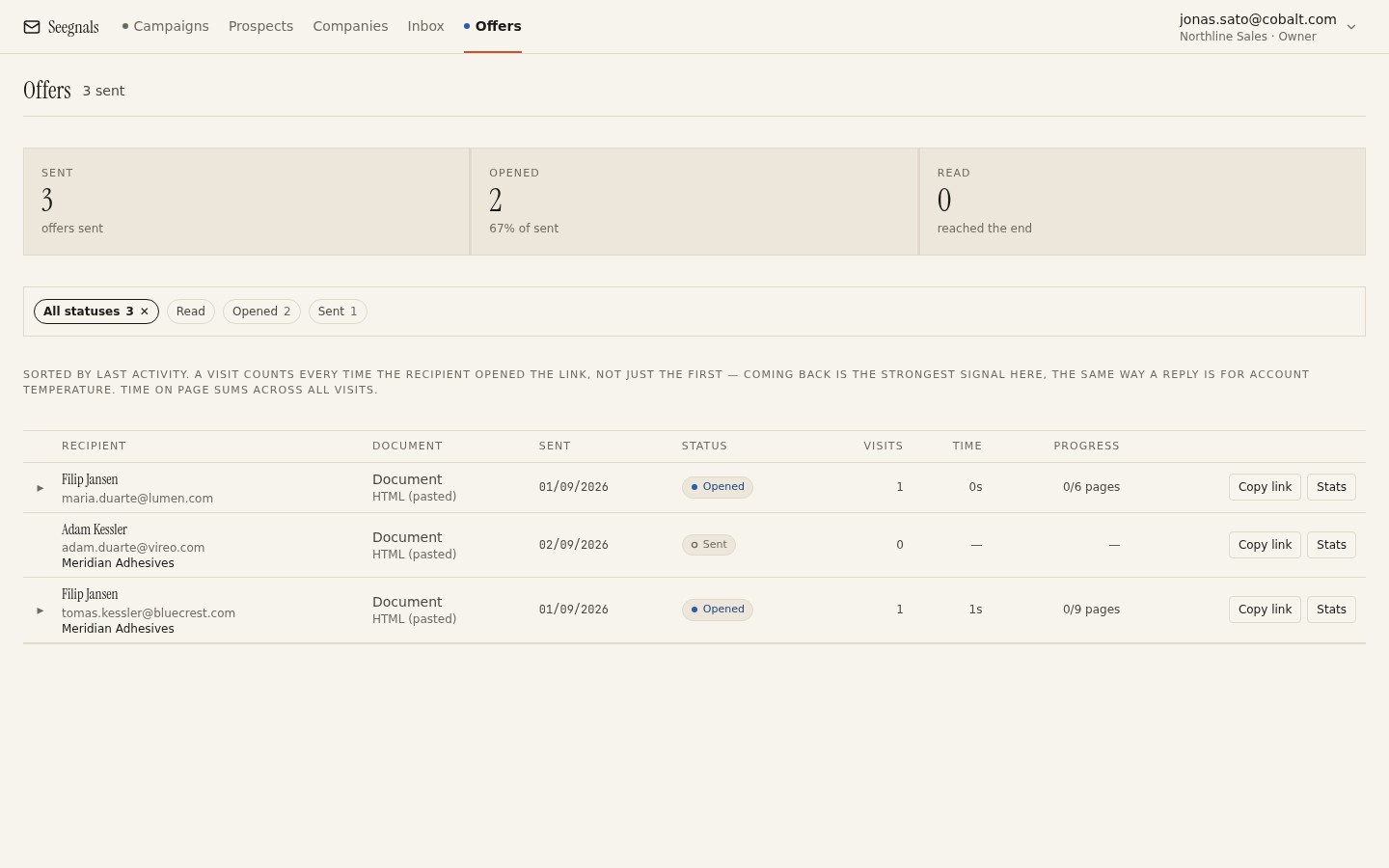 Each row is one proposal sent to one person: whether it has been sent, opened or read, how many visits, total reading time, how far they got, and a button to copy the link.
In Seegnals this lives in the Offers section. The list shows every proposal with its recipient, a status of Sent, Opened or Read, the number of visits, total reading time and progress through the document. Clicking through opens the detail for that proposal.
What gets recorded, event by event
Knowing exactly what is recorded helps you read it correctly, and helps you describe it honestly if a prospect asks.
The first open. When the link is first visited, the status moves from Sent to Opened and a notification goes to you by email. This is the single most useful event, because it starts the clock on your follow-up. When to follow up on a proposal is built around it.
Each visit. Every time the link is opened, a visit is recorded with when it started, how long it lasted, what device was used and how far into the document the reader got.
Reading time per page. Within a visit, time on each page is measured, and across visits it accumulates into a heat map: the pages that held attention are warm, the pages that were skipped are cold. This is the richest signal and the easiest to over-read, which is why it has its own article, reading time per page.
Returns. A reader who comes back is counted, with how many times. A return is a different event from a long first read: it usually means the document is being used, referred to, or shown to someone.
Progress. How far through the document the furthest visit reached. A proposal read to the last page has been read; one abandoned at page four has not, whatever the status says.
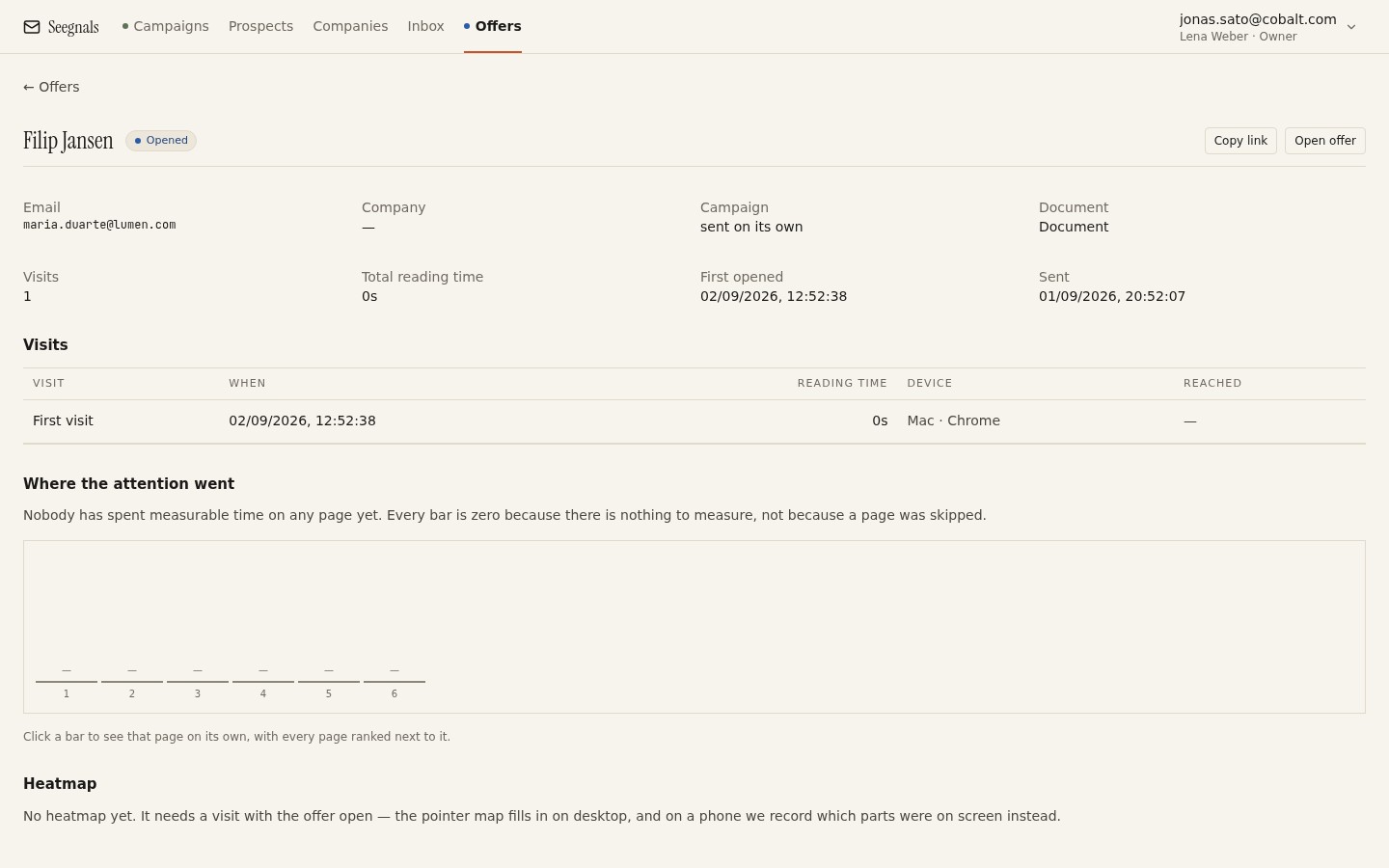 One proposal, one reader: the bars show where the time went page by page, the visit list shows when they came and on what, and the return count shows whether it stuck.
All of this appears on the company timeline as well, alongside the emails, so the proposal is part of the account’s story rather than a separate report. The reason that matters is set out in why the company is the unit.
What tracking cannot tell you
Honesty about limits is what keeps the data useful.
It cannot tell you who is reading, unless you gate the link. A personal link forwarded to a colleague records visits from that colleague under the original recipient’s name. Two visits from two devices in two cities is a strong hint of a forward, and still only a hint. If you need certainty, the link can be gated behind an email address and a one-time code; see protecting a proposal link with a one-time code.
It cannot tell you what they thought. Ten minutes on the pricing page could be enthusiasm or alarm. Time is attention, and attention is a reason to ask.
It cannot see the downloaded copy. If the reader downloads the PDF, what they do with the file afterwards is invisible. Tracking covers the online view only. Most readers stay in the browser because it is easier, but some will not.
It cannot tell you about a page left open. A tab left open through lunch will register as a long read of one page. Reading time is best read in relation to the rest of the document: a page with many times the time of its neighbours in a single visit is probably a break; a page that gets more time than its neighbours across three visits is interest.
Attachments versus links: the honest comparison
Links have costs as well as benefits, and you should decide with both in view.
A link requires the reader to be online and to click. Some readers, particularly in procurement or legal, want a file they can save to a shared folder and annotate. Offering the download button on the link page covers most of this; still, a small number of prospects will ask for the attachment, and you should send it when asked.
A link can be protected, an attachment cannot. Once a PDF is sent, it can go anywhere. A link can be gated, so that only verified readers open it.
A link can be branded. A proposal that opens on your own domain with your logo reads as yours; one that opens on a vendor’s domain reads as a vendor’s. White-label proposal links covers this.
A link is honest about tracking in a way an attachment with hidden beacons is not. The reader is on a web page, and web pages are known to record visits. Say so if asked, and consider saying so before you are asked.
Using the data without being creepy
The fastest way to lose a deal is to demonstrate that you have been watching. The data is for your decisions.
Use it to time follow-ups. “I noticed you spent six minutes on page five” is a sentence that should never be sent. “Happy to go through the implementation plan if useful” is the same information, delivered as an offer.
Use it to improve the next document. If every reader skips the company background section and lingers on the timeline, shorten the first and expand the second. That is analytics doing its proper job, which is making the thing better rather than making the seller cleverer.
Use it to prioritise. Ten proposals out, three opened, one read to the end and returned to twice: that one gets your call today. The others get a calendar reminder.
Say what you collect. A line in your proposal email (“this link opens the document in your browser; we can see when it is viewed so we can time our follow-up properly”) is unusual and disarming. It also keeps you comfortably on the right side of the data protection questions covered on the security page.
What to do this week
- Send your next proposal as a tracked link instead of an attachment, with the download button available. Note the time of the first-open notification.
- Read the per-page times once, then write your follow-up without quoting a single number from them.
- Compare the pages that got attention with the pages you spent the most time writing. If they differ, make one change to your template.
- Add a plain sentence to your proposal email saying the link is viewable in the browser and that you can see when it is opened.
- For one deal that went quiet after a proposal, check whether it was ever opened. If not, the problem is the email.