A proposal link is a URL. Anyone who has it can open it. Most of the time that is fine: the person you sent it to opens it, perhaps forwards it to a colleague, and the tracking tells you roughly what happened. Sometimes it is not fine. The proposal contains pricing you negotiated for one customer, or a technical design you do not want in a competitor’s inbox, or the deal has a committee and you need to know who has actually read the document rather than guess from device fingerprints.
For those cases you gate the link. The reader enters their email address, receives a one-time code, enters it, and the document opens. Known addresses get in directly. Unknown addresses can request access, and you decide. This article explains what the gate does, when to use it and when not to, how the approval flow works, what the gate does not protect, how to set expectations in the email you send, and how it compares with the older habit of password-protecting the PDF itself.
For the basics of tracked links, see what happens after you send the PDF.
What a gated link does
Without a gate, a tracked proposal link records visits and attributes all of them to the recipient, because the link is personal to them. Who actually sat at the keyboard is inferred from device and reading pattern, as described in who else opened your proposal.
With a gate, the link first shows a small page asking for an email address. The service sends a short code to that address. The reader enters the code and the document opens. From that point, every visit is tied to a verified address.
Three things change as a result.
Attribution becomes certain. A visit is by the person who controls that inbox rather than by whoever had the URL.
Forwards become visible as people. When the recipient passes the link to a colleague, the colleague has to enter their own address. If that address is not on your approved list, they see a request-access screen and you receive the request. You now know exactly who wants to read the proposal, before they have read it.
Control becomes possible. You can approve the colleague, or not. The document is no longer open to anyone holding the URL.
In Seegnals the gate is optional per offer: you choose when you send. The offers list shows each proposal’s status, visits and reading time as usual.
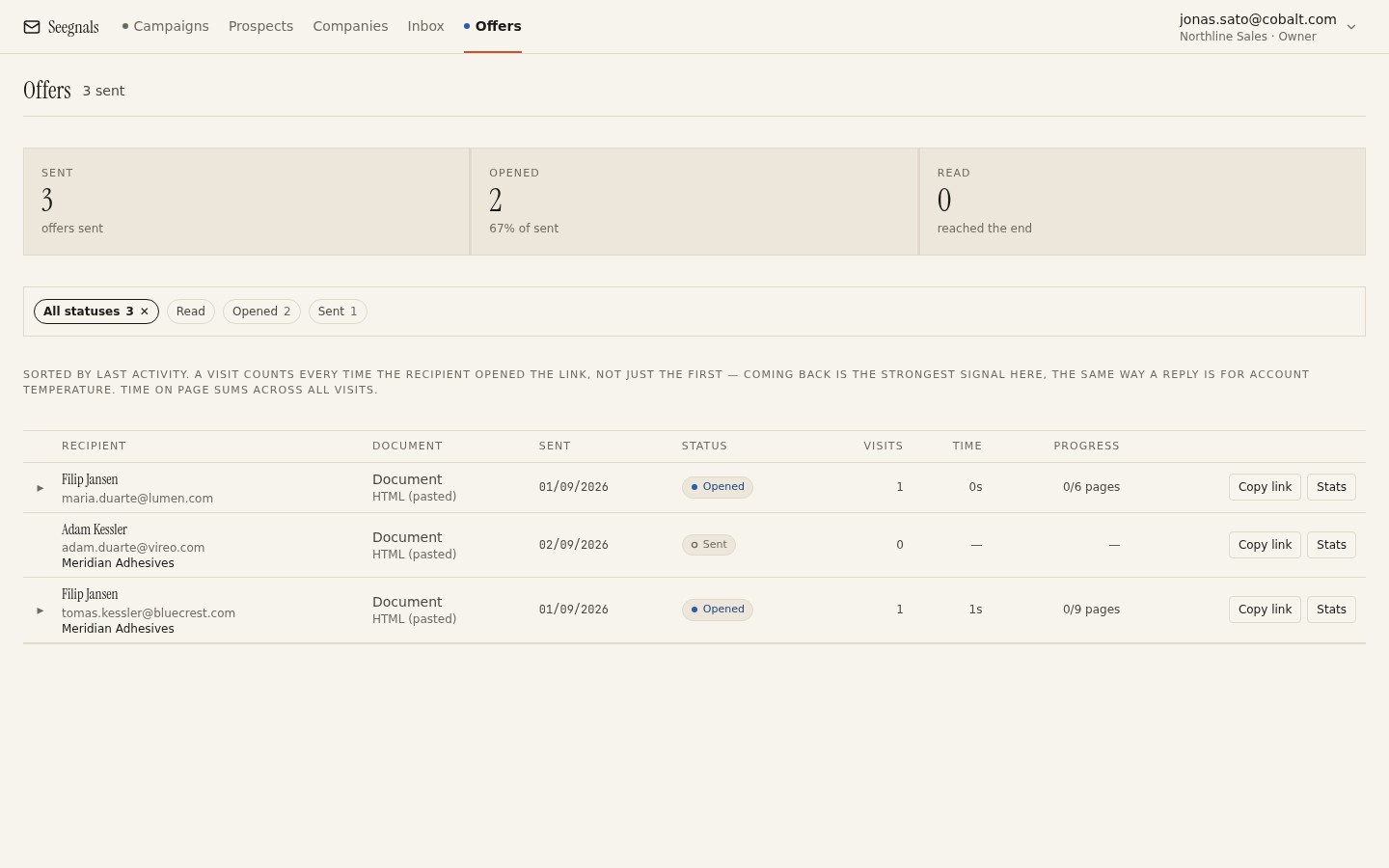 Gated or not, every proposal sits in the same list; the difference is that a gated one tells you the names behind the visits rather than leaving you to infer them.
When to gate and when not to
Gating adds friction. The reader has to type an address, wait for a code, and type it. For a first-time recipient who was half-interested, that is a reason to close the tab. So gate deliberately.
Gate when the content is sensitive. Custom pricing, discount structures you would not want other customers to see, technical designs, anything under an NDA.
Gate when identity changes your action. In committee sales, knowing that the finance director has read the terms is worth more than a faster first open. The gate turns guesswork into a list of names.
Gate when the recipient will forward, and you want to meet the forwardees. A request-access screen is a natural introduction point. The colleague asks; you approve; you now have their address and a reason to write to them.
Do not gate a first proposal to a warm but uncommitted prospect. Get the document read first. You can always send a gated version later when the content becomes sensitive.
Do not gate when the reader is likely to be on a phone in a hurry. Codes and small screens are a poor combination for a first read. If you must, tell them in the email that a code is coming.
Do not gate as a substitute for trusting your prospect. If the relationship is good, a request-access screen for their colleague can feel like a locked door. Decide based on the content.
How the approval flow works for unknown emails
The interesting case is the reader you did not expect.
The recipient forwards the link to a colleague. The colleague opens it and sees the email prompt. They enter their work address. It is not on the approved list, so instead of a code they see a message saying access has been requested and the sender will be in touch. You receive the request with the address and the proposal it relates to.
You now choose. Approve, and they receive their code and can open the document. Decline, and they cannot; the recipient can send you a note asking why, which is itself a conversation.
A few practical points.
Approve quickly. A request that sits for a day tells the colleague that the door is locked and the owner is away. If you are going to gate, treat requests as urgent.
Notice the pattern. A request from procurement means the deal has reached procurement. A request from a domain you do not recognise means the proposal has left the company. Both are information you would not have had without the gate. Once the colleague is in, the handling is the same as any new person at the account, covered in when a colleague replies instead of your prospect.
Tell the recipient. If you approve a colleague, a brief note to the original recipient (“I have given Anna access as well, let me know if anyone else needs it”) keeps you the host rather than the gatekeeper.
What the gate does not protect
A gate makes identity certain and forwarding visible. It does not make the document secret, and you should not describe it as if it did.
The reader can download. The link page offers download and print, because a proposal that cannot be saved is a proposal that gets asked for as an attachment. Once downloaded, the file is a file. If you need to prevent that, you need a different kind of document and a different kind of relationship.
The reader can screenshot. Anything on a screen can be photographed.
The code protects the link. The inbox is outside its reach. If someone has access to the recipient’s email, they have access to the code. This is true of every email-based verification and is not a weakness specific to proposals.
The gate records who entered a code, and it cannot see who is reading over their shoulder. A verified visit by the operations head may be a meeting-room screen with five people watching.
What the gate does do is raise the cost of casual leakage from nothing to something, and turn silent forwards into named requests. For most B2B proposals that is exactly the right level. Where the data lives and how it is protected in transit and at rest is set out on the security page.
Setting expectations in the email you send
A gated link surprises readers who are not warned. A sentence in the covering email fixes that.
Something like: “The proposal is at the link below. It will ask for your email and send you a short code, so that only you and the people you choose can open it. If a colleague needs access, they can request it from the same page and I will approve straight away.”
This does three things. It explains the friction before it happens. It frames the gate as protecting the customer’s information, which it does. And it tells the recipient how to bring in colleagues, which turns the request-access screen from a wall into a door.
Send the email from the mailbox the account already knows. A code arriving from an unfamiliar sender is the kind of thing that gets reported as phishing, and rightly so. Consistency of sender across the outreach, the proposal and the code is a trust signal, and white-label proposal links extend that consistency to the domain in the link itself.
Comparing with password-protected PDFs
The older approach is to put a password on the PDF and send the password separately. It has the appeal of needing no service. It also has real problems.
The password is usually sent in the same thread, or in the next email, which means anyone with the thread has both. A one-time code goes to the reader’s own inbox at the moment they ask.
A password-protected PDF, once opened and saved without the password, is an ordinary PDF. There is no record of who opened it or when.
Forwarding is invisible. The recipient sends the file and the password to a colleague, and you learn nothing. A gated link turns that same forward into a named request.
Updates are awkward. If your pricing changes, the old PDF is out there with the old numbers. A link can be pointed at a new version.
Password PDFs still have a place: offline reading in environments where links are blocked, or a customer’s own policy requiring files. When you are asked for one, send it. As a default, a gated link gives you more information and the reader a smoother path.
What to do this week
- List your current open proposals and mark which contain information you would not want outside the customer’s company. Those are the ones to gate.
- Write the two-sentence explanation of the gate for your covering email and save it as a snippet.
- Send one gated proposal this week and time how long it takes you to approve a request. Aim for minutes.
- Decide your default: gating for sensitive documents, open links for the rest. Write it down so the team applies it the same way.
- For any proposal you currently send as a password-protected PDF, try the gated link for the next one and compare what you learn.