Someone on the team reads that words like “free”, “guarantee” or “act now” get an email flagged as spam, spends an afternoon rewriting every subject line in the sequence to avoid them, and the reply rate does not move. That afternoon was spent on the wrong problem. Word lists are not how filtering has worked for a long time, and chasing them means the real cause goes untouched.
If your mail is landing in spam, the fix is almost never a word. It is far more likely to be a domain without proper authentication, a mailbox sending more than its history supports, a bounce rate that signals a bad list, or a pattern of low replies that reads as unwanted bulk mail. This article explains where the trigger-word idea came from, what a modern filter actually reads, and what to check instead of your vocabulary.
Where the trigger-word idea came from
The idea is not invented out of nowhere. Early spam filters, the kind built into mail servers in the early 2000s, scored messages by counting the frequency of certain words against a statistical model trained on known spam. In that era, a message stuffed with “viagra”, “winner” or a string of dollar signs really did score higher, because those words appeared constantly in the spam of the time and rarely in ordinary mail.
Two things changed. First, spammers adapted, replacing obvious words with misspellings and symbols, which made pure word-counting far less useful on its own. Second, mailbox providers moved to filtering based on the sender rather than the message: who is sending, from what domain, with what history, read by whom. A list of “words to avoid” got copied from blog post to blog post for two decades without anyone checking whether it still matched how Gmail or Microsoft 365 actually filter mail today. It mostly does not.
What a modern filter actually reads
A receiving server judges a message mostly on signals attached to the sender, not the text. The main ones are:
Authentication: whether SPF, DKIM and DMARC pass for the sending domain, which tells the receiver the message really came from where it claims to. This is covered in detail in SPF, DKIM and DMARC for cold email senders, and it is the first thing to rule out before blaming anything else.
Sending pattern: how many messages a mailbox and a domain send per day compared with their history, and whether that volume moved suddenly. A mailbox that has quietly sent a few dozen messages a day for months looks nothing like one that jumps from five to five hundred overnight, covered in daily sending limits per mailbox.
Engagement: replies, opens where they can be measured, deletions without opening, and complaints (marking as spam). A domain whose mail regularly gets read and answered earns a better score than one whose mail is ignored or reported.
List health: bounce rate is one of the clearest signals a receiving server has, because a high rate of invalid addresses is exactly what an untargeted bulk sender produces. What counts as too high is in what bounce rate is safe for cold email.
Google publishes some of this directly in its guidelines for bulk senders, and none of it mentions a forbidden word list. It talks about authentication, spam rate and unsubscribe handling.
A word never sent a message to spam on its own
Picture the same sentence, “start your free trial today”, sent two ways. The first comes from a mailbox that has exchanged genuine messages with dozens of people this month, on a domain with clean authentication, as a reply to someone who asked a question last week. The second comes from a domain created ten days ago, sending an identical sentence to five hundred addresses in an hour, several of which bounce.
The words are the same. The outcomes are not. The receiving server is not reading “free” and reaching for a rule. It is reading the domain’s history, the volume, the bounce pattern, and possibly complaints from earlier recipients on the same list, and drawing a conclusion about the sender that has nothing to do with a single sentence.
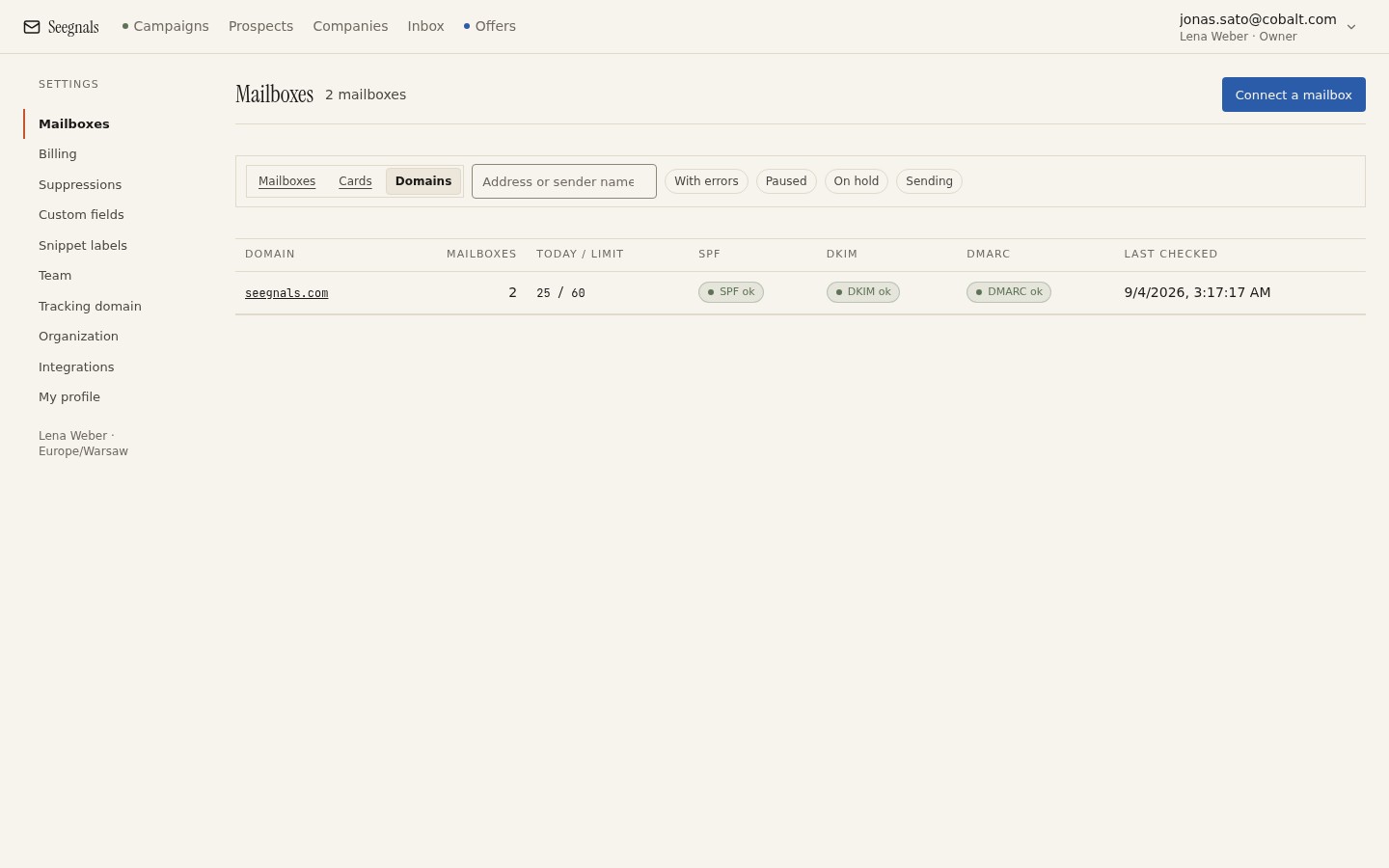 A domain that fails authentication gets filtered regardless of what the message says; this is where to look first, not the subject line.
The real predictors: volume, patterns and reputation
If a campaign that used to land well starts disappearing into spam, the useful question is what changed about the sender, not the copy. A sudden jump in daily volume, a new mailbox added without a lower starting limit, a spike in bounces after importing an unverified list, or a run of messages with no replies at all are the things that move a domain’s score.
The bounce shield exists for exactly this kind of pattern: it pauses a campaign automatically when bounces cross a threshold you set, rather than waiting for someone to notice replies have dried up.
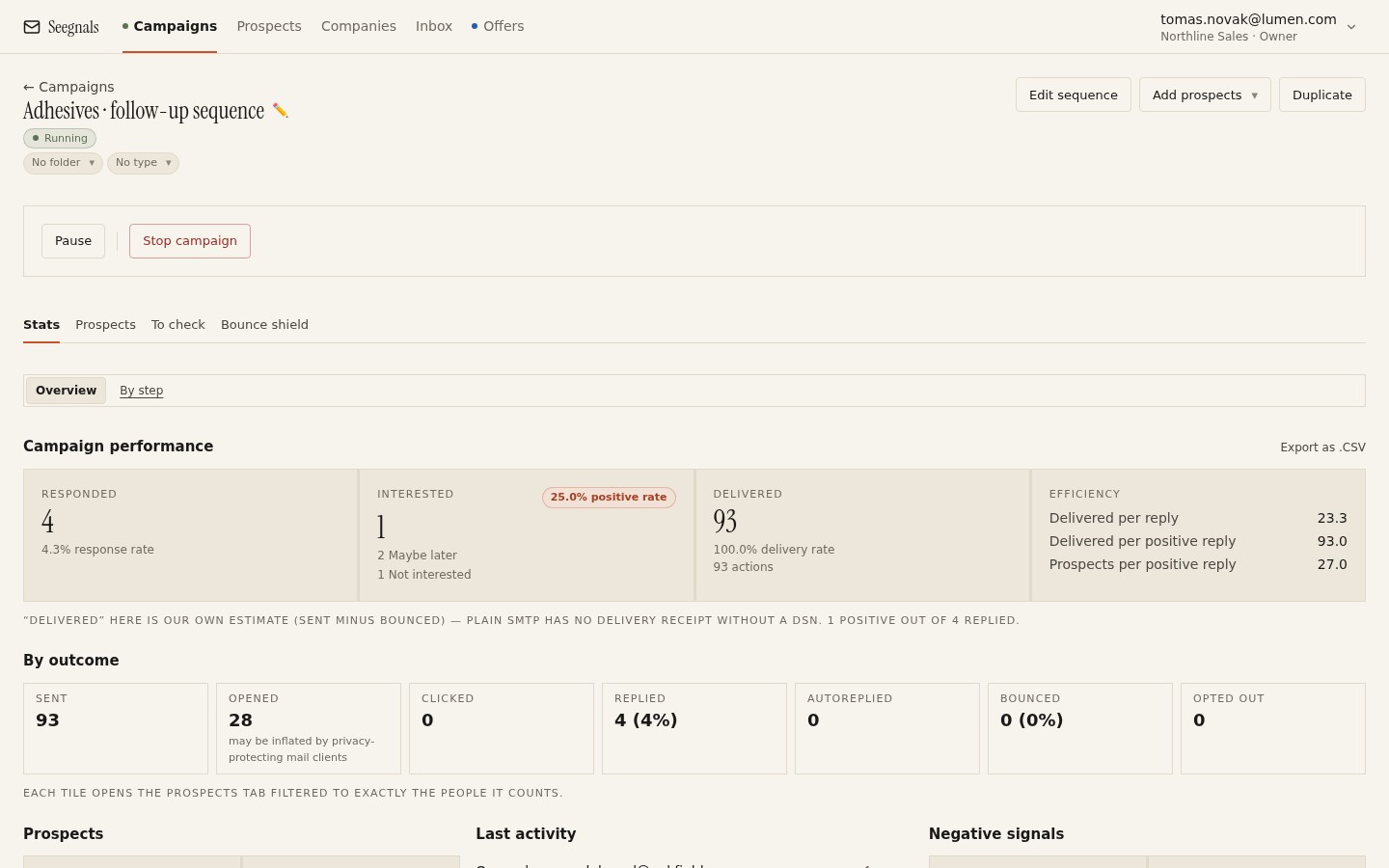 Bounces and replies here tell you far more about whether mail is reaching inboxes than any word in the message would.
A pattern worth watching specifically is replies going quiet while sends and even opens stay steady. Opens are an unreliable measure on their own, for reasons that come down to privacy features rather than genuine reading, so a real drop shows up in replies first. That is one more reason reply rate is the metric worth trusting more than surface numbers when something changes.
What to check instead of the wording
When a message underperforms, work through the sender-side checks before touching the copy:
Confirm SPF, DKIM and DMARC still pass for the domain in question. Records break silently when a colleague adds a tool or a domain changes registrar, and a passing check today does not guarantee one tomorrow.
Look at the bounce rate for the specific campaign against your usual baseline. A jump usually means the list, not the message.
Check whether the daily limit on the mailbox changed recently, deliberately or by accident, and whether a new mailbox was added to the rotation without a lower starting limit.
Look across the account for reply and complaint patterns, not at one message. A single ignored email is normal. A domain-wide silence is a signal.
None of these are about vocabulary, and none of them will show up by rereading the subject line for words that sound spammy.
Where specificity genuinely helps
There is a real, separate reason to write a plain, specific message rather than something that reads like a form letter, and it is not a hidden filter rule. A vague, generic message gets deleted without a reply and, often enough, marked as spam by an irritated recipient. Both of those are genuine engagement signals that do feed into a domain’s reputation over time. A specific message that names the reader’s actual situation gets replies, and replies are the strongest positive signal a sending domain can earn.
So the advice to be specific and relevant is correct, but the mechanism is engagement, not a word blacklist. Writing a sharper opening line because it gets more replies is a good idea for its own sake, covered in personalisation that scales without lying. Rewriting it because you read that “free” is dangerous is chasing folklore.
The deliverability page walks through the authentication, volume and list-quality practices in one place, and is the better use of the afternoon that would otherwise go into word-hunting.
What to do this week
- Stop editing subject lines for supposed trigger words. If a rewrite is underway for that reason, redirect the time to the checks below.
- Open the deliverability tab for every sending domain and confirm SPF, DKIM and DMARC all pass right now, not just when they were set up.
- Compare this month’s bounce rate against your usual baseline for each campaign. A jump points at the list, not the copy.
- Check whether any mailbox’s daily limit or the rotation itself changed recently without a deliberate reason.
- If replies have gone quiet across several campaigns at once rather than one, treat it as a domain-reputation question and work through the checklist above before rewriting anything.