The proposal took two days. The email that carries it takes two minutes, and it is the first thing the reader sees. Most cover emails fall into one of two traps. Either they are a formality (“Please find attached our proposal, let me know if you have any questions”) or they are a second proposal that summarises the first one in eight paragraphs. The first says nothing; the second gives the reader a reason not to open the document at all.
The cover email has one job: get the document opened by the right person, in the right frame of mind, and set up the follow-up that comes later. That job is done by four things. Keep it short. Be specific about what the document contains. Send a link rather than an attachment. Say, once, what the reader can expect from you next.
This article covers each of those, with a structure you can reuse. For the document itself, and for what happens after the send, see the golden rules of sending offers and proposals.
What the cover email is for
Separate the cover email from the proposal in your head. The proposal argues. The cover email delivers.
That means the cover email does not need to persuade anyone of anything. The reader has already talked to you, or they would not be receiving a proposal. They know roughly what you do and roughly what it costs. What they do not know is whether this document is worth twenty minutes of their afternoon, and whether they are the one who should read it or whether it should go straight to a colleague.
So the email answers three questions in the reader’s order. Is this the thing we discussed? What is in it and how long will it take me? What happens next? Everything else belongs in the document.
A useful test: if you deleted the email and kept only the link, would the reader lose anything they need to open the document at the right time? If the answer is no, the email is too long.
Why a link beats an attachment
A PDF attachment leaves your hands and disappears. You do not know whether it was opened, by whom, or how far anyone read. You find out when the reader replies, if they reply. Every follow-up you send in the meantime is a guess dressed up as a question: “Did you have a chance to look at it?”
A personal link to the same PDF changes the position. With proposal tracking, the link page shows the document page by page, and you see each visit: when it happened, how long it lasted, on which device, how far the reader got. You see returns, and you see reading time per page. What happens after you send the PDF walks through what the data looks like.
There are practical advantages too. A link cannot be blocked by an attachment size limit or stripped by a mail filter. It always opens the current version, so if you fix a typo on page four before the reader opens it, they see the fixed page. It can be protected with a one-time code so that a forwarded link does not become an open door; protecting a proposal link with a one-time code explains when that is worth the friction. And it can live on your own domain, so the address in the email looks like yours rather than a tool’s.
There is one honest cost. Some readers prefer attachments because they want to save the file or print it. The link page in Seegnals allows printing and downloading, so say so in the email. One clause (“you can download or print it from there”) removes the objection before it forms.
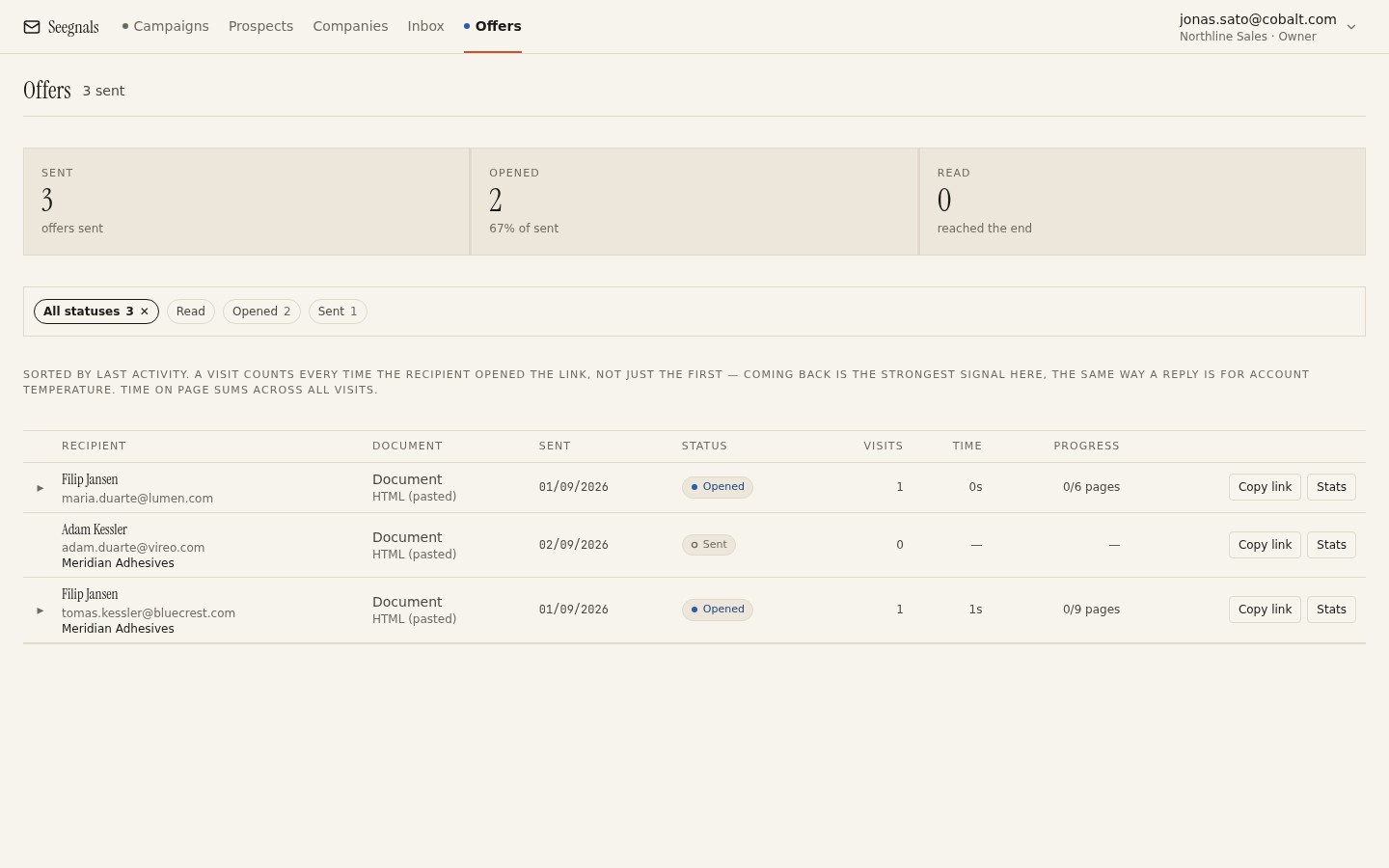 Each recipient gets their own link, copied from this list. The status column is where the cover email’s success shows up: Sent means it is still an email problem, Opened means the email did its job.
What to promise about the document
The strongest sentence in a cover email is a specific promise about what the document contains. Not “our proposal for your consideration”, but “the proposal covers the three-site rollout we discussed, with the price on page two and the timeline on page five”.
That sentence does three things. It confirms the document matches the conversation, so the reader is not bracing for surprises. It tells them where the number is, which is what most readers open a proposal to find; hiding it behind twelve pages of company history does not make anyone read the twelve pages, it makes them skip to the end. And it gives them a reason to open now rather than later, because they know what they will get for the twenty minutes.
Only promise what the document keeps. If you say the price is on page two, it had better be on page two. If you say the timeline covers their Q1 launch, the timeline must mention Q1. The reading data will tell you later whether the promise landed: a reader who goes straight to the promised page and stays there is a reader who trusted the email. Reading time per page covers how to read that.
Name the recipient’s situation. “The pricing assumes 40 users at the Leeds site and 15 in Manchester, as you described” is a promise. “Our flexible pricing scales with your team” is a brochure.
The structure: six lines
Here is a shape that fits nearly every B2B proposal. Six lines, none of them longer than two sentences.
- The link, first or second line. “Here is the proposal we discussed on Tuesday: [link].” Do not bury it under a paragraph of thanks.
- What it covers. One sentence, specific, matching the conversation.
- Where the price is and what it assumes. One sentence. If the number is likely to surprise, this is where a soft warning goes: “The price is higher than the range I gave verbally, because you asked for onboarding to be included; page three shows both ways.”
- How long it takes. “It is nine pages; the first two carry the whole argument if you are short on time.” You are helping the reader budget attention, and you are pointing them at the pages that matter.
- What happens next. Not a demand, a plan. “I will check in on Thursday unless I hear from you first. If it is easier to talk it through, I have time on Wednesday afternoon.”
- The one disclosure. “The link opens in your browser and lets us see when it is viewed, so we can time the follow-up sensibly. You can download or print it from there.”
Six lines is around 120 words. It reads in the time it takes to decide whether to open the document, which is the point.
Subject line, sender and timing
The subject line is not the place for creativity. “Proposal: [their company] and [yours], [topic]” is found in a search a month later, which is more useful than being clever today. If there was a meeting, reference it: “Proposal following Tuesday’s call”.
Send from the person who had the conversation, from the mailbox they know. A proposal that arrives from a different sender than the one who ran the meeting gets treated as administration rather than continuation. If the link is on your own domain as well, the whole thing looks like one person paying attention rather than a system reacting; white-label proposal links covers that side.
Timing: send in the reader’s working morning, ideally the day after the conversation while it is still fresh, and be reachable for the hour after you send. The first-open notification will often arrive within that hour, and the best follow-up is the one you can make the same working day. When to follow up based on how the proposal was read picks up from there.
Who else to put on the email
Resist the urge to copy everyone from the meeting. One recipient, one personal link. If a second person needs the document, send them their own link in their own email, with the promise sentence adjusted to what they care about (the finance contact cares about page two; the operations contact cares about page five).
Separate links tell you separately who read what. When a single link gets forwarded, you can still see that a new reader appeared, but you cannot address them by name in the follow-up. Who else opened your proposal explains how forwards and returns show up and what to do about each.
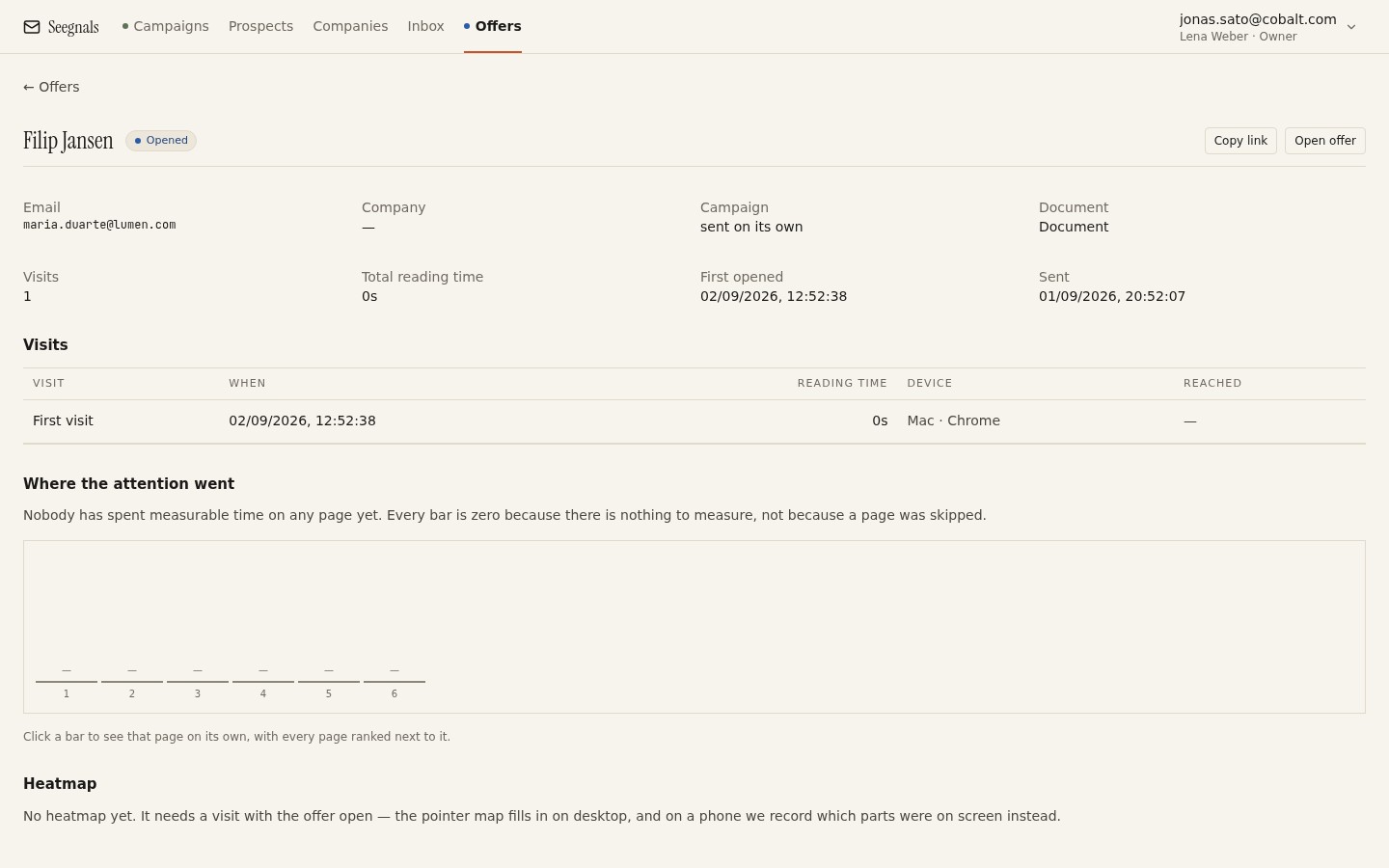 The first visit tells you whether the cover email worked: a reader who opens within the hour and goes to the promised page trusted the email; a reader who skims the first page on a phone needs a second nudge.
What to do this week
- Take the last proposal email you sent and cut it to six lines using the structure above. Compare the word counts.
- Write the promise sentence for your next proposal before you finish the document, then make sure the document keeps it.
- Switch from attachment to personal link for the next send, and add the clause about printing and downloading.
- Add the one-sentence tracking disclosure to your template so every later follow-up is legitimate rather than uncanny.
- Decide, before you send, what you will do on first open and what you will do after three days of silence; write both messages now.