Guide · Practitioner · 20 min read
The golden rules of sending offers and proposals that get read
How to build a proposal PDF for a screen, send it as a personal link instead of an attachment, read what happens after you send, and follow up on what the reader actually did.
You have done the hard part. Someone at a company you want to work with has asked for a proposal, or has engaged enough that sending one is the obvious next step. What happens in the following ten days decides whether the work was worth it, and for most of that time the proposal is out of your hands: sitting in an inbox, forwarded to someone you have never met, opened on a phone in a corridor, or not opened at all.
This guide is a set of rules for that stretch. It covers what a proposal PDF must do when it is read on a screen rather than printed, when to send it, why a personal link beats an attachment, which four signals to watch after sending, when to follow up and with what, when to put a gate in front of the document and when to put your own domain on the link, and the mistakes that show up again and again in teams that send proposals every week.
It is written for people who sell to other businesses and send somewhere between five and fifty proposals a month: founders who still write their own offers, small sales teams, agencies, consultancies, manufacturers with a quoting desk. At fifty a month you are sending two or three every working day, which is too many to treat each one as a project and too few to treat any of them as a formality. If you have been looking at a dedicated proposal tool such as PandaDoc, Proposify or Sellizer, this is the practice those tools assume you already have. The examples use the offers feature in Seegnals, where a proposal is a PDF behind a personal link with visit tracking, but the rules hold whatever you send with.
By the end you will be able to build a proposal that reads well on a laptop and a phone, send it in a way that tells you what happened next, read the reading data without over-reading it, and write a follow-up that refers to what the reader actually did.
Rule one: build the PDF for a screen, not a printer
Most proposals are still laid out as if they were going to be printed, bound and handed across a table. They will not be. They will be read in a browser or a PDF viewer, on a laptop at a desk or a phone on a train, in short bursts, by people who did not write the brief and are looking for the one page that concerns them.
The first page has to carry the whole proposal
The first page is the only page you can be sure will be read. On a screen it is also the page that decides whether the reader scrolls. Treat it as the summary that the rest of the document supports: who this is for, what you propose to do, what changes for them, what it costs (or where the price is), and what happens next. If the reader stops there, they should know enough to say yes, no, or “let me forward this”.
That means no cover page with your logo and a stock photograph. A cover page is a page nobody reads, and on a screen it is the first thing standing between the reader and the answer. Put your name and the client’s name in the header of the first page and use the space for substance.
One idea per page
Paper tolerates dense pages; screens do not. A page that mixes the scope, the timeline and the pricing forces the reader to hunt, and hunting is where they give up. Give each idea its own page: the problem as you understand it, the proposed solution, the scope and what is excluded, the timeline, the price, the team, the terms, the next step. A page the reader can name is a page they can come back to, and when you look at reading time per page later, a page with one idea gives you one clear answer about what held attention.
This also settles the length. The proposal should be as long as the number of ideas it needs to carry and no longer. If a page needs to scroll on a laptop, it is two pages. If two pages say the same thing in different words, they are one page. Padding a proposal to look substantial has the opposite effect on a screen: the reader sees a long scroll bar and defers reading to a later that does not come.
Prices where people look for them
Readers look for the price. They look for it first, they look for it again after reading the scope, and they look for it a third time before forwarding. Hiding the price on the last page, or spreading it across several, does not stop them; it makes them scroll past everything you wrote to find it, which means everything you wrote is read as an obstacle.
Put the price on its own page, clearly labelled, close enough to the front that a reader who is only there for the number finds it without irritation. State what is included beside it, not on another page. If there are options, present them as a short table with the differences in the rows, so a reader can compare without holding numbers in their head. If the price is confidential, that is what the gate is for (rule six), not what page position is for.
Text the reader can select, links that work
A proposal exported as flattened images looks the same as one exported as text and behaves worse: nothing can be searched, copied into an internal note, or read aloud by assistive software. Export from your document tool as a real PDF with selectable text. Make every link in it a working link, because the reader who wants to see your case study or your terms will click, not type. Keep the file size sensible; a proposal built from full-resolution photographs opens slowly on a phone, and the first impression is a spinner.
A short checklist for the file
- The first page states who it is for, what you propose, what it costs or where the price is, and the next step.
- Each page carries one idea and has a heading the reader could quote.
- The price has its own page, near the front, with inclusions beside it.
- Text is selectable and links work.
- The file opens quickly on a phone.
- Nothing in it is a placeholder left over from the last proposal.
Rule two: send a personal link, not an attachment
What an attachment cannot tell you
An attachment leaves your control the moment it is sent. You do not know whether it was opened, by whom, for how long, or whether it was forwarded to three people or none. The only feedback channel is a reply, and the absence of a reply tells you nothing: the proposal may have been read carefully and parked, or never opened. Everything you do next is a guess.
What a personal link tells you
A personal link is a page that shows the document, one link per recipient. In Seegnals you upload the PDF and the link page shows it page by page, with keyboard navigation, zoom, fit, print and download. Every visit is recorded: when it happened, how long it lasted, on what kind of device, and how far the reader got. Returns are recorded as returns, so you know who came back and how many times. Reading time is recorded per page.
The consequence is that the stretch after sending stops being silence. You know within the hour whether the proposal was opened (Seegnals sends you an email on the first open of an offer), you know a day later which pages were read and which were skipped, and you know a week later whether anyone came back. The full mechanics are in proposal tracking: what happens after you send the PDF. Offers are part of every plan, not a separate tier; the pricing page has the detail.
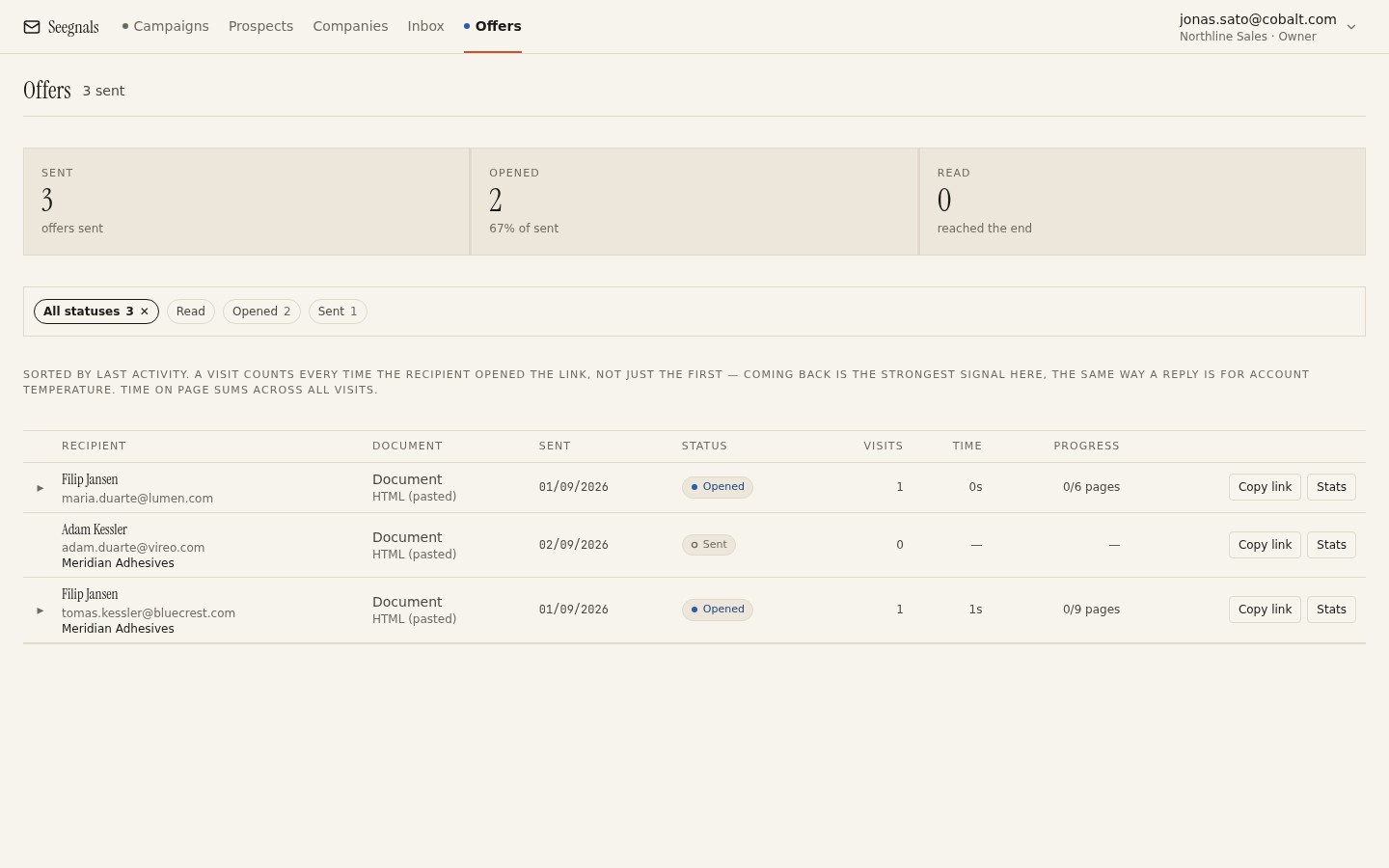 Every proposal you have out, in one list: who has it, whether it is Sent, Opened or Read, how many times it was visited and for how long.
One link per recipient
The link is personal, and that is the point of it. If you send the same link to three people at the account, their visits merge and you lose the one thing the method depends on: knowing who read what. Create one link per person you send to, even when they sit in the same room. If a recipient forwards their link, you will see it as a visit from an unfamiliar device on their link, which is itself useful information (rule four).
The covering email
The link needs an email around it, and the email should be short. Say what you are sending, refer to the conversation or the request that led to it, point at the one thing you want them to look at first, and name the next step with a date. Do not summarise the proposal in the email; that is what the first page is for, and a reader who gets the summary in the email has less reason to open the document. Send the email from the mailbox and thread where the conversation has been happening, so it lands as a reply and not as a new item.
Rule three: send when the reader can read it, then get out of the way
Timing is about the reader’s day, not yours
There is no universally best hour to send a proposal, and anyone who gives you one is selling something. There are two things you can reason about. First, the reader’s working hours: a proposal that arrives at nine in the reader’s morning is at the top of the inbox when they sit down, and one that arrives at six in their evening is under a day’s mail by the time they see it. If your accounts are in several countries, the case for sending in the prospect’s timezone applies to proposals as much as to sequences. Second, your own availability: send when you can answer a question within the hour, because the first read is when questions arise, and an answer that comes back quickly keeps the reader in the document.
Late Friday is the exception worth stating. A proposal sent then sits over a weekend, and the first open on Monday is a cold one: the conversation that prompted it is three days old in the reader’s mind. If it is ready on Friday afternoon, hold it until the reader’s Monday morning.
Do not send it before you have said it
A proposal should confirm a conversation, not start one. If the reader has not heard the price, the scope and the shape of the work from you before the document arrives, the document has to do the persuading on its own, and documents are bad at that. Talk first, then send what you agreed, then let the document do what it is good at: being forwarded to people you did not talk to.
Rule four: watch four signals after you send
The first open, the reading time per page, the returns, and who else opened. Each one answers a different question, and each one is easy to over-read. Take them in order.
The first open: it arrived, and it was seen
The open tells you the proposal reached a human and was looked at. In the offers list the status moves from Sent to Opened. That is all it tells you. A proposal opened for a few seconds on a phone has been opened; it has not been read. Do not follow up on an open.
Reading time per page: what held attention
This is the signal that pays for the whole method. Reading time per page shows you where the reader slowed down and where they skipped. A pricing page read for minutes and a scope page passed in seconds tell you the question in the reader’s head is “can we afford it”, not “will it work”. The reverse tells you the opposite. A page nobody has spent time on, across several proposals, is a page you can remove.
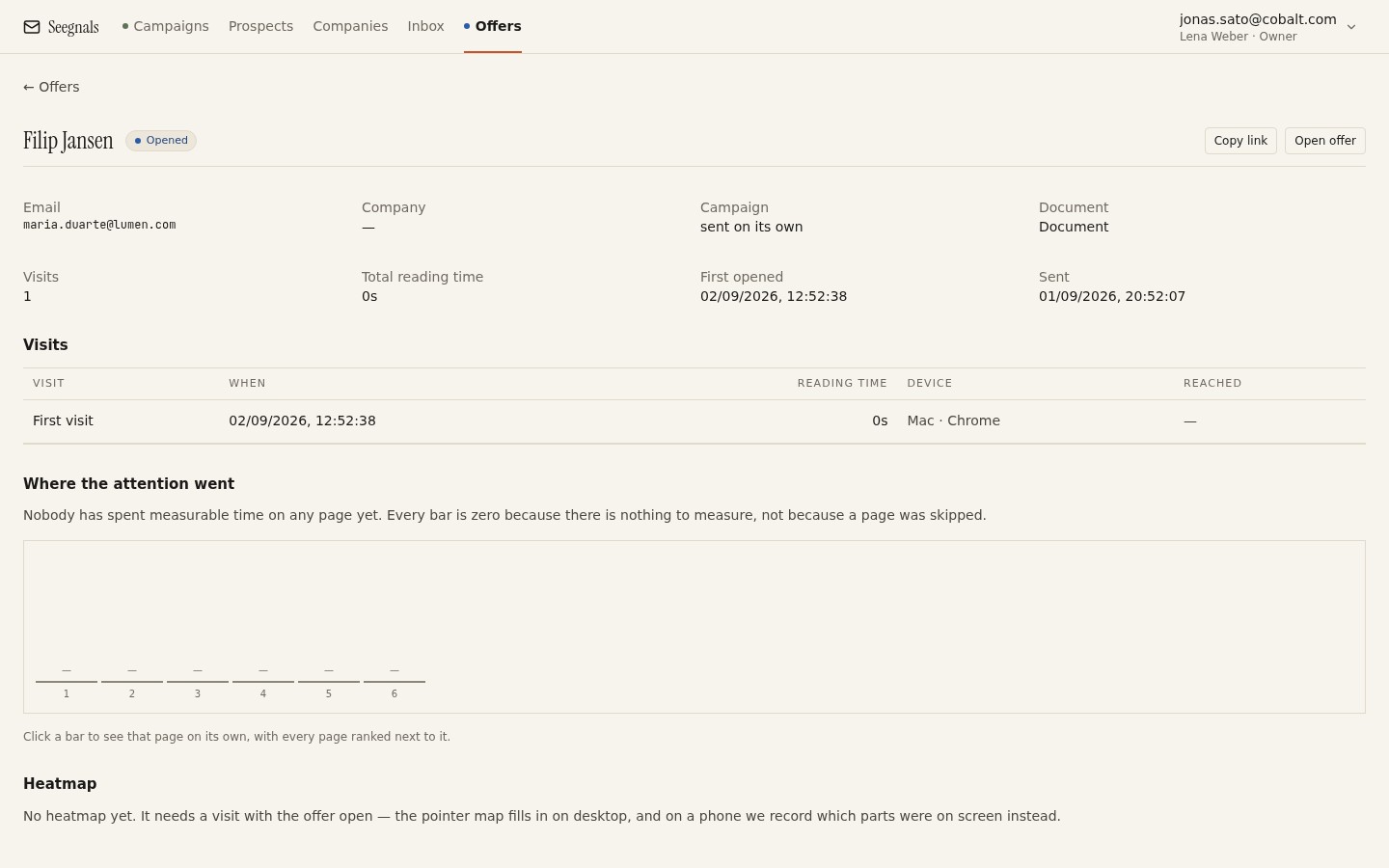 Reading time per page is the closest you will get to sitting beside the reader: here the pricing and scope pages held attention, and the team page was passed over.
Two cautions. A long time on one page can mean careful reading or a tab left open while the reader made coffee; check whether the visit as a whole is consistent with someone reading. And a proposal read to the end once, quickly, is often a first pass before forwarding, not a rejection. Reading time per page: what proposal analytics tell you works through the patterns.
Returns: the strongest signal you will get without a reply
Nobody re-reads a proposal they have decided against. A return, the same reader coming back a second or third time, means the proposal is being considered: compared with another, discussed with a colleague, checked before a meeting. Returns clustered before a particular day and hour tell you when the internal meeting is. A return that goes straight to the pricing page and stays there tells you what the meeting is about.
Returns are recorded per recipient in Seegnals, and they also appear on the company’s timeline as “offer returned”, so an account that has gone quiet in email can still show as active because someone keeps opening the proposal.
Who else opened: the forward you did not see
A visit on a personal link from a device that does not match the recipient’s earlier visits is a forward. Someone sent your proposal to someone else. Without a gate you know that it happened and roughly when; with the gate on (rule six) the new reader identifies themselves with their email address to get in, and you know who. Either way, a forward is the moment the proposal starts working for you inside the account, and the moment your next follow-up should change shape, because there is now a second reader with their own questions. The detail is in who else opened your proposal: forwards and returns.
What the signals do not tell you
Reading data measures attention. It does not measure agreement. A proposal read four times may be being taken apart by a sceptical finance director, and a proposal read once may have been approved on the spot. The signals tell you when and where to follow up, and what to refer to when you do. They do not tell you the answer. Only the reader does.
Rule five: follow up on what they read, not on the calendar
Why checking in fails
The follow-up most people send is a calendar follow-up: it is Thursday, the proposal went out on Monday, so a message goes out asking whether they had a chance to look at the proposal. The reader has no reason to answer it. It asks them to do work (summarise their state of mind) in exchange for nothing, and it reveals that you do not know what they did.
A read-based follow-up is different in kind. It arrives because of something the reader did, it refers to that thing, and it offers something specific in return. It does not need to mention that you can see the reading data; it needs to be useful in a way that only someone who had seen it could be.
Three situations, three follow-ups
| What you see | What it probably means | What you send |
|---|---|---|
| Not opened after two or three working days | Buried, or the reader is away | A one-line reply in the same thread, link included, with a subject line that names the outcome |
| Opened, pricing page held attention, no reply | Cost is the question | A short note offering to walk through the pricing, or a smaller option |
| Returned twice, or a second reader appeared | Being discussed internally | An offer of a call for the group, plus a one-page summary they can forward |
The first row is the only one where the follow-up is about the proposal itself. In the other two it is about the reader’s question, which you now know.
What to write
Keep the follow-up in the same thread as the covering email, so the link is one scroll away. Refer to the part of the proposal the reader spent time on, in terms of their question rather than your document: “if the phasing of the price is the issue, there is a version where the second phase is optional” rather than “I noticed you looked at page four”. Offer one thing: a call, a revised page, an answer to a question you suspect they have. End with a date, not a question about their availability.
When to stop
A proposal that has not been opened after several follow-ups, in a thread where there was a real conversation before, is usually a proposal the reader has decided not to read. Send one closing note that makes it easy to say no (a one-word reply that saves you both the reminders), record the outcome, and put the account on a revisit date. Do not keep writing to a person who has stopped responding; their colleagues at the account are a better use of the next message, and the account view will show you whether any of them are active.
The timing question, in full, is in when to follow up on a proposal based on reads.
Rule six: gate the document when the price is the secret, brand the link when the relationship is the point
The gate
The optional gate in Seegnals asks the reader for their email address and sends them a one-time code before the offer opens. Unknown addresses can request access, and you approve them. Two things follow. Anyone reading the document has identified themselves, so a forward becomes a named second reader rather than an anonymous device. And the document is not sitting on an open link that can be pasted into a chat and read by anyone with the URL. How the offer pages and the documents behind them are hosted is described on the security page.
Use the gate when the proposal contains pricing or terms you would not want a competitor to see, when the deal is large enough that you need to know exactly who is in the room, or when the buyer has asked for confidentiality. Do not use it by default on every proposal: it is a step between the reader and the document, and for a small, early proposal that step costs you more opens than it earns you in names. The trade-off is discussed in protecting a proposal link with a one-time code.
The white label
By default the link page carries the tool’s domain. With white label it carries yours: the proposal opens on a domain you own, with your logo, so the reader sees your company from the email to the last page. This matters most when the proposal is going to be forwarded to people who have never heard of you; a link on an unfamiliar third-party domain is a small trust cost at exactly the moment you can least afford one. It is set up once, on a domain you own, as described in white-label proposal links on your own domain.
When neither is worth the effort
For a quick quote to a customer who already buys from you, a plain personal link is enough. The gate and the white label are for proposals that will be forwarded, scrutinised or kept confidential. Decide per proposal, and default to the simplest option that fits.
Rule seven: keep the proposal on the company’s timeline
A proposal is an account event, not a contact event
The person you send the proposal to is rarely the only person who reads it, and often not the person who decides. If your proposal tracking lives in a separate tool from your outreach, you see the proposal’s reads in one place and the account’s emails in another, and the connection between them (the colleague who opened the proposal is the one who replied to your sequence last month) is invisible.
In Seegnals every prospect belongs to a company by email domain, and the company card carries a single timeline of everything that happened across campaigns and offers: sent, opened, clicked, replied, offer viewed, offer returned. An offer return raises the company’s temperature the way a reply does, so an account where the emails have gone quiet but the proposal keeps being read still appears among the hottest companies on the dashboard. The company view is built around that card.
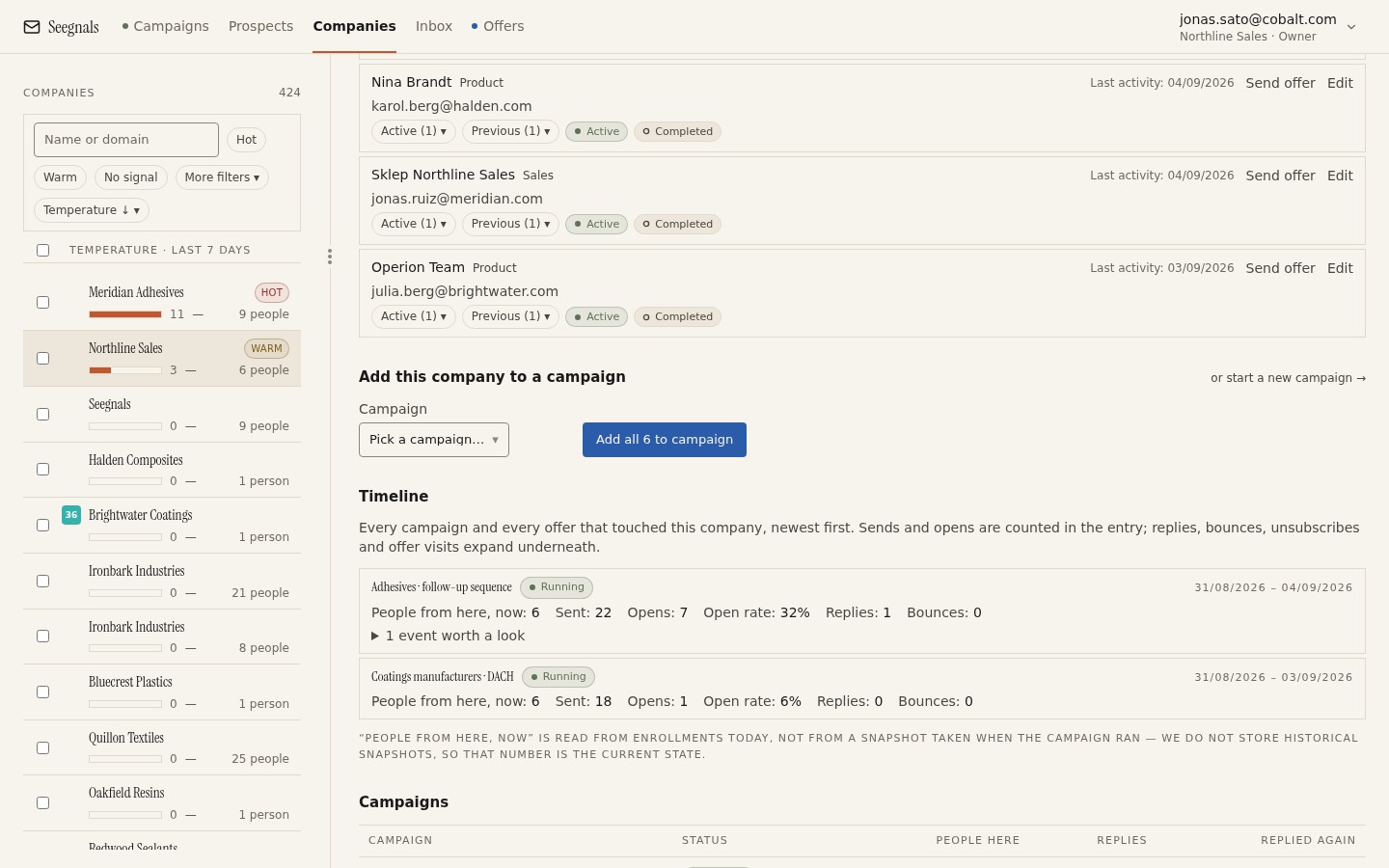 The proposal’s visits and returns sit on the same timeline as the emails to everyone at the account, so you can see that the second reader of the offer is the person who replied to your colleague in June.
Reading the proposal beside the inbox
When a reply arrives about the proposal, read it with the account context beside it. The inbox in Seegnals shows the company next to the thread, so you can see, while you answer, that two other people at the account visited the offer yesterday. A reply answered with that knowledge is a different reply. The broader method for reading an account is in company temperature: reading engagement across people, and the argument for organising outbound by company rather than by contact is in account-based cold email: why the company is the unit.
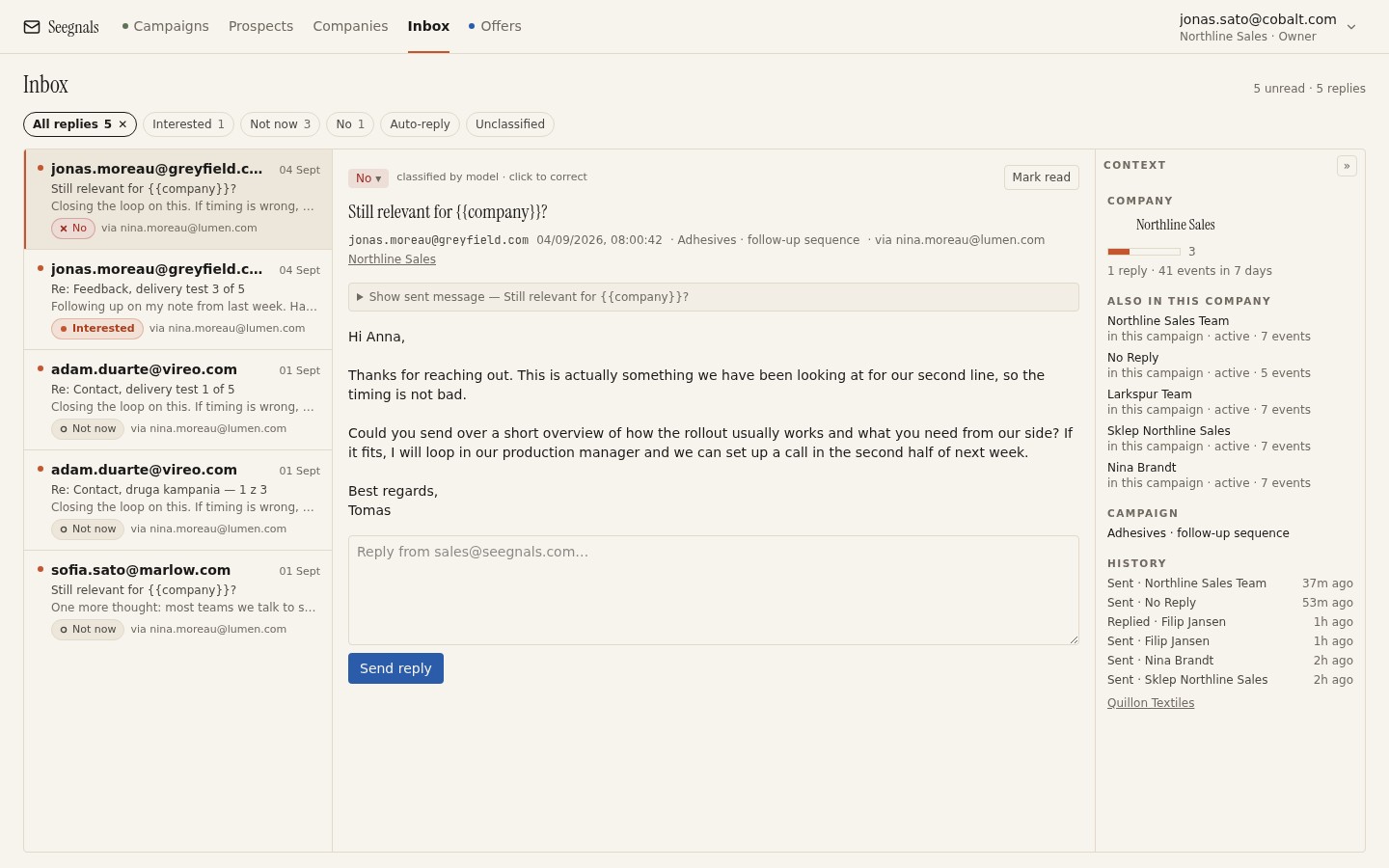 The reply about the proposal on the left, the account on the right: before you answer, you already know who else at the company has read it.
When the reply comes from someone else
A proposal that has been forwarded often produces a reply from the person it was forwarded to, not from the person you sent it to. Treat that reply as the account speaking, not as an interruption: answer it, send the new person their own personal link so their reads are recorded separately, and keep the original recipient in the thread. When a colleague replies instead of your prospect covers the etiquette.
Passing the outcome to the CRM
The proposal’s state is what a sales manager wants to see on the deal, and typing it in is the step that gets skipped. Seegnals pushes replies, with their classification, into the CRM as notes or activities on the matching person and organisation, so the reply that says “we have read it and want a call” reaches the deal without anyone retyping it. Which CRMs are covered and how to connect one is in push replies into your CRM and on the product page.
The common mistakes, and the rule each one breaks
- Sending the proposal as an attachment, and learning nothing until a reply arrives or does not. (Rule two.)
- A cover page, a table of contents and a company history before the first page that says anything. (Rule one.)
- The price on the last page, or split across three. (Rule one.)
- One link sent to three people at the account, so their reads merge. (Rule two.)
- Sending on Friday evening, or before the conversation that the proposal should confirm. (Rule three.)
- Following up on an open, or following up on the calendar with a message that asks whether they had a chance to look. (Rules four and five.)
- A gate on every proposal, including the small ones that never needed it. (Rule six.)
- Tracking proposals in one tool and outreach in another, so the forward to the decision-maker is never connected to the sequence they replied to. (Rule seven.)
- Sending a PDF made of images, so nothing can be searched or copied. (Rule one.)
A pre-send checklist for every proposal
Before you send:
- The conversation has happened; the proposal confirms it.
- First page: who it is for, what you propose, what it changes, the price or where to find it, the next step.
- One idea per page; each page has a quotable heading.
- Price page near the front, inclusions beside the number, options in a short table.
- Text is selectable, links work, the file opens quickly on a phone.
- Names, dates and figures checked against this client, not the last one.
- One personal link per recipient.
- Gate on if the price or terms are confidential; white label on if the link will be forwarded to strangers.
- Covering email is short, sits in the existing thread, points at one page and names a date.
- Send time is in the reader’s working morning, and you are available for the following hour.
After you send:
- First open noted; no follow-up on the open itself.
- Reading time per page checked the next working day.
- Returns and new readers checked before each follow-up.
- Each follow-up refers to what was read and offers one thing.
- After several unanswered follow-ups: one closing note, outcome recorded, account on a revisit date.
Where to go from here
- Proposal tracking: what happens after you send the PDF is the mechanics behind rule two.
- Reading time per page: what proposal analytics tell you goes deeper into the patterns in rule four.
- When to follow up on a proposal based on reads expands rule five with timing.
- Who else opened your proposal: forwards and returns covers the second reader.
- Hottest companies: what to do when an account heats up is what to do once the proposal has made the account hot.
Questions people ask
Should I send a proposal as a PDF attachment or as a link?
As a personal link. An attachment tells you nothing after it leaves your outbox. A tracked link tells you whether it was opened, how long each page was read, whether the reader came back and whether someone else opened it, and that is what your follow-up should be based on.
How long should a B2B proposal be?
As long as the number of ideas it needs to carry, with one idea per page and no padding. If a page needs to scroll on a laptop it is two pages; if two pages say the same thing they are one. The first page should stand on its own.
Where should the price go in a proposal?
On its own page, clearly labelled, near the front, with what is included beside the number. Readers look for the price first, and hiding it makes them scroll past everything else to find it.
When is the best time to send a proposal?
In the reader's working morning, on a day when you can answer questions within the hour, and after the conversation that the proposal confirms. Avoid late Friday, because the first open on Monday is a cold one.
How do I follow up on a proposal without being annoying?
Refer to what the reader did rather than to the calendar. If the pricing page held their attention, offer to walk through the pricing or a smaller option. If they came back twice or a second reader appeared, offer a call for the group. Stay in the same thread and offer one thing.
What does a proposal gate do?
It asks the reader for their email address and a one-time code before the document opens. Every reader is then identified, so a forward becomes a named second reader, and the document is not sitting on an open link that anyone with the URL can read.
Written by