Guide · Practitioner · 20 min read
The account-based outbound playbook for small teams
How a team of one or two runs outbound by company: choosing accounts, who to write to and in what order, reading temperature with the inbox, and a weekly rhythm.
Most outbound advice assumes a big team: a list of thousands, a sequence that runs on its own, a dashboard of reply rates. A team of one or two people selling something considered, to companies that take weeks to decide, has a different problem. You cannot afford to burn through a market, you cannot follow up with everyone, and the person who eventually says yes is rarely the first person you wrote to.
This playbook is for that team. It treats the company, not the contact, as the unit of work: you choose accounts, decide which people at each one to contact and in what order, write for roles rather than for names, and read every signal that comes back at the level of the company. It is written for founders who do their own selling, for a two-person sales function, and for the SDR who has just been told to “do ABM” with no budget for an ABM platform.
By the end you will have a way to pick accounts, a rule for how many people to contact per account and when, a method for writing per role, a sequence design that does not hit everyone on day one, a morning routine for temperature and the inbox, a hand-off to a proposal, a weekly rhythm, and a short list of numbers worth tracking. The examples use Seegnals, which groups every prospect under its company by email domain, but the method does not depend on one tool.
Why a small team should sell to companies rather than to a list of names
What changes when the company is the unit
A cold email list is a list of people. A market is a list of companies. When you measure and act per person, you optimise for the things that happen to individuals (they open, they reply, they ignore) and you lose the things that happen to companies: a colleague is forwarded your message, two people at the same site open on the same afternoon, the buyer replies from an address you never had. Reading per company puts those events back together. The argument in full is in account-based cold email: why the company is the unit.
For a small team the practical effect is focus. If the unit is a company, the daily question is not “how many emails did we send” but “which accounts moved, and what do we do about each”. That question has a short answer every morning, and it fits in two people’s day.
What account-based means at this scale
Account-based marketing in large companies means custom landing pages, targeted ads and a committee; none of that is needed here. At your scale, account-based outbound means four things: you choose the companies before you find any people; you contact more than one person per company, on purpose and in order; you write for the role each person holds; and you read engagement per company before you act. Everything else in this guide is how to do those four things with email, a CRM and a few hours a week.
Choose the accounts before you find any people
Start from a list you can finish
Write down the whole market you want, as companies. If you sell to plants, list the plants. If you sell to agencies of a certain size in three countries, list them. The list will be shorter than you expect, and that is the point: a small team should be able to work through the whole of it in a defined period, then start again with what it learned.
Say you sell a maintenance service to industrial bakeries and you have found 300 of them in your region. Two people working together can open a manageable number of new accounts a week while still following up the ones already in play. If you decide that number is 20, you have a 15-week programme, and you know it before you send anything. That arithmetic, not a growth target, is what sets your pace.
Tier the list, but only into three
Tiering is where small teams over-engineer. Three tiers are enough. Tier one is companies where you have a specific reason to believe they need what you sell now: a public job posting, a new site, a regulation that touches them, a technology they have just adopted. Tier two is companies that fit the profile with no known trigger. Tier three is everyone else who could conceivably buy.
Record the reason for each account
For every account, write one line: why this company, and why now. It goes in the CRM or in a custom field on the import. It does two jobs. It gives you the opening of the first email without research later, and it lets you learn, at the end of the programme, which reasons produced conversations and which did not. Without the line you cannot tell a good tier from a lucky one.
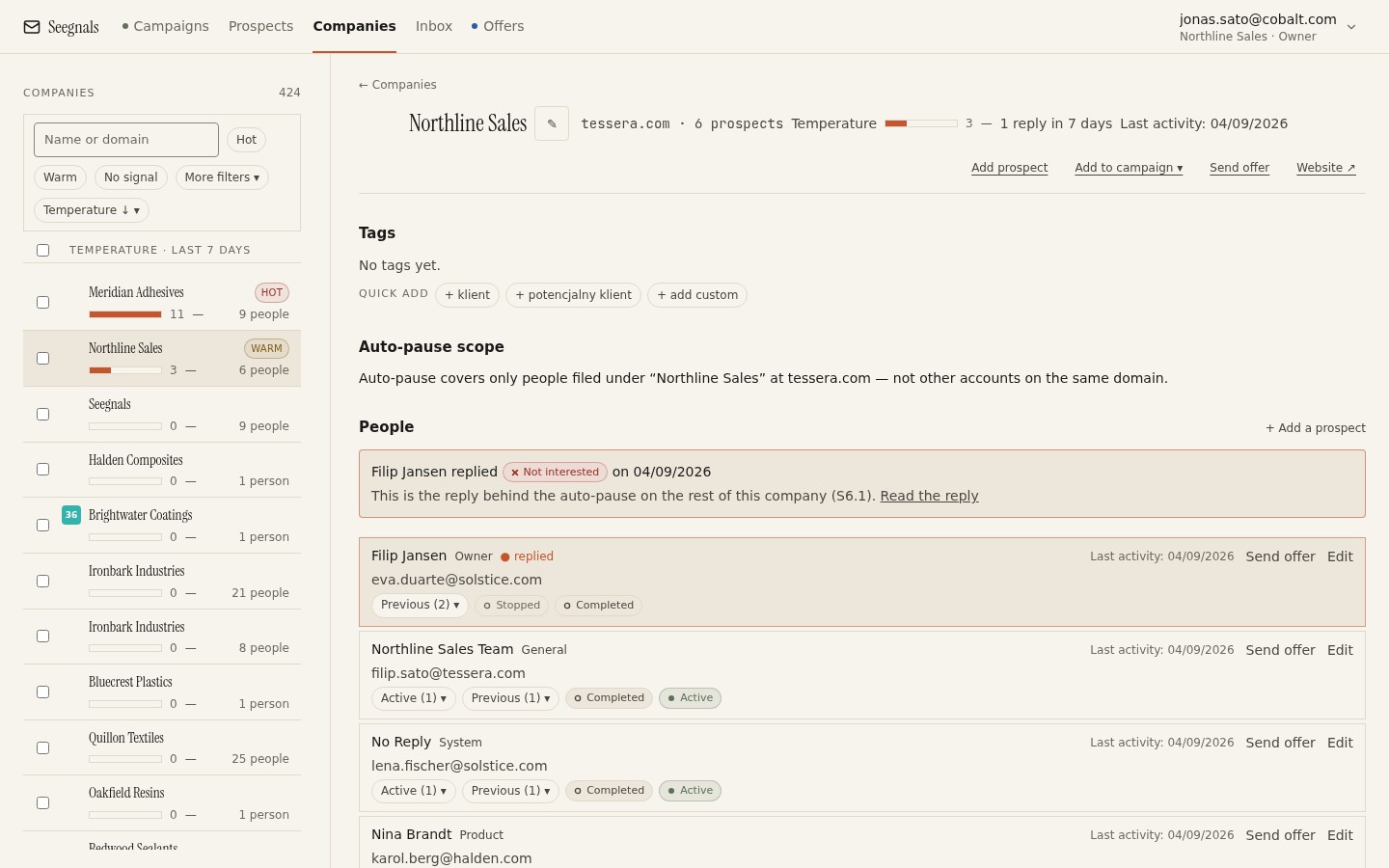 The Companies view lists every account with its people and temperature. Working from here, rather than from a table of names, keeps the company as the unit.
Checklist: accounts
- The whole target market is written down as a list of companies, not people.
- Each company has a tier (one of three) and a one-line reason.
- The number of new accounts opened per week is decided from your capacity, and the programme has an end date.
- Companies that are already customers, in a live conversation, or on your suppression list are removed before any people are found.
Decide how many people per account and in which order
Roles first, names second
Before you search for anyone, list the roles that are involved when a company buys what you sell. There is usually a user of the thing, an owner of the budget, a person whose problem it solves, and sometimes a gatekeeper who evaluates suppliers. Write those roles down. Then, for each account, find one person per role. You now have a short list per company with a reason attached to every name, instead of a dozen people whose titles looked relevant.
How many is enough
The answer depends on the size of the company and how many roles are genuinely involved, and it is a decision you make once per tier, not per account. A useful way to think about it is capacity. If two mailboxes carry a daily limit of 30 messages each, you have 60 sends a day. If each person receives a sequence of 4 steps, one person costs 4 sends over its life. Three people per account then cost 12 sends, and 60 a day supports opening 5 new accounts a day with the rest of the capacity left for follow-ups already scheduled. Change any input and the arithmetic changes with it. Do not contact everyone you can find: every additional person at the same company who ignores you tells that company’s mail server and its people that you are spraying. The detail is in how many people to contact in one company.
Order matters more than count
The order in which you contact people at one account shapes what happens. Three common patterns:
| Order | When it suits | What to watch |
|---|---|---|
| User first, then budget owner | The user feels the problem daily and can champion you internally | The user may not be able to say yes; you are building a referral, not a deal |
| Budget owner first, then user | The purchase is a budget decision and the user has little say | A silent budget owner can close the account before anyone with the problem hears from you |
| Peer roles in parallel | Several people share the decision equally | Each must see a different angle; identical messages to colleagues are noticed |
Pick one pattern per tier, write it into the sequence design, and do not vary it per account, or you will not be able to tell afterwards what worked.
Checklist: people
- The buying roles for your product are written down and each account has at most one person per role.
- The number of people per account is decided per tier from your sending capacity and the roles, not from how many addresses you found.
- The contact order is chosen per tier and recorded.
- Every address has been verified on import, and the list has passed the pre-import quality checklist.
Write one message per role rather than one message per person
Personalisation that scales to two people
You cannot write bespoke emails to every person at every account and still run a programme. You also cannot send one template to everyone and call it account-based. The middle path is to write per role. The user of your product gets a message about the daily problem. The budget owner gets a message about cost, risk or time. The evaluator gets a message about how you compare and what proof you can offer. The first line of each is the account reason you recorded earlier, pulled in through a custom field, so the opening is specific to the company without being written by hand each time.
In practice that means a small number of sequences, one per role or one per role and tier, each using snippets such as {{first_name}}, {{company}} and a custom field for the account reason, every snippet with a fallback. If you rename a custom field, Seegnals updates every sequence that uses it, which matters when two people share the same set of fields. The technique is in cold email personalisation with snippets and custom fields.
The account reason as the opening
The one-line reason you wrote per account becomes the first sentence of the first email. “You posted for a second maintenance engineer at the Leeds site” tells the reader you know their company and gives a reason for the timing. It works for every person at the account, because it is about the company, and it does not need rewriting per role. The second sentence changes per role. The ask is the same for everyone: one small thing.
Referencing colleagues, carefully
Once someone at an account has replied positively or neutrally, later messages to their colleagues can mention it: “I have been talking to Anna in production about this” is a stronger opening than any research. Never mention a negative reply or a colleague who asked not to be contacted. The case where the reply comes from someone you did not write to is covered in when a colleague replies instead of your prospect.
Checklist: writing
- One sequence per role (or per role and tier), not one per person and not one for everyone.
- The first sentence of the first email is the account reason, drawn from a custom field with a fallback.
- Each role’s message addresses that role’s stake in the decision.
- Colleagues at the same account never receive identical text.
- The To check queue is empty before launch, so no message goes out with a missing field.
Sequence across the account so nobody gets everyone on day one
Stagger people, not only steps
A sequence has steps and delays between them. An account plan has people and delays between them. Most tools only give you the first, so you build the second yourself: add the first-order person to the campaign when the account opens, and add the second-order person some days later, either by hand from the company card or by starting them in a second campaign with a delayed start. The point is that the second person hears from you after the first has had time to react, forward, or ignore.
Three people at one company receiving a message from the same sender in the same hour looks like a phishing wave to a mail administrator and like a coordinated campaign to the people themselves. Staggered, the same three messages look like a person working an account.
Use the fork for what happened at the account
Steps in a Seegnals campaign can be conditional: a different path depending on what happened. The obvious use is per person (opened but did not reply gets a different follow-up from never opened). The account-based use is to plan the second person’s start on what the first person did. If the first person replied, the second person’s sequence should open by referencing the conversation rather than restarting from the account reason. If the first person bounced, the second person becomes your first contact and the account reason opening applies unchanged.
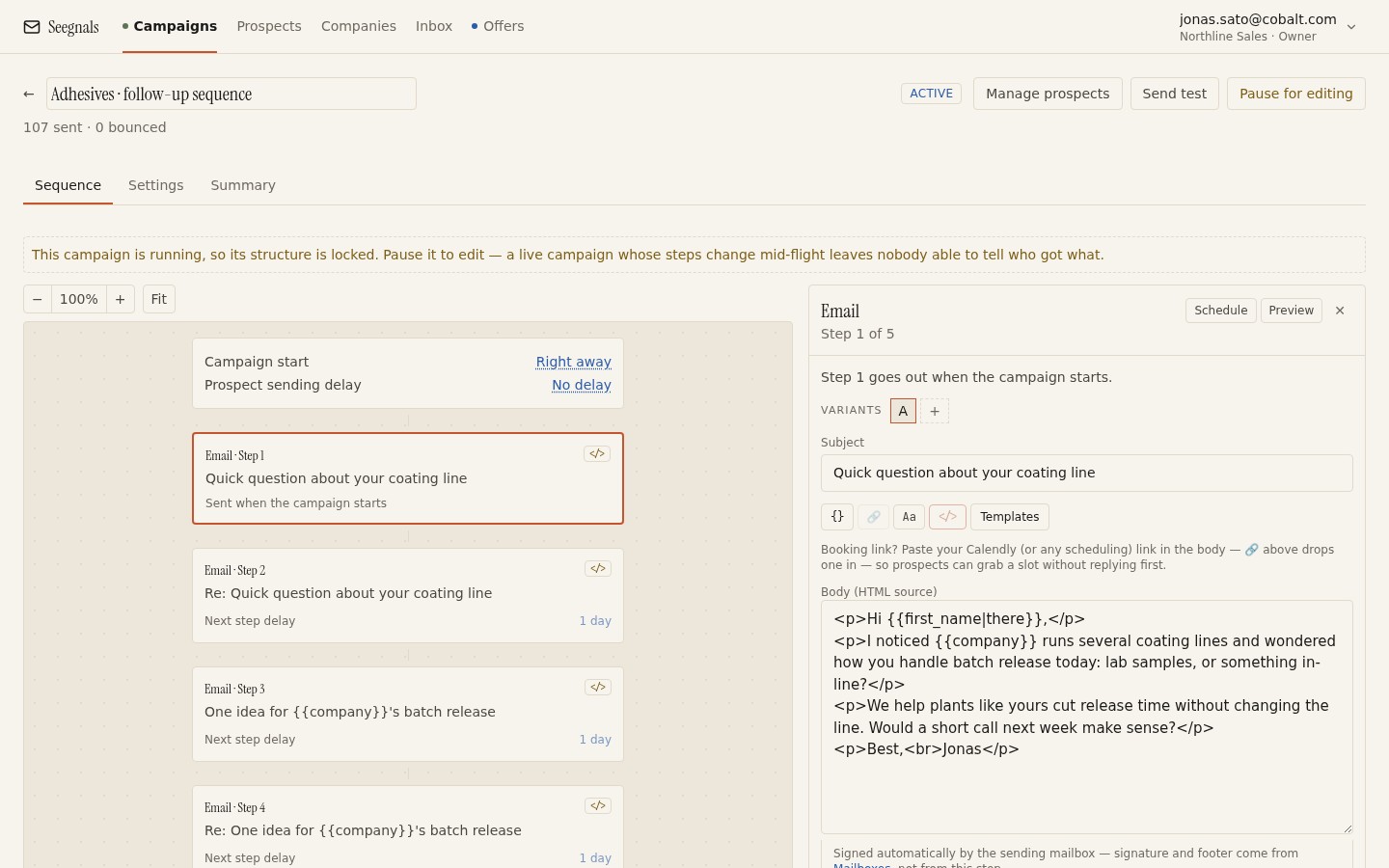 Steps, delays and a conditional path in the sequence editor. The delays between people at one account are yours to plan on top of the delays between steps.
Follow-ups per person, restraint per account
Decide how many follow-ups each person receives and how many days they span, then hold to it; the reasoning is in how many follow-ups in a cold email sequence. Then add an account-level rule: if nobody at the account has shown any signal after every planned person has finished their sequence, the account rests. It goes back to tier three with a note and a date, and you do not touch it again until the date passes or a new trigger appears. Without this rule, a small team keeps returning to the same silent accounts because they are familiar, while the rest of the market waits.
Checklist: sequencing
- Each account has a plan for who is contacted first, second and third, and the gap in days between them.
- No account receives messages to more than one person on the same day unless the roles are deliberately in parallel.
- The conditional paths for “first person replied”, “first person bounced” and “first person silent” are designed before launch.
- Every person’s sequence has a fixed number of steps and span; every account has a rest rule.
Read temperature and the inbox together every morning
What temperature adds up
In the company view, every event across all your campaigns at one domain lands on the company’s timeline: sent, opened, clicked, replied, offer viewed, offer returned. The company’s temperature rises with engagement. The signal you care about is the pattern across people: one person opening once is weak; two people opening within a day of each other, or one reply plus one colleague’s click, is strong. The method for reading it is set out in company temperature: reading engagement across people.
The morning routine starts with the dashboard, which lists the hottest companies, and moves to the company card of each. Ask three questions at each card: who did what, in what order, and is this more than last week. Then act on the account, not on the person.
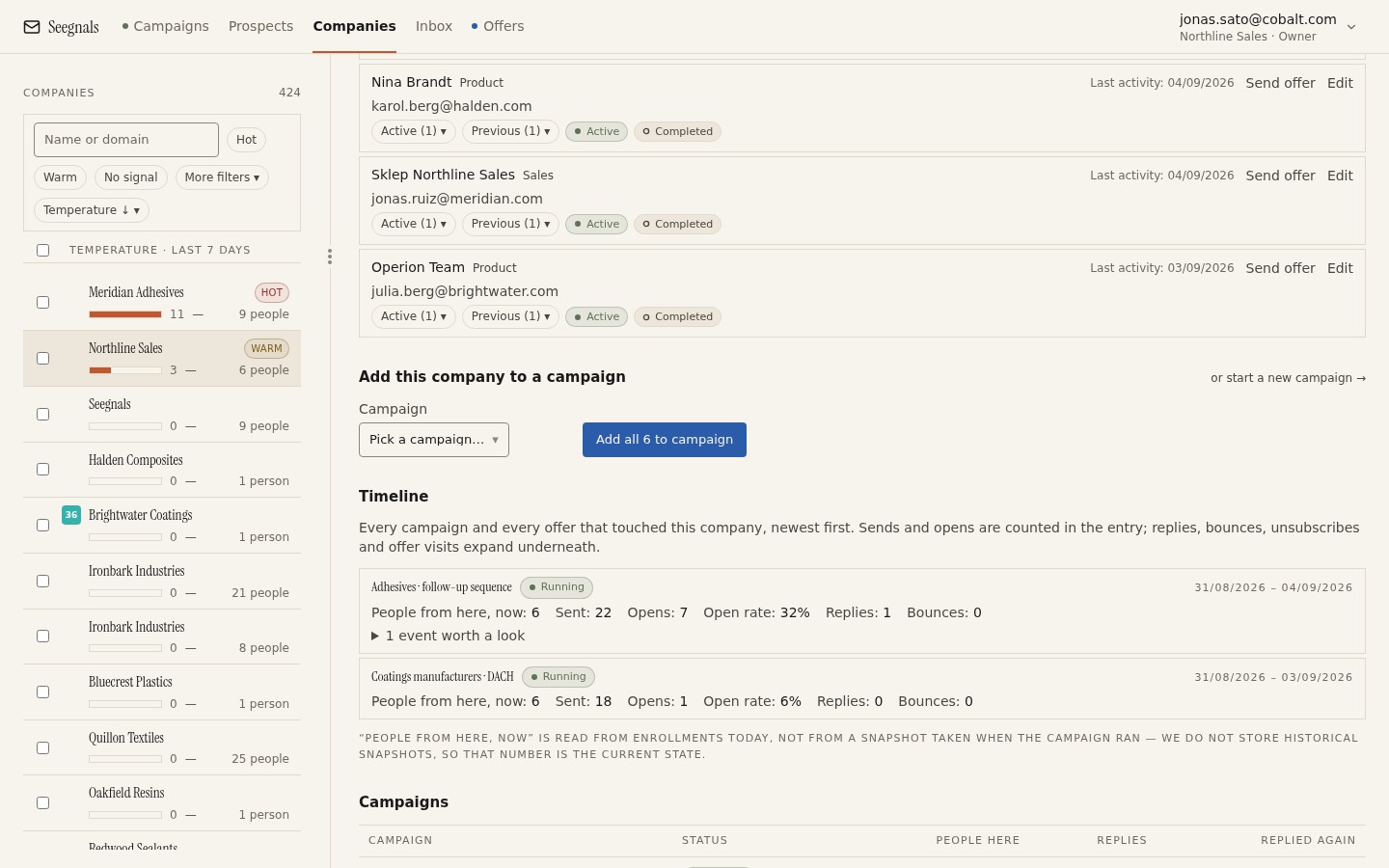 One company: every person you have contacted, every event across campaigns in order, and the temperature. This is the page to act from.
The inbox is the other half
Temperature tells you an account is active. The inbox tells you what they said. Replies from every connected mailbox arrive in one place with the company context beside the thread, classified as Interested, Maybe later, Not interested, Autoreply / Out of office, Bounce, Unsubscribe request or Other. A classified reply stops the sequence for that person; you can reclassify with one click if the classifier got it wrong. The routine is to clear the inbox before reading temperature, because a reply changes what temperature means: a hot account with an Interested reply is a conversation, a hot account with a Not interested reply is a colleague to approach differently or an account to rest. How to work the classes is in sorting replies: Interested, Maybe later, Not now.
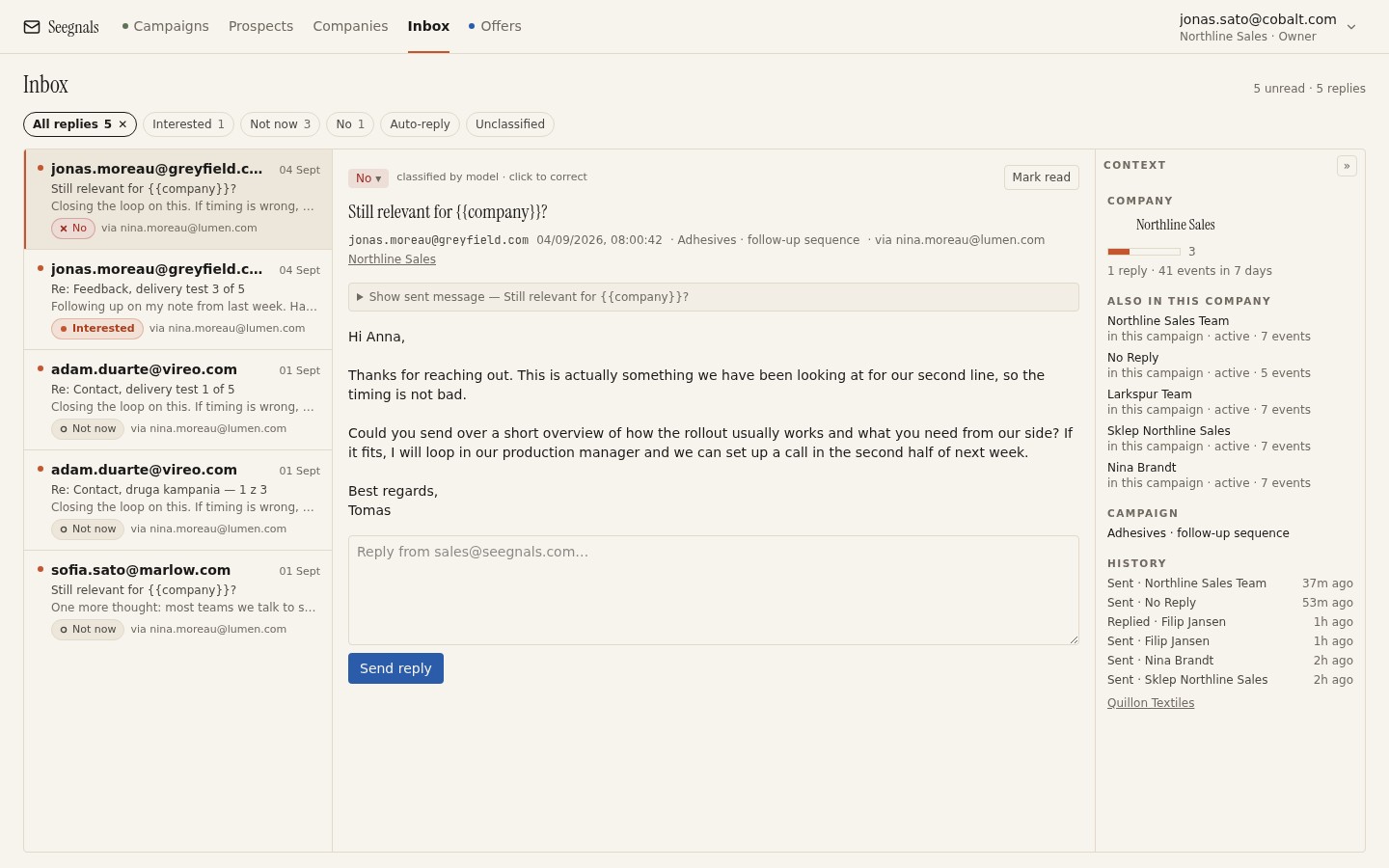 The inbox shows the reply, its class and the company beside it, so you answer a person knowing what else has happened at their account.
Reading the account, not the row
Some patterns and what they usually mean at account level:
- One person replies Maybe later, a colleague opens the next day. The reply was forwarded. Write to the colleague referencing the conversation; do not send the colleague’s planned step.
- Out-of-office from the first person, no other signal. Note the return date and add the second-order person now instead of waiting. See what to do with autoreplies and out of office.
- Two or three opens from different people, no clicks or replies. Attention without action. Change the angle for the next person, not the volume to the existing ones.
- Bounce from the first person. They have probably left. The account reason still stands; move the second person to first.
- Not interested from a budget owner. Rest the account unless a user at the same company has shown interest; if so, ask the user, not the owner, what changed.
Checklist: daily reading
- Inbox cleared first: every reply answered or scheduled, misclassifications fixed.
- The dashboard’s hottest companies reviewed, each company card read for who, in what order, and whether it is rising.
- Every action decided at account level and recorded on the company (or in the CRM) with a date.
- Accounts with no signal after their full plan moved to rest with a review date.
Hand a warm account to a proposal and keep watching
When to send an offer
An account is ready for a proposal when a person with a stake has asked for one or agreed to a conversation, not when the temperature is high. Temperature is attention, not intent. The moment to send is after that conversation, while the account is still warm, and the document goes to the person who asked, with a note of who else at the account has been involved so far.
A link, not an attachment
Send the proposal as a personal link rather than a PDF attachment. An attachment disappears into a mailbox and you learn nothing; a link shows you each visit, how long they read, how far they got, and whether they came back. In Seegnals an offer is a PDF you upload that opens page by page at a personal link, with reading time per page and a record of returns. What happens after you press send is in proposal tracking: what happens after you send the PDF.
Offer events feed the account
Offer viewed and offer returned land on the company timeline like any other event, so a proposal sent to one person and read by two is visible as such. A return visit after a quiet week is often the best signal you will get that a decision is near. Use reads to time the follow-up rather than the calendar; when to follow up on a proposal based on reads gives the method.
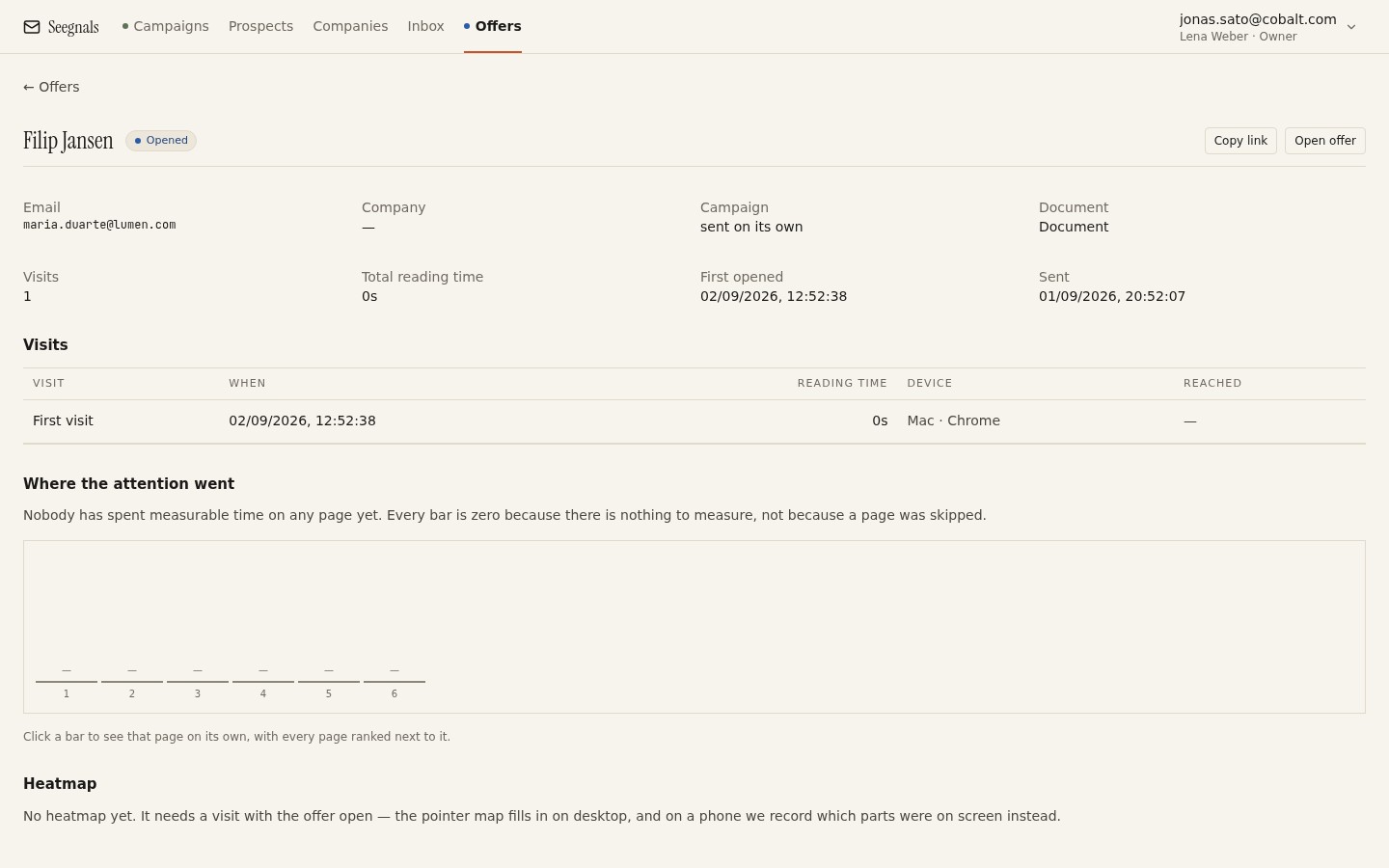 Reading time per page shows which part of the proposal held attention and which was skipped. Returns tell you it is being discussed.
Gate and white label, when they matter
If the proposal contains prices you would rather not see forwarded freely, switch on the gate: the reader enters their email and a one-time code, and unknown emails can request access for you to approve, so each approved reader becomes a known person at the account. White-label puts your domain and logo on the offer page, which matters when the link is passed up to someone who has never heard of you.
Checklist: hand-off
- A proposal is sent after a conversation with a stakeholder, not because temperature rose.
- The offer goes as a personal link, never as an attachment in a cold thread.
- Offer visits and returns are read on the company timeline alongside email events.
- Follow-up is timed on reads and returns; the gate is on when the pricing is sensitive.
A weekly operating rhythm for two people
Split by activity, not by account
Two people can split the market in half and each work their own accounts, or they can split the work: one opens accounts (research, reasons, import, launch), the other works the warm ones (inbox, calls, proposals). The second split usually suits a small team better: opening accounts is batch work that needs a quiet block, working warm accounts is interrupt-driven and needs someone watching. Swap roles every few weeks.
A shape for the week
- Monday: read last week’s numbers together (next chapter), decide this week’s batch of new accounts, agree which warm accounts get a call.
- Tuesday and Wednesday: the opener researches and imports the batch, writes the account reasons, checks the To check queue, launches. The closer clears the inbox each morning and works warm accounts.
- Thursday: the opener adds second-order people to accounts opened last week; the closer sends proposals that are due and reviews offer reads.
- Friday: both review accounts that have finished their plan and decide rest or extend; suppression list and CRM tidied.
The daily inbox and temperature reading runs every morning regardless. A fuller version of this rhythm is in a weekly rhythm for a two-person outbound team.
Checklist: rhythm
- Roles (opener, closer) assigned for the period, with a swap date.
- The weekly batch size is set from capacity; the batch block is fixed, and a batch that cannot be finished is shrunk rather than skipped.
- Second-order people are added on schedule, not when someone remembers.
- Every account that has finished its plan gets a rest-or-extend decision on Friday.
Metrics that matter for a two-person team
Count accounts, not emails
Emails sent, open rate and reply rate are activity numbers. For an account-based programme, the numbers that matter are per account: how many accounts opened this week, how many accounts have at least one signal from a human (a reply, a click that is not a scanner, an offer visit), how many accounts have a conversation, how many have a proposal out, and how many rested without any signal. Reply rate as a target pushes you towards more emails to more people, which is the opposite of the method; the argument is in reply rate is the wrong north star.
A small table, kept weekly
| Metric | How to count it | What it tells you |
|---|---|---|
| Accounts opened | Companies whose first person was sent to this week | Whether the batch is being protected |
| Accounts with a human signal | Companies with a reply, deliberate click or offer visit | Whether the reasons and roles are right |
| Accounts in conversation | Companies with an Interested or Maybe later reply being worked | Whether the writing converts attention |
| Accounts rested silent | Companies that finished their plan with no signal | Whether the tier or the reasons need revisiting |
Do not compare these against industry figures you read somewhere; compare them against your own last four weeks. The direction is the information. If accounts opened is steady and accounts with a signal falls, the reasons or the list source changed. If signals hold and conversations fall, the writing or the follow-up timing changed. If conversations hold and proposals do not, the hand-off is the problem.
Checklist: metrics
- The four account-level counts are recorded weekly in the same place.
- Comparison is against your own previous weeks, never against a benchmark.
- A fall in one count is traced to the stage before it (reasons, writing, hand-off) before anything is changed.
- Reply rate and open rate are checked for deliverability, not used as targets.
Tooling: what Seegnals does for this and what it does not
What it does
Seegnals groups every prospect under a company by email domain, shows the company card with all people, the timeline of events across campaigns and the temperature, and lists the hottest companies on the dashboard. Campaigns have steps with delays, A/B variants and conditional steps. Replies from all mailboxes arrive in one inbox, classified, with the company beside the thread, and a classified reply stops the sequence for that person. Offers are tracked per visit, per return and per page, and their events join the company timeline. CRM sync pushes replies and their classification into Pipedrive, HubSpot, Attio, Monday, Insightly or Keap as notes and activities on the matching person and organisation, so the account record in your CRM stays whole; see push replies into your CRM. All of this is in every plan, priced by the number of people contacted per month; the pricing page has the tiers, and the company view page shows the account side in more detail.
What it does not do
It does not find accounts or people for you; lead sources such as Apollo, Lusha and FullEnrich are integrated, but choosing the market and the roles is your work. It does not stagger people within an account automatically; you plan the order and add second-order people yourself or through a delayed campaign. It does not warm up mailboxes yet; warm-up is planned through a partner and shows as coming soon. It does not adapt sending speed for you; each mailbox has a daily limit you set and gaps between messages are randomised, nothing more. It does not score fit or intent; temperature measures attention only, and whether the account is worth a proposal is your judgement.
Where to go from here
The playbook fits on a page once you have run it for a month. These articles go deeper on the pieces that most often need adjusting.
- Account-based cold email: why the company is the unit, for the reasoning behind measuring per company.
- How many people to contact in one company, for the count and order decision in more depth.
- Hottest companies: what to do when an account heats up, for the actions once temperature rises.
- A weekly rhythm for a two-person outbound team, for the operating week with more detail on each day.
- Reply rate is the wrong north star, for what to measure instead.
Questions people ask
What is account-based outbound for a small team?
It is outbound where the company is the unit of work: you choose target companies first, contact a small number of people at each in a planned order, write for their roles, and read every reply, open and proposal visit at the level of the company before you act. It needs email, a CRM and a method, not an ABM platform.
How many people should I contact at one company?
Enough to cover the roles involved in the decision, usually one person per role, and no more than your sending capacity supports once you multiply people by sequence steps. Decide it once per tier and hold to it; contacting everyone you can find looks like spraying to the company and its mail server.
Should I email everyone at an account on the same day?
No. Contact the first-order person, wait some days, then add the second. Three messages from one sender landing at one company in the same hour looks like a phishing wave to an administrator and like a coordinated campaign to the people. Staggered, the same messages look like a person working an account.
How do I read account temperature together with replies?
Clear the inbox first, because a reply changes what temperature means. A hot account with an Interested reply is a conversation; a hot account with a Not interested reply from a budget owner is an account to rest or a colleague to approach differently. Then read each hot company card for who did what and in what order.
When should I send a proposal to a warm account?
After a person with a stake has asked for one or agreed to a conversation, not because the temperature rose. Send it as a personal link rather than an attachment, so visits, reading time per page and returns land on the company timeline and can time your follow-up.
What metrics should a two-person outbound team track?
Count companies, not emails: accounts opened this week, accounts with a human signal, accounts in conversation, accounts with a proposal out, and accounts rested without a signal. Compare against your own last few weeks. Reply rate and open rate are for checking deliverability, not for setting targets.
Written by